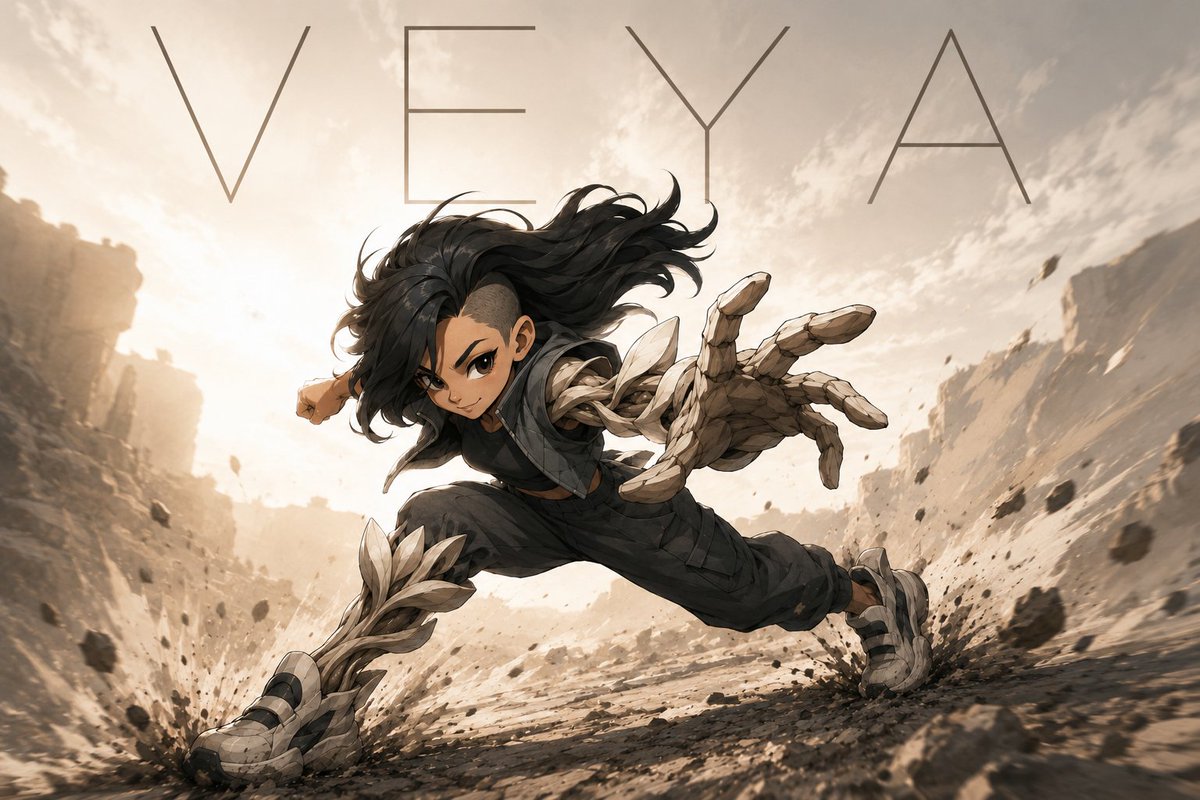
VEYA Anime Canyon Action Poster
Generates a cinematic anime action poster of a stone-armored warrior lunging through a dusty canyon with a minimalist title.
This is a GPT Image 2 prompt case for Anime & Game. Use the copy-ready prompt below to generate similar visuals, and review Awesome GPT Image 2 Prompts attribution plus commercial-use rights before reuse.
Free 1K preview
Generate one preview image instantly, no sign-up required.
Prompt
Copy-ready prompt
Create a dynamic cinematic anime-style action poster of {argument name="character name" default="VEYA"}, a young warrior sprinting and lunging low across a rocky desert canyon at sunset. The composition is wide 16:9, with an extreme low-angle perspective and strong motion blur: the character is centered, hair whipping wildly backward, one huge stone-and-crystal armored hand reaching toward the viewer in foreshortened perspective, the other arm pulled behind, legs spread in a powerful running leap. The outfit is dark tactical clothing in charcoal and black, with organic jagged pale stone armor wrapping the forearm, hand, shin guards, and rugged shoes; the armor looks like layered shards of bone, crystal, and rock. Add flying gravel, dust explosions at both feet, scattered debris suspended in the air, and canyon walls receding into a bright hazy sunlit background. Use warm beige, sand, sepia, and smoky gray tones, high contrast lighting, detailed painterly linework, and an epic manga-meets-concept-art finish. Across the top, place the large thin uppercase title text {argument name="headline text" default="VEYA"} in a minimalist widely spaced geometric font, dark gray, spanning nearly the full width. Show every face clearly with natural, detailed facial features, covering the facial features while leaving the hair, ears, body pose, and action readable. No additional text, no watermark.Prompt variables
Editable argument placeholders found in the prompt, with their default values.
Best for
- - Anime & Game visual exploration
- - Image generation and reference-image edits
- - Reusable briefs that keep source attribution visible
Change these parts
- - Subject, product, character, or scene
- - Aspect ratio, camera, lighting, and background
- - Brand, text, color, and output constraints
Recommended model and settings
- - Model: gpt-image-2
- - Input mode: Text to Image
- - Aspect ratio: source
- - Commercial status: review original source
How to use this prompt
- 1. Copy the prompt and preserve its structure for the first test.
- 2. Replace the subject, context, and publishing channel.
- 3. Change one camera, lighting, or style variable per iteration.
- 4. Inspect the output, source, text, and rights before reuse.
Limitations, source, and reuse cautions
- - Generated output is an editable draft, not factual, legal, or rights evidence.
- - Review the linked source, people, brands, logos, text, and third-party media before commercial use.
More cases in this category
Prioritized by category, input mode compatibility, quality, and lower risk.
Reuse and source notes
Use this prompt safely after previewing the case.
- 1.Copy the prompt or open it directly in Dovoo with the generation button.
- 2.Adjust variables, aspect ratio, and reference images for your own use case.
- 3.Before publishing or paid usage, verify source rights, attribution requirements, and brand or likeness risks.
Can I use this prompt commercially?
Commercial-use status is allowed. Review the original source, license, brand constraints, and legal requirements before paid usage.
Where does this case come from?
This case is imported from Awesome GPT Image 2 Prompts; keep attribution visible and check the source URL before reuse.