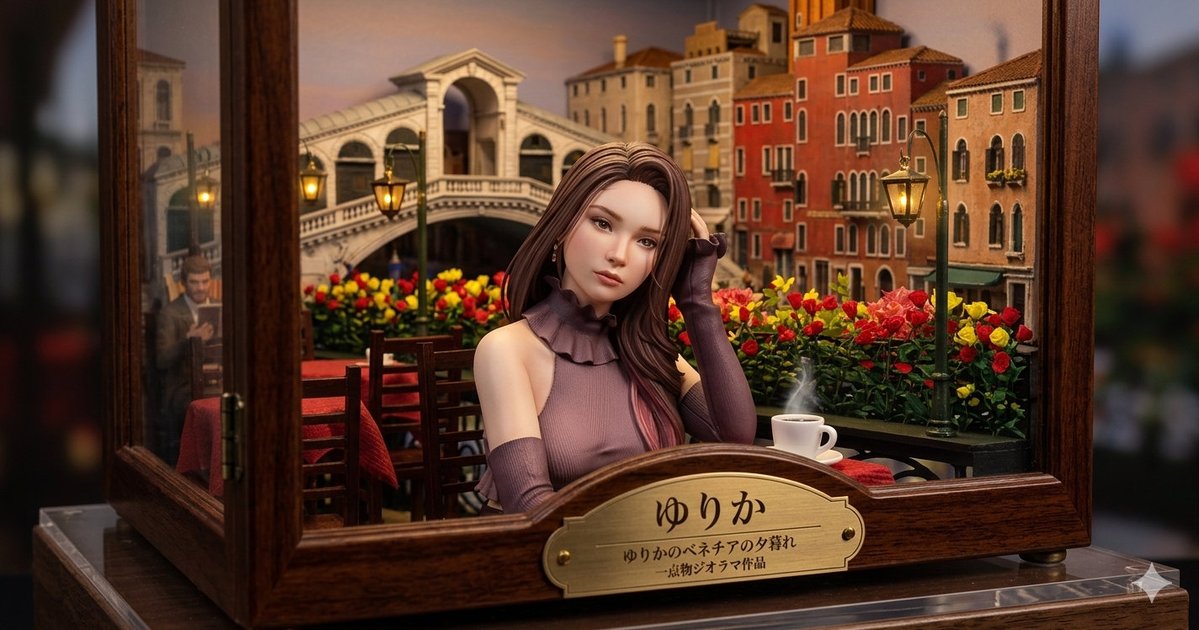
Venice Café Diorama Display
Generates a realistic miniature glass-case diorama of a woman at a sunset Venice café with a Japanese brass nameplate.
This is a GPT Image 2 prompt case for Product & Commercial. Use the copy-ready prompt below to generate similar visuals, and review Awesome GPT Image 2 Prompts attribution plus commercial-use rights before reuse.
Free 1K preview
Generate one preview image instantly, no sign-up required.
Prompt
Copy-ready prompt
Create a highly detailed miniature museum diorama inside a polished dark wooden and glass display case, photographed like a realistic macro product shot with shallow depth of field. The scene shows a romantic Venice café at sunset: a young elegant woman named {argument name="character name" default="ゆりか"} sits centered at a small outdoor table, her face intentionally smooth and featureless/blurred, with long flowing {argument name="hair color" default="chestnut brown"} hair and a sleeveless mauve knit top with a ruffled high collar plus matching long arm warmers. She rests one hand near her hair, posed calmly. Behind her is a miniature Venetian canal-city backdrop with the Rialto Bridge, warm orange and cream buildings, arched windows, balconies, glowing street lamps, and a sky tinted peach and dusk blue. The café foreground contains exactly 5 main prop groups: 1 wooden table with a red tablecloth, 2 wooden chairs, 1 white coffee cup and saucer with visible steam, 2 green lampposts with warm yellow lanterns, and 1 dense flower bed of red and yellow roses running across the balcony rail. The diorama is framed by open glass panels and thick varnished wood borders, sitting on a clear acrylic base, with softly blurred dark surroundings outside the case. On the front of the wooden case, attach an ornate brass nameplate with engraved Japanese text: large title {argument name="plaque title" default="ゆりか"}, smaller subtitle {argument name="plaque subtitle" default="ゆりかのベネチアの夕暮れ"}, and tiny line {argument name="plaque credit" default="-博物ジオラマ作品"}. Use warm cinematic lighting, rich wood grain, realistic miniature scale, glossy glass reflections, cozy lantern glow, and a high-end handcrafted diorama aesthetic. Keep the composition horizontal 16:9, centered on the seated woman and brass plaque, with the background softly but recognizably detailed.Prompt variables
Editable argument placeholders found in the prompt, with their default values.
Best for
- - Product & Commercial visual exploration
- - Image generation and reference-image edits
- - Reusable briefs that keep source attribution visible
Change these parts
- - Subject, product, character, or scene
- - Aspect ratio, camera, lighting, and background
- - Brand, text, color, and output constraints
Recommended model and settings
- - Model: gpt-image-2
- - Input mode: Text to Image
- - Aspect ratio: source
- - Commercial status: review original source
How to use this prompt
- 1. Copy the prompt and preserve its structure for the first test.
- 2. Replace the subject, context, and publishing channel.
- 3. Change one camera, lighting, or style variable per iteration.
- 4. Inspect the output, source, text, and rights before reuse.
Limitations, source, and reuse cautions
- - Generated output is an editable draft, not factual, legal, or rights evidence.
- - Review the linked source, people, brands, logos, text, and third-party media before commercial use.
More cases in this category
Prioritized by category, input mode compatibility, quality, and lower risk.
Reuse and source notes
Use this prompt safely after previewing the case.
- 1.Copy the prompt or open it directly in Dovoo with the generation button.
- 2.Adjust variables, aspect ratio, and reference images for your own use case.
- 3.Before publishing or paid usage, verify source rights, attribution requirements, and brand or likeness risks.
Can I use this prompt commercially?
Commercial-use status is allowed. Review the original source, license, brand constraints, and legal requirements before paid usage.
Where does this case come from?
This case is imported from Awesome GPT Image 2 Prompts; keep attribution visible and check the source URL before reuse.