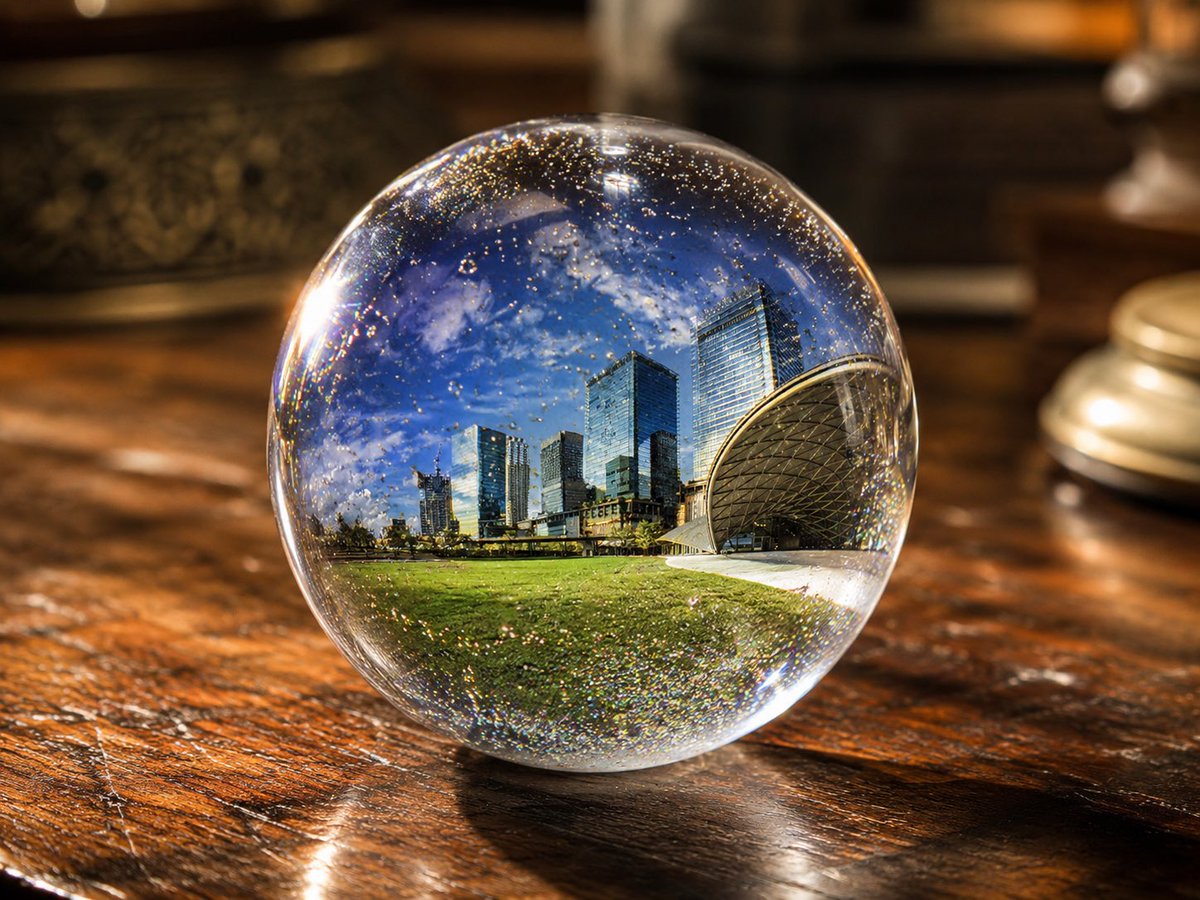
UV Resin Cityscape Orb
Generates a photorealistic macro image of a clear resin sphere containing a miniature city landscape, useful for UV resin art and magical product mockups.
This is a GPT Image 2 prompt case for Product & Commercial. Use the copy-ready prompt below to generate similar visuals, and review Awesome GPT Image 2 Prompts attribution plus commercial-use rights before reuse.
Free 1K preview
Generate one preview image instantly, no sign-up required.
Prompt
Copy-ready prompt
Create a photorealistic close-up product-style image of a perfectly clear spherical UV resin art orb sitting on a glossy dark wooden tabletop. Inside the transparent sphere, encapsulate a miniature panoramic {argument name="embedded scene" default="modern city skyline beside a green park under a vivid blue sky"}, with tall glass skyscrapers, a low urban horizon, bright grass in the foreground, and a distinctive curved dome-like architectural structure on the right. The sphere should look like polished resin or glass, with strong refraction, lens distortion, magnified internal scenery, tiny suspended gold glitter and micro-bubbles throughout, and sparkling highlights around the rim. Use {argument name="lighting mode" default="lighting on"}: warm indoor illumination with bright specular reflections, a glowing highlight on the left edge of the orb, and shimmering gold flecks. Place the orb centered slightly low in the frame on a richly grained varnished wooden table with visible scratches, reflections, and warm amber tones. The background should be softly blurred with cozy dark-brown interior objects, including an out-of-focus decorative container on the left and a small round metallic object on the right, creating shallow depth of field and bokeh. Compose as a realistic macro photograph, 4:3 aspect ratio, high detail, crisp sphere, blurred background, luxurious handmade resin craft aesthetic, magical miniature world trapped inside a crystal ball.Prompt variables
Editable argument placeholders found in the prompt, with their default values.
Best for
- - Product & Commercial visual exploration
- - Image generation and reference-image edits
- - Reusable briefs that keep source attribution visible
Change these parts
- - Subject, product, character, or scene
- - Aspect ratio, camera, lighting, and background
- - Brand, text, color, and output constraints
Recommended model and settings
- - Model: gpt-image-2
- - Input mode: Text to Image
- - Aspect ratio: source
- - Commercial status: review original source
How to use this prompt
- 1. Copy the prompt and preserve its structure for the first test.
- 2. Replace the subject, context, and publishing channel.
- 3. Change one camera, lighting, or style variable per iteration.
- 4. Inspect the output, source, text, and rights before reuse.
Limitations, source, and reuse cautions
- - Generated output is an editable draft, not factual, legal, or rights evidence.
- - Review the linked source, people, brands, logos, text, and third-party media before commercial use.
More cases in this category
Prioritized by category, input mode compatibility, quality, and lower risk.
Reuse and source notes
Use this prompt safely after previewing the case.
- 1.Copy the prompt or open it directly in Dovoo with the generation button.
- 2.Adjust variables, aspect ratio, and reference images for your own use case.
- 3.Before publishing or paid usage, verify source rights, attribution requirements, and brand or likeness risks.
Can I use this prompt commercially?
Commercial-use status is allowed. Review the original source, license, brand constraints, and legal requirements before paid usage.
Where does this case come from?
This case is imported from Awesome GPT Image 2 Prompts; keep attribution visible and check the source URL before reuse.