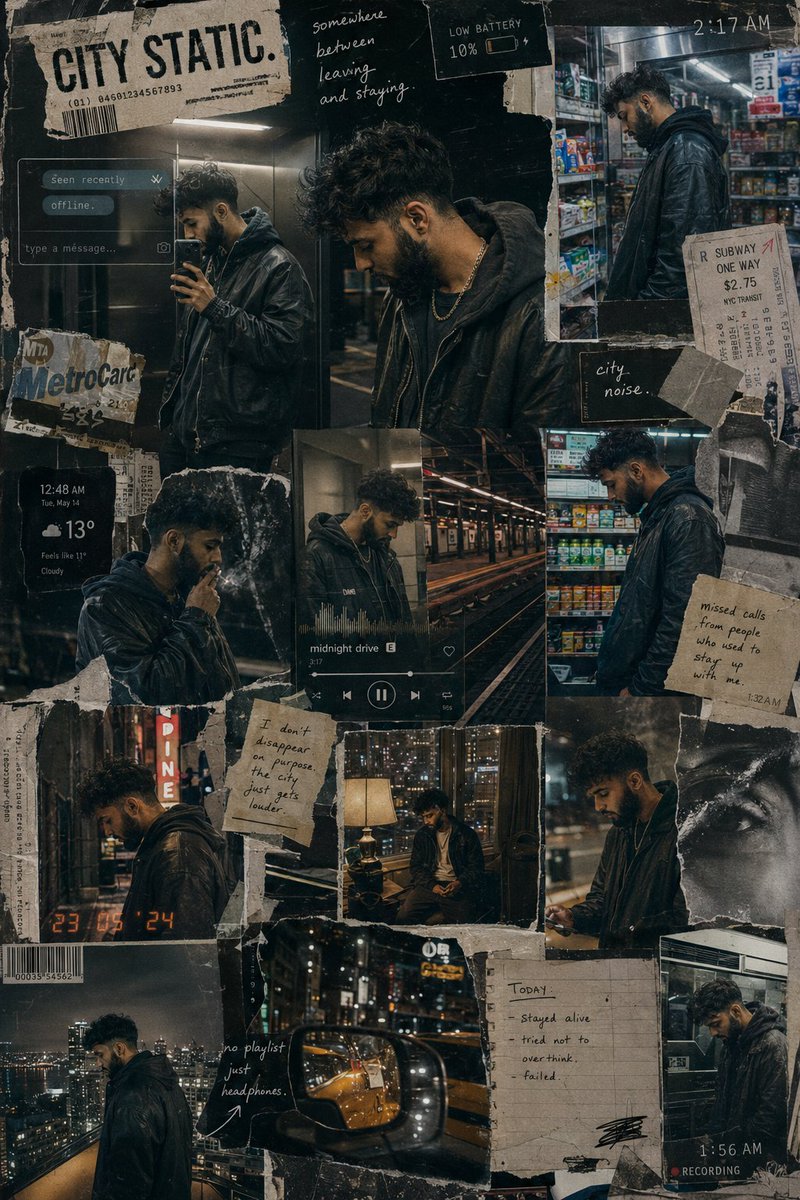
Urban Life Mixed-Media Collage
A complex, fragmented mixed-media fashion editorial collage capturing the moody, layered rhythm of modern urban life for a male character.
This is a GPT Image 2 prompt case for Fashion & Beauty. Use the copy-ready prompt below to generate similar visuals, and review Awesome GPT Image 2 Prompts attribution plus commercial-use rights before reuse.
Free 1K preview
Generate one preview image instantly, no sign-up required.
Prompt
Copy-ready prompt
Create a cinematic mixed-media fashion editorial collage

The composition should feel like a fragmented visual diary of a {argument name="subject" default="young man"} slowly disappearing into the rhythm of modern urban life.

Instead of a clean magazine layout, build the image like a layered wall of memories, screenshots, late-night photographs and torn printed posters assembled by hand over time.

The collage should contain multiple interconnected scenes of the same male character across one long sleepless city night:

rooftop solitude,

elevator mirror selfies,

empty subway platforms,

neon-lit convenience stores,

cigarette smoke drifting through alleyways,

blurry taxi reflections,

apartment-window loneliness,

headphones on during midnight walks,

and quiet moments of emotional exhaustion.

The same person should appear consistently throughout the collage but in different emotional states rather than different poses.

ART DIRECTION:

Blend:

luxury streetwear editorial photography,

analog film texture,

layered paper collage aesthetics,

distressed print graphics,

underground fashion magazines,

and modern urban melancholy.

Avoid: generic “cool guy” influencer aesthetics, symmetrical layouts, or overly polished AI perfection.

The composition should feel: messy in an intentional way.

Integrate:

torn paper edges,

tape marks,

handwritten notes,

distorted timestamps,

subway tickets,

blurred chat notifications,

weather widgets,

music-player overlays,

barcode fragments,

scratched textures,

scanned notebook pages,

and partially ripped typography.

The typography should feel fragmented and emotionally detached rather than motivational.

Examples: “2:17 AM” “offline.” “seen recently.” “somewhere between leaving and staying.” “low battery.” “city noise.”

No inspirational quotes.

WARDROBE:

Dark layered streetwear with realistic styling:

oversized hoodies,

washed leather jackets,

silver chains,

cargo pants,

worn sneakers,

heavy headphones,

slightly messy hair,

realistic fabric folds and texture.

The clothing should feel: expensive but lived-in.

LIGHTING:

Every section of the collage should use realistic urban nighttime lighting:

sodium-vapor streetlights,

convenience-store fluorescents,

elevator LEDs,

rainy reflections,

warm apartment lamps,

passing headlights,

rooftop city glow.

Use realistic low-light behavior:

soft sensor grain,

slight blur,

chromatic aberration,

imperfect exposure,

flash reflections,

realistic digital-camera texture.

COLOR PALETTE:

charcoal black, washed amber, cold teal, silver reflections, muted cream paper tones, faded neon and dark urban browns.

The final image should feel like: a visual archive of someone trying to stay emotionally visible in a city designed to make everyone disappear.
Prompt variables
Editable argument placeholders found in the prompt, with their default values.
Best for
- - Fashion & Beauty visual exploration
- - Image generation and reference-image edits
- - Reusable briefs that keep source attribution visible
Change these parts
- - Subject, product, character, or scene
- - Aspect ratio, camera, lighting, and background
- - Brand, text, color, and output constraints
Recommended model and settings
- - Model: gpt-image-2
- - Input mode: Text to Image
- - Aspect ratio: source
- - Commercial status: review original source
How to use this prompt
- 1. Copy the prompt and preserve its structure for the first test.
- 2. Replace the subject, context, and publishing channel.
- 3. Change one camera, lighting, or style variable per iteration.
- 4. Inspect the output, source, text, and rights before reuse.
Limitations, source, and reuse cautions
- - Generated output is an editable draft, not factual, legal, or rights evidence.
- - Review the linked source, people, brands, logos, text, and third-party media before commercial use.
More cases in this category
Prioritized by category, input mode compatibility, quality, and lower risk.
Reuse and source notes
Use this prompt safely after previewing the case.
- 1.Copy the prompt or open it directly in Dovoo with the generation button.
- 2.Adjust variables, aspect ratio, and reference images for your own use case.
- 3.Before publishing or paid usage, verify source rights, attribution requirements, and brand or likeness risks.
Can I use this prompt commercially?
Commercial-use status is allowed. Review the original source, license, brand constraints, and legal requirements before paid usage.
Where does this case come from?
This case is imported from Awesome GPT Image 2 Prompts; keep attribution visible and check the source URL before reuse.