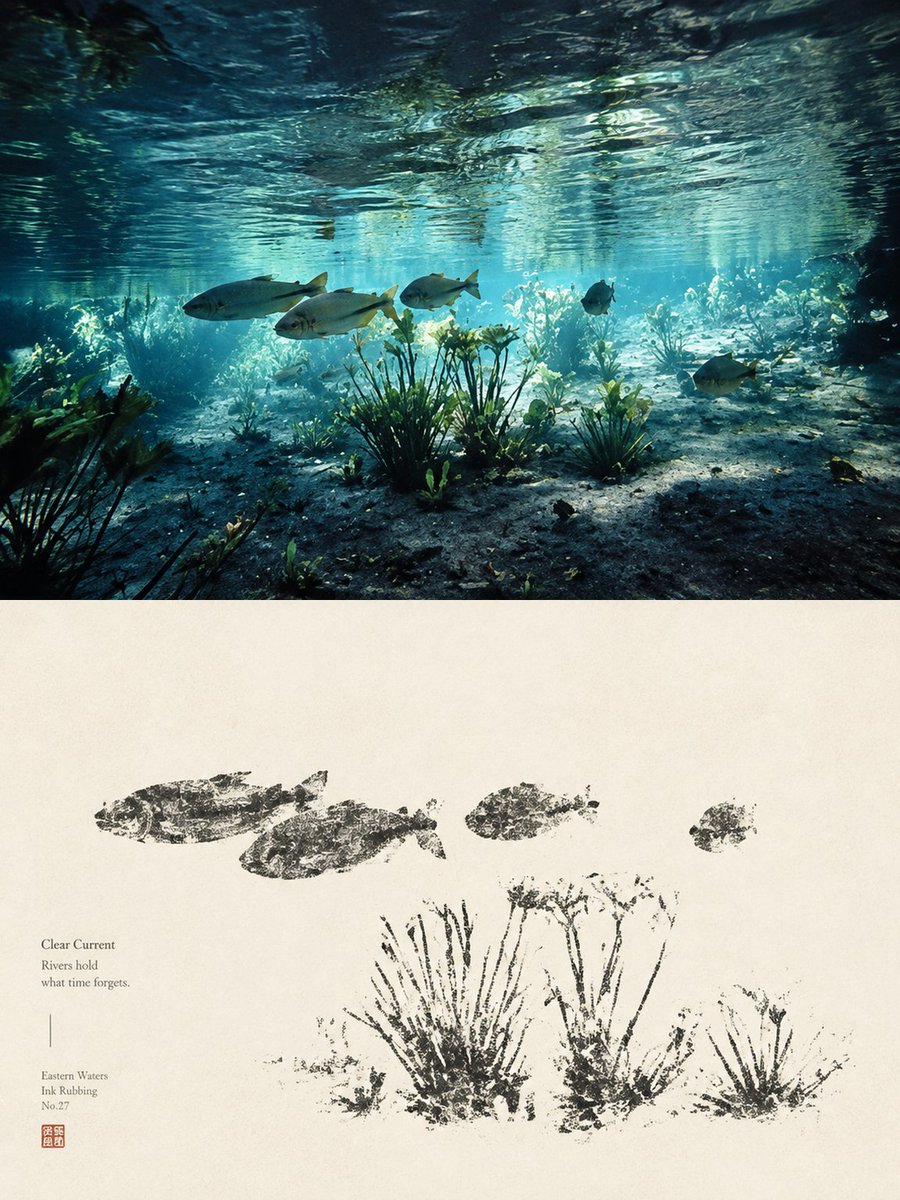
Underwater River Ink Rubbing Diptych
Generates a museum-style vertical diptych combining a realistic clear river scene with a traditional ink-rubbing poster interpretation.
This is a GPT Image 2 prompt case for Illustration & Art. Use the copy-ready prompt below to generate similar visuals, and review Awesome GPT Image 2 Prompts attribution plus commercial-use rights before reuse.
Free 1K preview
Generate one preview image instantly, no sign-up required.
Prompt
Copy-ready prompt
Goal: Create a vertical fine-art diptych poster that contrasts a realistic underwater river scene with a traditional Chinese-style ink rubbing interpretation of the same scene, inspired by cultural relic rubbings and quiet Eastern water aesthetics.

Canvas: Portrait orientation, 3:4 ratio. Divide the image into 2 horizontal panels: the top panel occupies about 45% of the canvas and is a vivid underwater photograph-like scene; the bottom panel occupies about 55% and is an aged ivory paper artwork.

Top panel: Show a clear shallow river viewed from underwater, with rippling water surface across the top, turquoise-blue sunlight beams, sandy and rocky riverbed, and aquatic vegetation. Include exactly 5 visible fish: 3 larger silver fish swimming left-to-right across the middle-left, 1 small dark fish near the center-right, and 1 medium fish near the lower-right. Add several rooted aquatic plants, including 3 prominent plant clusters in the foreground, with soft caustic light and natural depth haze. The mood should feel calm, transparent, ancient, and poetic.

Bottom panel: Reinterpret the same scene as a sparse black ink rubbing on warm handmade paper. Use rough, broken, stamped textures like stone-rubbing or bronze-inscription transfer marks, not smooth brush painting. Include exactly 4 fish rubbing silhouettes across the upper half: 2 larger fish on the left, 1 smaller fish near the center, and 1 small fish on the right. Include exactly 3 main aquatic plant rubbing clusters along the lower half, with irregular stems, speckled ink gaps, and distressed edges.

Text content on the lower-left of the paper panel: Set small refined serif text in dark gray. Include the title {argument name="title text" default="Clear Current"}, then the short poem {argument name="poem text" default="Rivers hold\nwhat time forgets."}. Beneath a thin vertical divider line, add {argument name="series text" default="Eastern Waters\nInk Rubbing\nNo.27"}. Add a small square red seal stamp below the text.

Visual style: Elegant museum-poster composition, minimal and contemplative. The top is cinematic underwater realism with teal, cyan, and deep shadow tones; the bottom is monochrome black ink on cream rice paper with subtle grain, stains, and natural fiber texture. Strong contrast between living water above and archaeological ink impression below.

Constraints: Keep the two panels cleanly separated by a straight horizontal boundary. Do not add extra fish beyond the specified counts. Avoid modern UI elements, frames, captions outside the lower-left text block, or decorative borders. Maintain a quiet Chinese antiquarian aesthetic, as if a river ecosystem has been transformed into a cultural relic rubbing.
Prompt variables
Editable argument placeholders found in the prompt, with their default values.
Best for
- - Illustration & Art visual exploration
- - Image generation and reference-image edits
- - Reusable briefs that keep source attribution visible
Change these parts
- - Subject, product, character, or scene
- - Aspect ratio, camera, lighting, and background
- - Brand, text, color, and output constraints
Recommended model and settings
- - Model: gpt-image-2
- - Input mode: Text to Image
- - Aspect ratio: source
- - Commercial status: review original source
How to use this prompt
- 1. Copy the prompt and preserve its structure for the first test.
- 2. Replace the subject, context, and publishing channel.
- 3. Change one camera, lighting, or style variable per iteration.
- 4. Inspect the output, source, text, and rights before reuse.
Limitations, source, and reuse cautions
- - Generated output is an editable draft, not factual, legal, or rights evidence.
- - Review the linked source, people, brands, logos, text, and third-party media before commercial use.
More cases in this category
Prioritized by category, input mode compatibility, quality, and lower risk.



Reuse and source notes
Use this prompt safely after previewing the case.
- 1.Copy the prompt or open it directly in Dovoo with the generation button.
- 2.Adjust variables, aspect ratio, and reference images for your own use case.
- 3.Before publishing or paid usage, verify source rights, attribution requirements, and brand or likeness risks.
Can I use this prompt commercially?
Commercial-use status is allowed. Review the original source, license, brand constraints, and legal requirements before paid usage.
Where does this case come from?
This case is imported from Awesome GPT Image 2 Prompts; keep attribution visible and check the source URL before reuse.