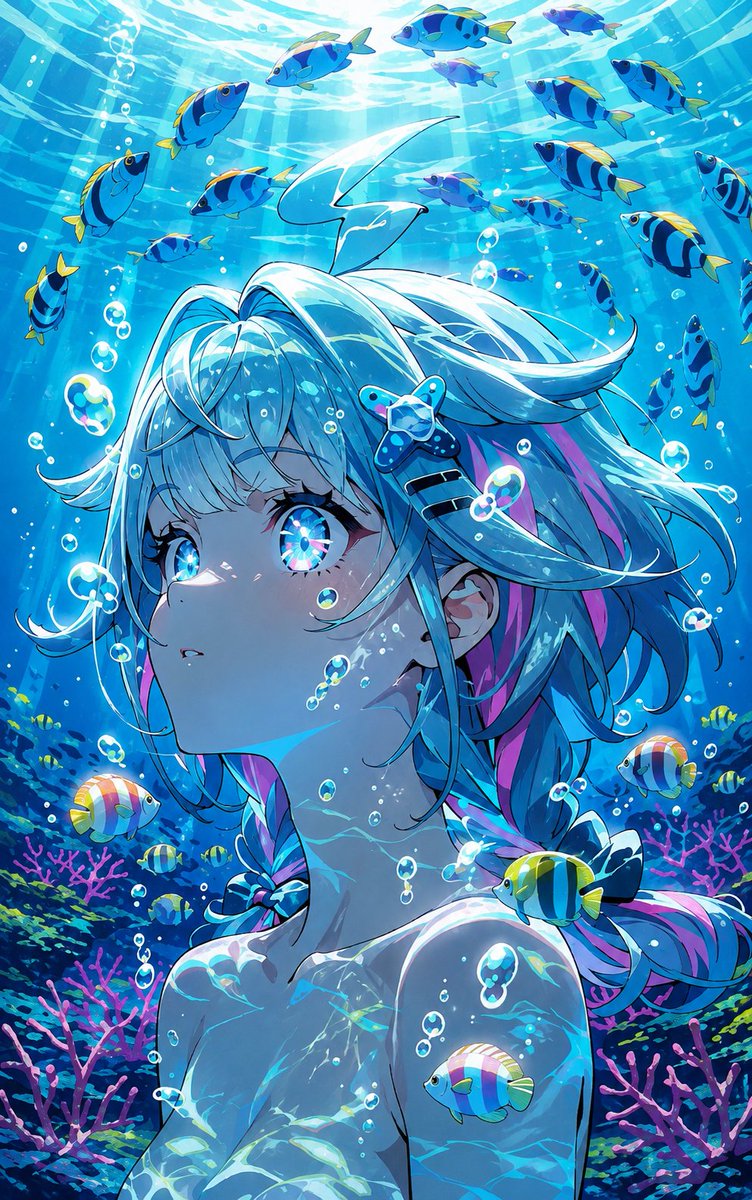
Underwater Anime Mermaid Portrait
A vivid vertical anime key-visual prompt for creating a luminous underwater girl surrounded by tropical fish, bubbles, coral, and sunlit ocean caustics.
This is a GPT Image 2 prompt case for Anime & Game. Use the copy-ready prompt below to generate similar visuals, and review Awesome GPT Image 2 Prompts attribution plus commercial-use rights before reuse.
Free 1K preview
Generate one preview image instantly, no sign-up required.
Prompt
Copy-ready prompt
Create a vivid vertical anime illustration of an underwater {argument name="character type" default="young mermaid-like girl"} gazing upward in wonder, shown from the chest up with her face in three-quarter profile. She has luminous {argument name="hair color" default="aqua-white hair with cyan and pink streaks"}, long flowing twin braids and loose strands drifting in the water, plus a starfish hair clip near one temple. Give her huge sparkling iridescent blue eyes with refracted rainbow highlights, soft pale skin, delicate eyelashes, and tiny air bubbles clinging to her cheeks and neck. Surround her with exactly 29 visible tropical fish: 18 blue-and-yellow striped fish swimming across the bright upper water, 5 small yellow-and-black fish near the coral, 3 round pastel rainbow fish, 2 tiny purple-blue fish, and 1 blue fish resting near her shoulder. Add many transparent bubbles of different sizes, shimmering caustic light patterns on her skin and hair, sun rays streaming from the water surface above, and a rich coral reef background with pink branching coral and dark blue-green sea plants. Use a highly polished anime key-visual style, saturated turquoise and cobalt palette, crisp line art, glossy highlights, dreamy magical atmosphere, strong underwater refraction, high detail, vertical portrait composition, no text, no watermark.Prompt variables
Editable argument placeholders found in the prompt, with their default values.
Best for
- - Anime & Game visual exploration
- - Image generation and reference-image edits
- - Reusable briefs that keep source attribution visible
Change these parts
- - Subject, product, character, or scene
- - Aspect ratio, camera, lighting, and background
- - Brand, text, color, and output constraints
Recommended model and settings
- - Model: gpt-image-2
- - Input mode: Text to Image
- - Aspect ratio: source
- - Commercial status: review original source
How to use this prompt
- 1. Copy the prompt and preserve its structure for the first test.
- 2. Replace the subject, context, and publishing channel.
- 3. Change one camera, lighting, or style variable per iteration.
- 4. Inspect the output, source, text, and rights before reuse.
Limitations, source, and reuse cautions
- - Generated output is an editable draft, not factual, legal, or rights evidence.
- - Review the linked source, people, brands, logos, text, and third-party media before commercial use.
More cases in this category
Prioritized by category, input mode compatibility, quality, and lower risk.

Reuse and source notes
Use this prompt safely after previewing the case.
- 1.Copy the prompt or open it directly in Dovoo with the generation button.
- 2.Adjust variables, aspect ratio, and reference images for your own use case.
- 3.Before publishing or paid usage, verify source rights, attribution requirements, and brand or likeness risks.
Can I use this prompt commercially?
Commercial-use status is allowed. Review the original source, license, brand constraints, and legal requirements before paid usage.
Where does this case come from?
This case is imported from Awesome GPT Image 2 Prompts; keep attribution visible and check the source URL before reuse.