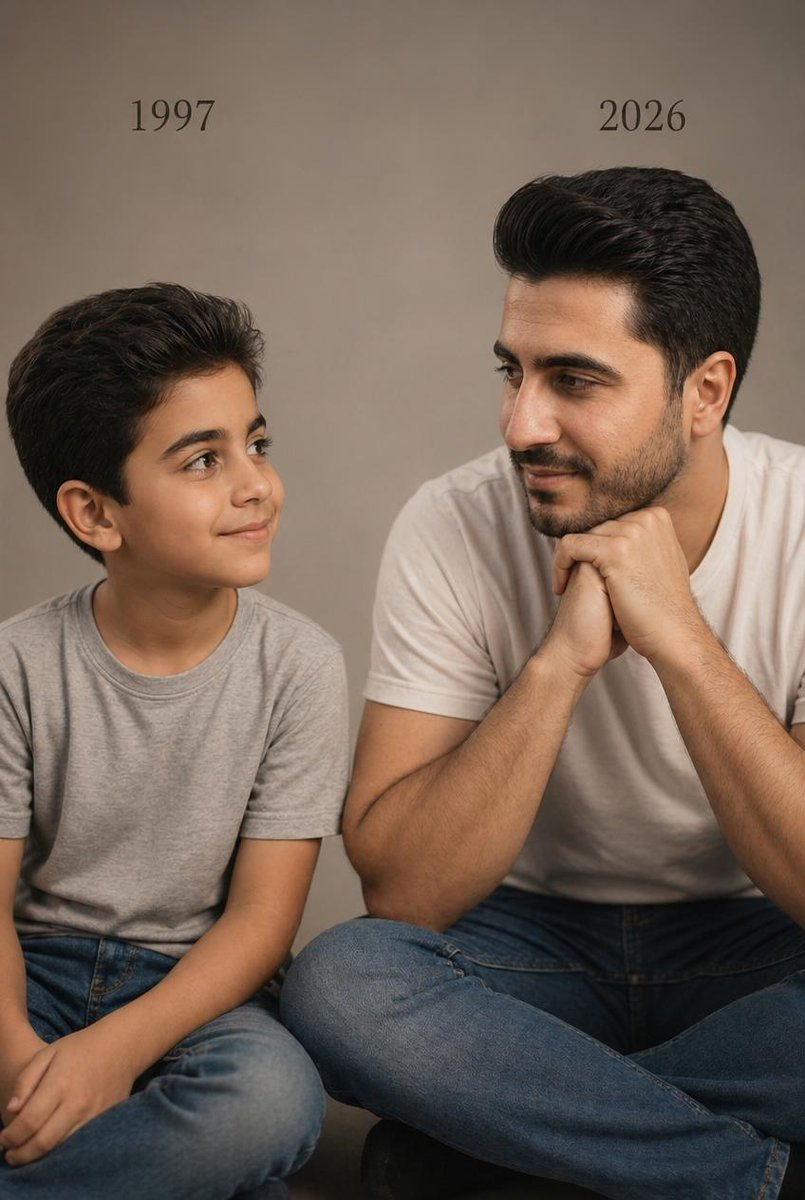
Two Ages Studio Portrait
This prompt generates a realistic emotional studio photo of the same man as a child and as an adult seated side by side with year labels, ideal for age-comparison and memory-themed portraits.
This is a GPT Image 2 prompt case for Portrait & Character. Use the copy-ready prompt below to generate similar visuals, and review Awesome GPT Image 2 Prompts attribution plus commercial-use rights before reuse.
Free 1K preview
Generate one preview image instantly, no sign-up required.
Prompt
Copy-ready prompt
A photorealistic studio portrait in a vertical 4:5 composition showing two versions of the same male person seated side by side against a plain warm beige-gray studio backdrop. On the left, a child version of {argument name="subject identity" default="the same person"} sits cross-legged, wearing a light gray crew-neck T-shirt and medium-blue jeans, with neatly styled dark brown to black hair swept back and slightly voluminous. The child is turned slightly to the right, looking toward the adult version with a soft innocent smile and relaxed posture. Above the child, place the text {argument name="left year text" default="1997"} in a simple elegant black serif font. On the right, the present-day version of the same person sits cross-legged, larger in scale and closer to camera, wearing a plain white crew-neck T-shirt and blue jeans, with matching facial structure and matching dark swept-back hair. He leans forward slightly with both hands clasped together under his chin, elbows resting near his knees, and looks left toward the child with a calm gentle smile. Above the adult, place the text {argument name="right year text" default="2026"} in the same black serif font. Keep both subjects visually consistent as the same person at two ages, emphasizing emotional connection, recognition, and quiet reflection. Use soft cinematic warm studio lighting, realistic skin texture, subtle shadows, minimal styling, professional editorial photography, sharp focus, natural proportions, and a clean uncluttered composition. The image should feel like a real photoshoot, intimate, minimal, emotional, and highly realistic.Prompt variables
Editable argument placeholders found in the prompt, with their default values.
Best for
- - Portrait & Character visual exploration
- - Image generation and reference-image edits
- - Reusable briefs that keep source attribution visible
Change these parts
- - Subject, product, character, or scene
- - Aspect ratio, camera, lighting, and background
- - Brand, text, color, and output constraints
Recommended model and settings
- - Model: gpt-image-2
- - Input mode: Text to Image
- - Aspect ratio: source
- - Commercial status: review original source
How to use this prompt
- 1. Copy the prompt and preserve its structure for the first test.
- 2. Replace the subject, context, and publishing channel.
- 3. Change one camera, lighting, or style variable per iteration.
- 4. Inspect the output, source, text, and rights before reuse.
Limitations, source, and reuse cautions
- - Generated output is an editable draft, not factual, legal, or rights evidence.
- - Review the linked source, people, brands, logos, text, and third-party media before commercial use.
More cases in this category
Prioritized by category, input mode compatibility, quality, and lower risk.
Reuse and source notes
Use this prompt safely after previewing the case.
- 1.Copy the prompt or open it directly in Dovoo with the generation button.
- 2.Adjust variables, aspect ratio, and reference images for your own use case.
- 3.Before publishing or paid usage, verify source rights, attribution requirements, and brand or likeness risks.
Can I use this prompt commercially?
Commercial-use status is allowed. Review the original source, license, brand constraints, and legal requirements before paid usage.
Where does this case come from?
This case is imported from Awesome GPT Image 2 Prompts; keep attribution visible and check the source URL before reuse.