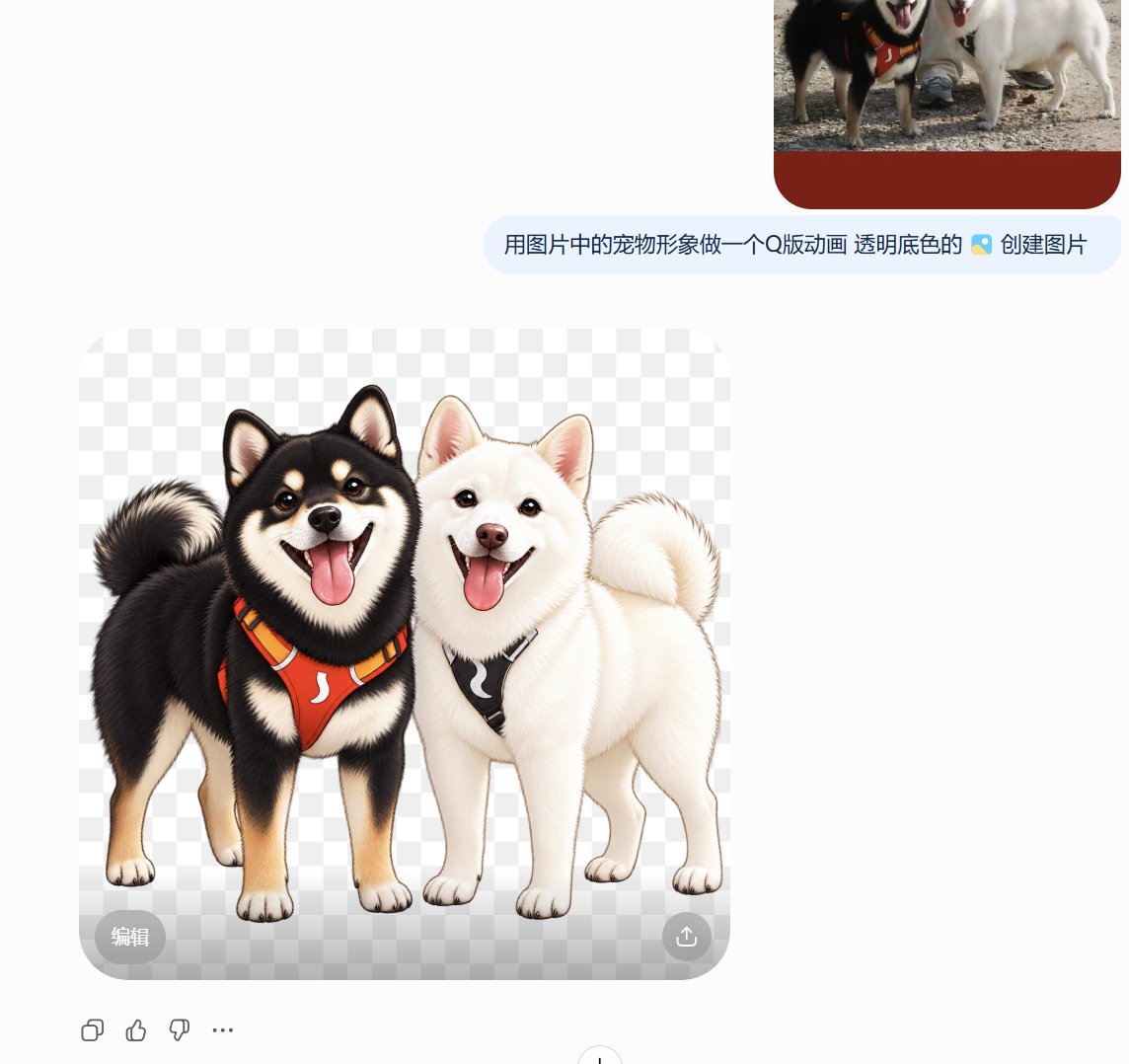
Transparent Q-Style Shiba Inu Sticker
Generates a transparent-background PNG sticker illustration of two happy Shiba Inu dogs for chat stickers, social posts, or pet avatar art.
This is a GPT Image 2 prompt case for Portrait & Character. Use the copy-ready prompt below to generate similar visuals, and review Awesome GPT Image 2 Prompts attribution plus commercial-use rights before reuse.
Free 1K preview
Generate one preview image instantly, no sign-up required.
Prompt
Copy-ready prompt
Create a cute, Q-style sticker illustration in PNG format with a transparent background (displayed on a gray-white gradient transparency preview). The main subjects are two Shiba Inus standing side-by-side, full body, facing forward, with happy and friendly expressions: The dog on the left is a {argument name="left dog color" default="black-and-tan Shiba Inu"} Shiba Inu, wearing a bright {argument name="left harness color" default="white Shiba Inu"} harness with black and yellow straps and a white arc-shaped logo; the dog on the right is a {argument name="right dog color" default="Cream white"} Shiba Inu, wearing a {argument name="right harness color" default="Black"} harness with a white arc-shaped logo. Maintain their respective pet characteristics to make them easily recognizable: upright triangular ears, curled fluffy tails, thick fur, round and shiny eyes, open smiles, visible pink tongues, small paws, and compact Shiba Inu body proportions. Use a refined digital illustration style with soft, realistic fur texture, clean cut edges, subtle shadows under their feet, bright and cheerful expressions, and a high-resolution transparent PNG sticker appearance. Do not add text, background scenery, additional animals, collars or props other than the harnesses.Prompt variables
Editable argument placeholders found in the prompt, with their default values.
Best for
- - Portrait & Character visual exploration
- - Image generation and reference-image edits
- - Reusable briefs that keep source attribution visible
Change these parts
- - Subject, product, character, or scene
- - Aspect ratio, camera, lighting, and background
- - Brand, text, color, and output constraints
Recommended model and settings
- - Model: gpt-image-2
- - Input mode: Text to Image
- - Aspect ratio: source
- - Commercial status: review original source
How to use this prompt
- 1. Copy the prompt and preserve its structure for the first test.
- 2. Replace the subject, context, and publishing channel.
- 3. Change one camera, lighting, or style variable per iteration.
- 4. Inspect the output, source, text, and rights before reuse.
Limitations, source, and reuse cautions
- - Generated output is an editable draft, not factual, legal, or rights evidence.
- - Review the linked source, people, brands, logos, text, and third-party media before commercial use.
More cases in this category
Prioritized by category, input mode compatibility, quality, and lower risk.


Reuse and source notes
Use this prompt safely after previewing the case.
- 1.Copy the prompt or open it directly in Dovoo with the generation button.
- 2.Adjust variables, aspect ratio, and reference images for your own use case.
- 3.Before publishing or paid usage, verify source rights, attribution requirements, and brand or likeness risks.
Can I use this prompt commercially?
Commercial-use status is allowed. Review the original source, license, brand constraints, and legal requirements before paid usage.
Where does this case come from?
This case is imported from Awesome GPT Image 2 Prompts; keep attribution visible and check the source URL before reuse.