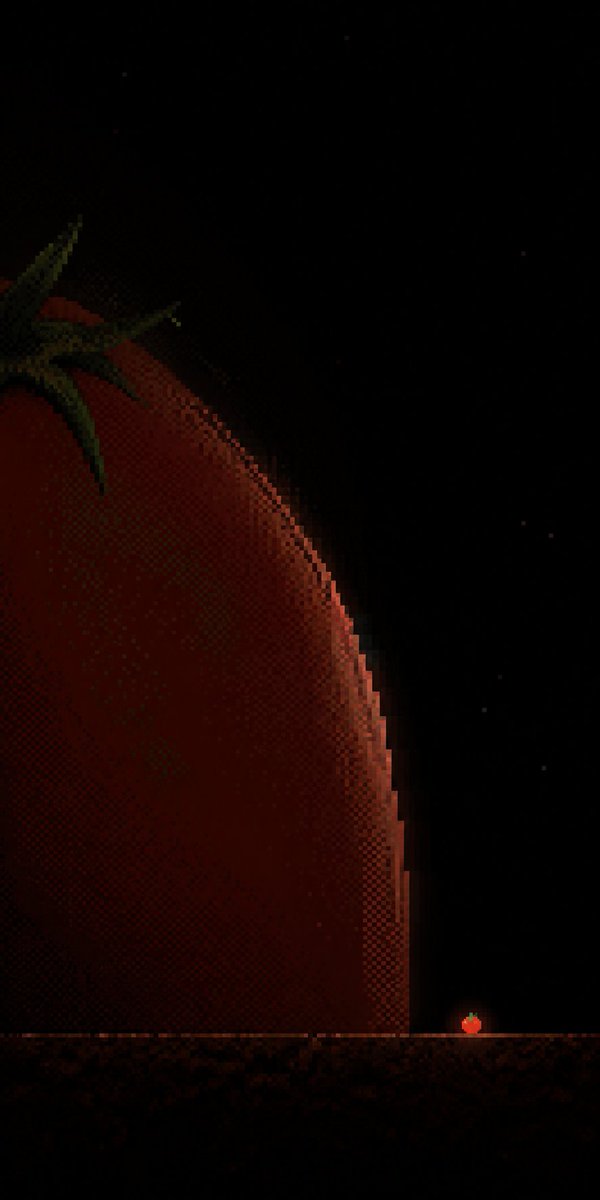
Tiny Tomato in Dark Pixel Void
Generates a vertical minimalist pixel-art poster with a huge cropped tomato and a tiny glowing tomato focal point for atmospheric visual storytelling.
This is a GPT Image 2 prompt case for Illustration & Art. Use the copy-ready prompt below to generate similar visuals, and review Awesome GPT Image 2 Prompts attribution plus commercial-use rights before reuse.
Free 1K preview
Generate one preview image instantly, no sign-up required.
Prompt
Copy-ready prompt
Create a vertical 9:16 minimalist pixel-art poster about {argument name="subject" default="a tomato"} in a near-black void. The canvas is mostly empty black space with extremely low brightness and a quiet cinematic mood. On the far left, show one enormous cropped tomato form entering from the edge, only its right curved rim visible as a huge dark red arc occupying the lower-left half of the frame; its body is rendered with coarse dithering, muted crimson and brown shadows, and a thin warm orange rim light along the edge. At the upper-left corner of the giant fruit, include exactly 5 dark green pointed calyx leaves, partially cropped and barely lit. Near the bottom, place one thin horizontal ground ledge or platform line spanning the full width, colored dim rusty brown with pixel noise. Just above this line near the lower-right area, place one tiny glowing tomato icon as the core focal point, with a red-orange body, a small green top, and a soft warm halo, emphasizing the scale difference between the tiny signal and the massive cropped structure. Include exactly 8 faint star-like pixel specks scattered in the black background, all very subtle. Use {argument name="color palette" default="near-black, deep crimson, burnt orange, dark olive green"}, retro 8-bit / 16-bit pixel art, heavy halftone dithering, blocky jagged edges, high negative space, no text, no border, no watermark.Prompt variables
Editable argument placeholders found in the prompt, with their default values.
Best for
- - Illustration & Art visual exploration
- - Image generation and reference-image edits
- - Reusable briefs that keep source attribution visible
Change these parts
- - Subject, product, character, or scene
- - Aspect ratio, camera, lighting, and background
- - Brand, text, color, and output constraints
Recommended model and settings
- - Model: gpt-image-2
- - Input mode: Text to Image
- - Aspect ratio: source
- - Commercial status: review original source
How to use this prompt
- 1. Copy the prompt and preserve its structure for the first test.
- 2. Replace the subject, context, and publishing channel.
- 3. Change one camera, lighting, or style variable per iteration.
- 4. Inspect the output, source, text, and rights before reuse.
Limitations, source, and reuse cautions
- - Generated output is an editable draft, not factual, legal, or rights evidence.
- - Review the linked source, people, brands, logos, text, and third-party media before commercial use.
More cases in this category
Prioritized by category, input mode compatibility, quality, and lower risk.




Reuse and source notes
Use this prompt safely after previewing the case.
- 1.Copy the prompt or open it directly in Dovoo with the generation button.
- 2.Adjust variables, aspect ratio, and reference images for your own use case.
- 3.Before publishing or paid usage, verify source rights, attribution requirements, and brand or likeness risks.
Can I use this prompt commercially?
Commercial-use status is allowed. Review the original source, license, brand constraints, and legal requirements before paid usage.
Where does this case come from?
This case is imported from Awesome GPT Image 2 Prompts; keep attribution visible and check the source URL before reuse.