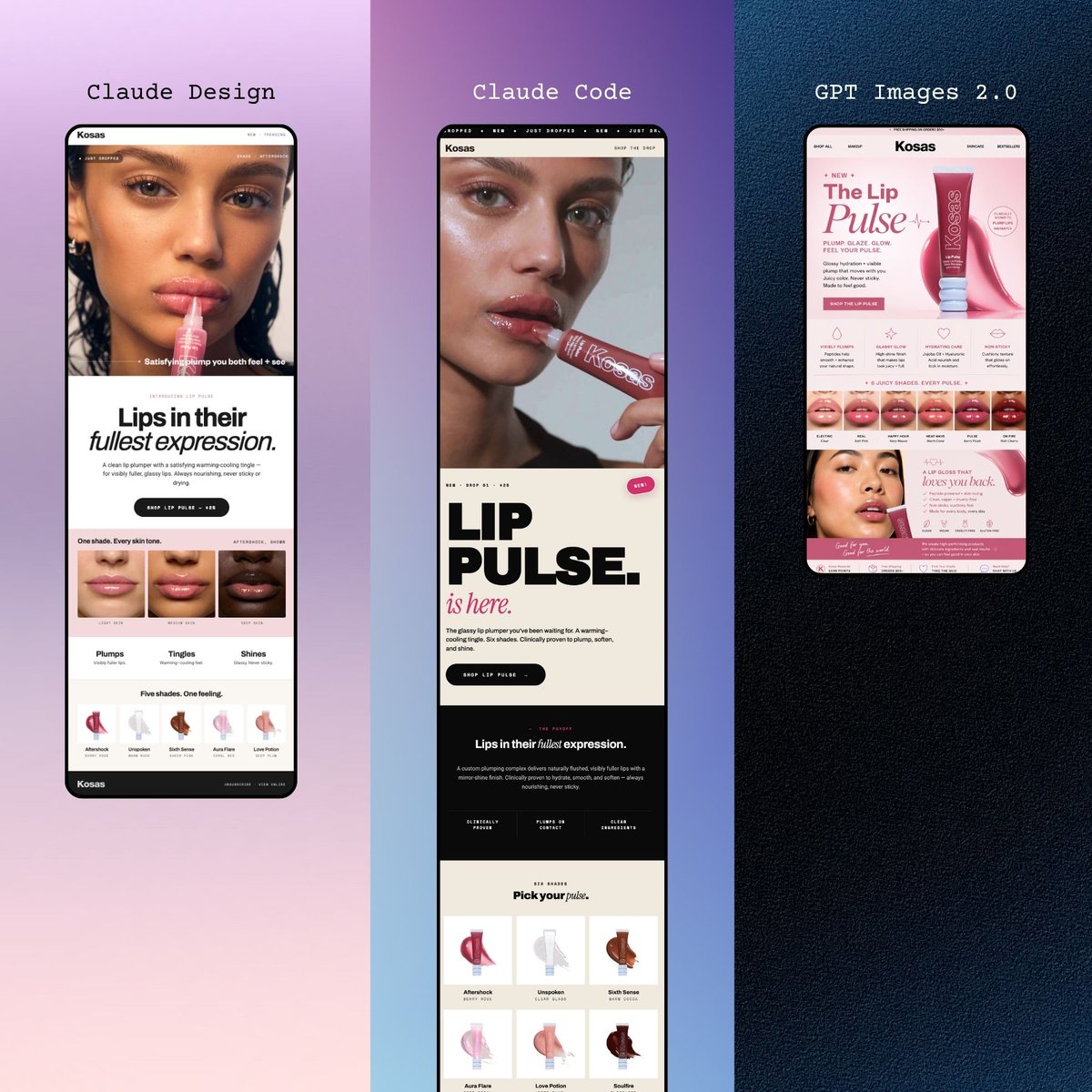
Three Beauty Mobile Landing Pages
A premium triptych mockup of three smartphone beauty website designs, ideal for showcasing AI-generated cosmetic brand landing page concepts on social media.
This is a GPT Image 2 prompt case for Product & Commercial. Use the copy-ready prompt below to generate similar visuals, and review Awesome GPT Image 2 Prompts attribution plus commercial-use rights before reuse.
Free 1K preview
Generate one preview image instantly, no sign-up required.
Prompt
Copy-ready prompt
A polished promotional mockup showing 3 tall smartphone screens displayed side by side in a vertical triptych layout, each presenting a modern beauty brand landing page for a lip product. The overall composition is editorial, minimal, and premium, designed like a social media showcase of mobile web designs. The left panel sits on a soft lavender-to-blush gradient background and shows a black-framed phone with a cream and blush beauty website for {argument name="brand name" default="Kosas"}. At the top of this panel, small elegant serif text reads {argument name="left headline" default="Fresh Pout."}. The phone screen features a cropped close-up beauty image at the top, a bold headline reading “Lips in their fullest expression.” with “fullest” in italic serif styling, a rounded dark call-to-action button, a strip of 3 lip close-up thumbnails, 3 labeled benefit tabs reading “Plumps,” “Tingles,” and “Shines,” and a row of 5 shade or effect icons underneath. The middle panel sits on a lavender-to-deep-violet gradient background and shows a second black-framed phone with a more typographic landing page. Above it, serif text reads {argument name="middle headline" default="Claude Code"}. The screen includes a cropped portrait image at top, a very large bold black stacked title reading “LIP PULSE.” with a pink italic script-style line “is here.” beneath it, a rounded dark button, a dark section with the phrase “Lips in their fullest expression.”, and a product grid near the bottom containing 6 shade cards arranged in 2 rows of 3. The right panel sits on a dark navy textured background and shows a third black-framed phone with a pink-forward e-commerce style page. Centered above it, monospaced white text reads {argument name="right headline" default="GPT Images 2.0"}. This screen prominently displays the product hero section with the brand name “Kosas,” a large title “The Lip Pulse,” a pink lip gloss tube angled to the right, small feature icons, a shade strip of 6 lip swatches near the middle, and a lower promotional block with additional pink product imagery. Keep the layout symmetrical with exactly 3 phones, one per panel, each fully visible and vertically oriented. Use high-end cosmetic campaign aesthetics, clean spacing, fashion-web typography mixing serif and bold sans serif, soft pink and cream UI palettes, subtle shadows, and a sleek product-design presentation suitable for showcasing AI-generated mobile website concepts.Prompt variables
Editable argument placeholders found in the prompt, with their default values.
Best for
- - Product & Commercial visual exploration
- - Image generation and reference-image edits
- - Reusable briefs that keep source attribution visible
Change these parts
- - Subject, product, character, or scene
- - Aspect ratio, camera, lighting, and background
- - Brand, text, color, and output constraints
Recommended model and settings
- - Model: gpt-image-2
- - Input mode: Text to Image
- - Aspect ratio: source
- - Commercial status: review original source
How to use this prompt
- 1. Copy the prompt and preserve its structure for the first test.
- 2. Replace the subject, context, and publishing channel.
- 3. Change one camera, lighting, or style variable per iteration.
- 4. Inspect the output, source, text, and rights before reuse.
Limitations, source, and reuse cautions
- - Generated output is an editable draft, not factual, legal, or rights evidence.
- - Review the linked source, people, brands, logos, text, and third-party media before commercial use.
More cases in this category
Prioritized by category, input mode compatibility, quality, and lower risk.



Reuse and source notes
Use this prompt safely after previewing the case.
- 1.Copy the prompt or open it directly in Dovoo with the generation button.
- 2.Adjust variables, aspect ratio, and reference images for your own use case.
- 3.Before publishing or paid usage, verify source rights, attribution requirements, and brand or likeness risks.
Can I use this prompt commercially?
Commercial-use status is allowed. Review the original source, license, brand constraints, and legal requirements before paid usage.
Where does this case come from?
This case is imported from Awesome GPT Image 2 Prompts; keep attribution visible and check the source URL before reuse.