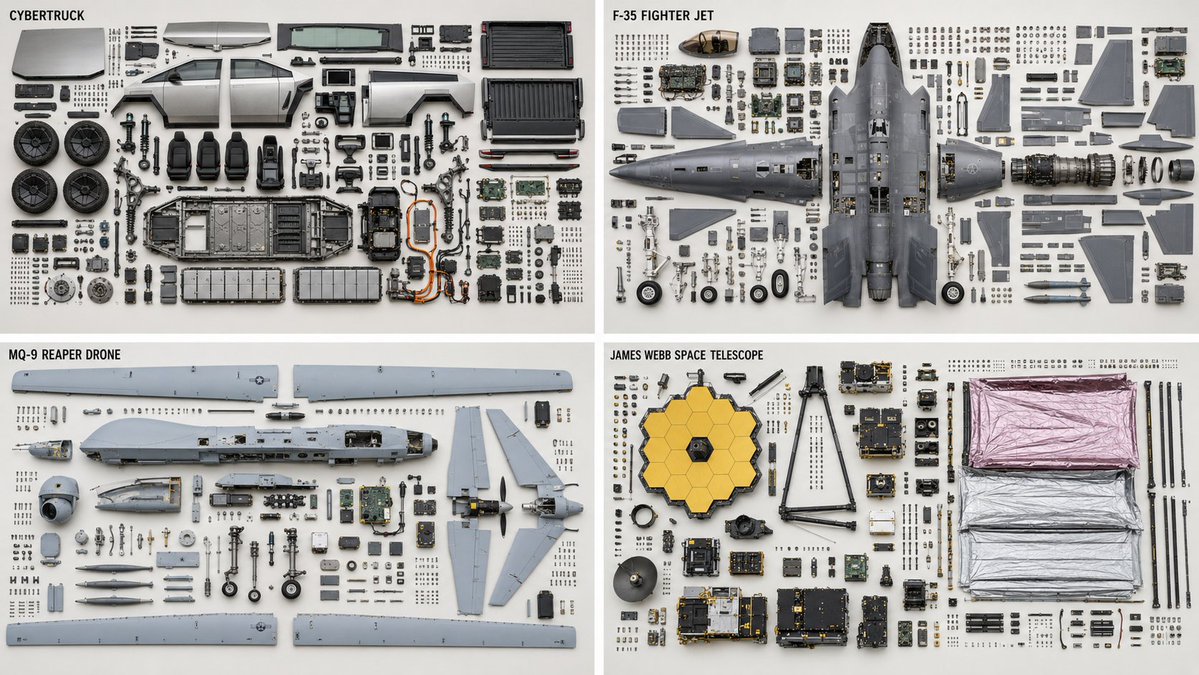
Technical Machine Knolling Teardown
A highly detailed technical prompt for generating clean, top-down orthographic teardowns of complex machinery with organized parts.
This is a GPT Image 2 prompt case for Illustration & Art. Use the copy-ready prompt below to generate similar visuals, and review Awesome GPT Image 2 Prompts attribution plus commercial-use rights before reuse.
Free 1K preview
Generate one preview image instantly, no sign-up required.
Prompt
Copy-ready prompt
2x2 grid, 16:9, do this for {argument name="machines" default="4 complex machines, like CyberTruck, F35 plane, Reaper Drone, James Webb Telescope"} Knolling teardown — {argument name="subject" default="{SUBJECT}"} ({argument name="category" default="{SUBJECT_TYPE}"}), top-down orthographic. PARTS — complete bill of materials, show each exactly once: {argument name="parts" default="{PARTS — list every part with quantity}"} LAYOUT - clean rectilinear grid; every part aligned to horizontal and vertical axes - grouped by subassembly — a subassembly's parts stay adjacent as one cluster - each group anchored by its largest structural part; fasteners cluster beside the part they secure - even spacing, no overlapping parts, no diagonal scatter - consistent scale across every part DEPICTION — keep it truthful - every fastener sits near a matching mounting hole; screw count = hole count - every gasket or seal shown with the perimeter it seals against - no duplicated or phantom parts - preserve each part's true orientation and handedness; do not mirror chiral parts RENDER - orthographic projection, no perspective, all parts in sharp focus - flat, even, diffuse lighting; minimal soft shadow - neutral seamless backgroundPrompt variables
Editable argument placeholders found in the prompt, with their default values.
Best for
- - Illustration & Art visual exploration
- - Image generation and reference-image edits
- - Reusable briefs that keep source attribution visible
Change these parts
- - Subject, product, character, or scene
- - Aspect ratio, camera, lighting, and background
- - Brand, text, color, and output constraints
Recommended model and settings
- - Model: gpt-image-2
- - Input mode: Text to Image
- - Aspect ratio: source
- - Commercial status: review original source
How to use this prompt
- 1. Copy the prompt and preserve its structure for the first test.
- 2. Replace the subject, context, and publishing channel.
- 3. Change one camera, lighting, or style variable per iteration.
- 4. Inspect the output, source, text, and rights before reuse.
Limitations, source, and reuse cautions
- - Generated output is an editable draft, not factual, legal, or rights evidence.
- - Review the linked source, people, brands, logos, text, and third-party media before commercial use.
More cases in this category
Prioritized by category, input mode compatibility, quality, and lower risk.



Reuse and source notes
Use this prompt safely after previewing the case.
- 1.Copy the prompt or open it directly in Dovoo with the generation button.
- 2.Adjust variables, aspect ratio, and reference images for your own use case.
- 3.Before publishing or paid usage, verify source rights, attribution requirements, and brand or likeness risks.
Can I use this prompt commercially?
Commercial-use status is allowed. Review the original source, license, brand constraints, and legal requirements before paid usage.
Where does this case come from?
This case is imported from Awesome GPT Image 2 Prompts; keep attribution visible and check the source URL before reuse.