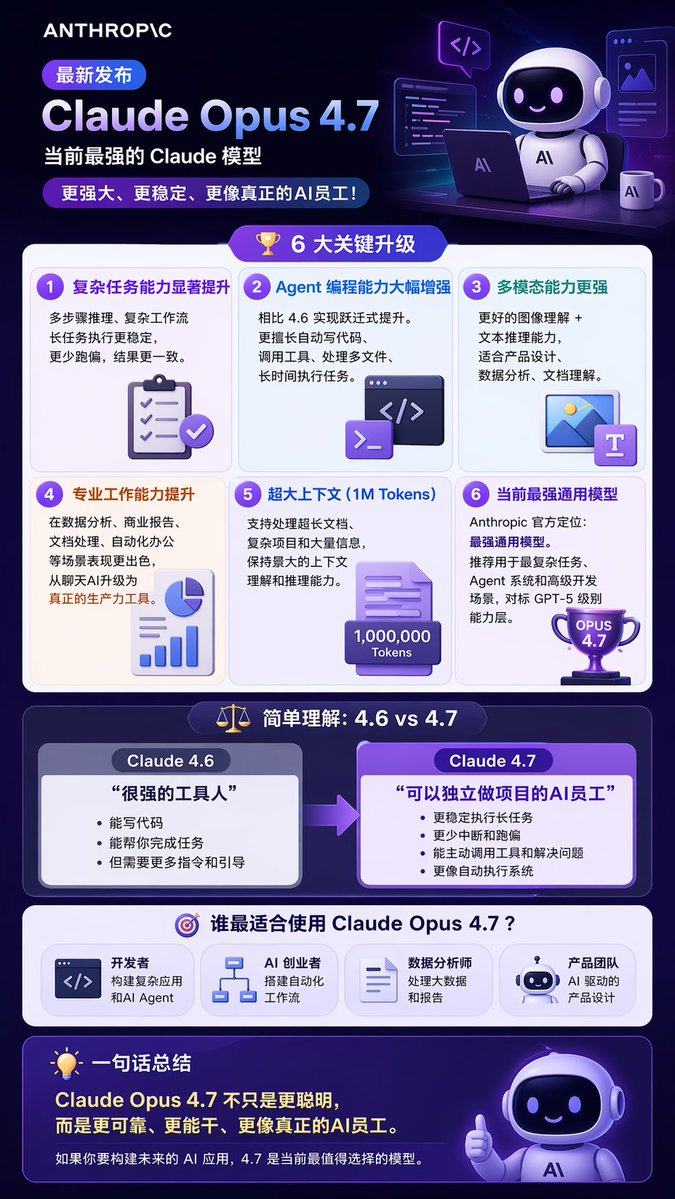
Tech Product Announcement Infographic
Generates a multi-section tech product infographic with 3D illustrations, feature grids, and comparison tables.
This is a GPT Image 2 prompt case for Graphic & Poster. Use the copy-ready prompt below to generate similar visuals, and review Awesome GPT Image 2 Prompts attribution plus commercial-use rights before reuse.
Free 1K preview
Generate one preview image instantly, no sign-up required.
Prompt
Copy-ready prompt
{
  "type": "long vertical infographic poster",
  "style": "modern tech, 3D isometric illustrations, dark purple and blue color palette, glassmorphism UI elements",
  "header": {
    "logo": "{argument name=\"company logo\" default=\"ANTHROPIC\"}",
    "badge": "Latest Release",
    "title": "{argument name=\"product name\" default=\"Claude Opus 4.7\"}",
    "subtitle": "{argument name=\"main subtitle\" default=\"Currently the strongest Claude model\"}",
    "tagline": "More powerful, more stable, and more like a real AI employee!",
    "illustration": "3D cute robot sitting at a desk with a laptop, coffee mug, and floating code windows"
  },
  "layout": {
    "sections": [
      {
        "title": "6 Key Upgrades",
        "icon": "3D gold trophy",
        "layout": "2x3 grid",
        "count": 6,
        "items": [
          {
            "title": "Significantly improved ability to handle complex tasks",
            "icon": "3D clipboard with checkmarks"
          },
          {
            "title": "Agent programming capabilities greatly enhanced",
            "icon": "3D code terminal window"
          },
          {
            "title": "More powerful multimodal capabilities",
            "icon": "3D image and text document"
          },
          {
            "title": "Enhanced professional work abilities",
            "icon": "3D pie chart and bar graph"
          },
          {
            "title": "Extra-large context (1M Tokens)",
            "icon": "3D document with 1,000,000 Tokens text"
          },
          {
            "title": "Currently the strongest general-purpose model",
            "icon": "3D purple trophy with OPUS 4.7 text"
          }
        ]
      },
      {
        "title": "Simple understanding: 4.6 vs 4.7",
        "icon": "3D balance scale",
        "layout": "side-by-side comparison with right-pointing arrow",
        "count": 2,
        "columns": [
          {
            "header": "{argument name=\"comparison version 1\" default=\"Claude 4.6\"}",
            "quote": "A very capable assistant",
            "style": "grey box"
          },
          {
            "header": "{argument name=\"comparison version 2\" default=\"Claude 4.7\"}",
            "quote": "An AI employee who can independently handle projects",
            "style": "purple box, highlighted"
          }
        ]
      },
      {
        "title": "Who is best suited to use Claude Opus 4.7?",
        "icon": "3D target",
        "layout": "horizontal row",
        "count": 4,
        "labels": [
          "Developers",
          "AI entrepreneurs",
          "Data Analyst",
          "Product Team"
        ]
      }
    ],
    "footer": {
      "title": "One-sentence summary",
      "icon": "3D lightbulb",
      "main_text": "Claude Opus 4.7 isn't just smarter, it's more reliable, more capable, and more like a true AI employee.",
      "sub_text": "If you're building the future of AI applications, 4.7 is the most worthwhile model to choose right now.",
      "illustration": "3D cute robot giving a thumbs up"
    }
  }
}
Prompt variables
Editable argument placeholders found in the prompt, with their default values.
Best for
- - Graphic & Poster visual exploration
- - Image generation and reference-image edits
- - Reusable briefs that keep source attribution visible
Change these parts
- - Subject, product, character, or scene
- - Aspect ratio, camera, lighting, and background
- - Brand, text, color, and output constraints
Recommended model and settings
- - Model: gpt-image-2
- - Input mode: Text to Image
- - Aspect ratio: source
- - Commercial status: review original source
How to use this prompt
- 1. Copy the prompt and preserve its structure for the first test.
- 2. Replace the subject, context, and publishing channel.
- 3. Change one camera, lighting, or style variable per iteration.
- 4. Inspect the output, source, text, and rights before reuse.
Limitations, source, and reuse cautions
- - Generated output is an editable draft, not factual, legal, or rights evidence.
- - Review the linked source, people, brands, logos, text, and third-party media before commercial use.
More cases in this category
Prioritized by category, input mode compatibility, quality, and lower risk.




Reuse and source notes
Use this prompt safely after previewing the case.
- 1.Copy the prompt or open it directly in Dovoo with the generation button.
- 2.Adjust variables, aspect ratio, and reference images for your own use case.
- 3.Before publishing or paid usage, verify source rights, attribution requirements, and brand or likeness risks.
Can I use this prompt commercially?
Commercial-use status is allowed. Review the original source, license, brand constraints, and legal requirements before paid usage.
Where does this case come from?
This case is imported from Awesome GPT Image 2 Prompts; keep attribution visible and check the source URL before reuse.