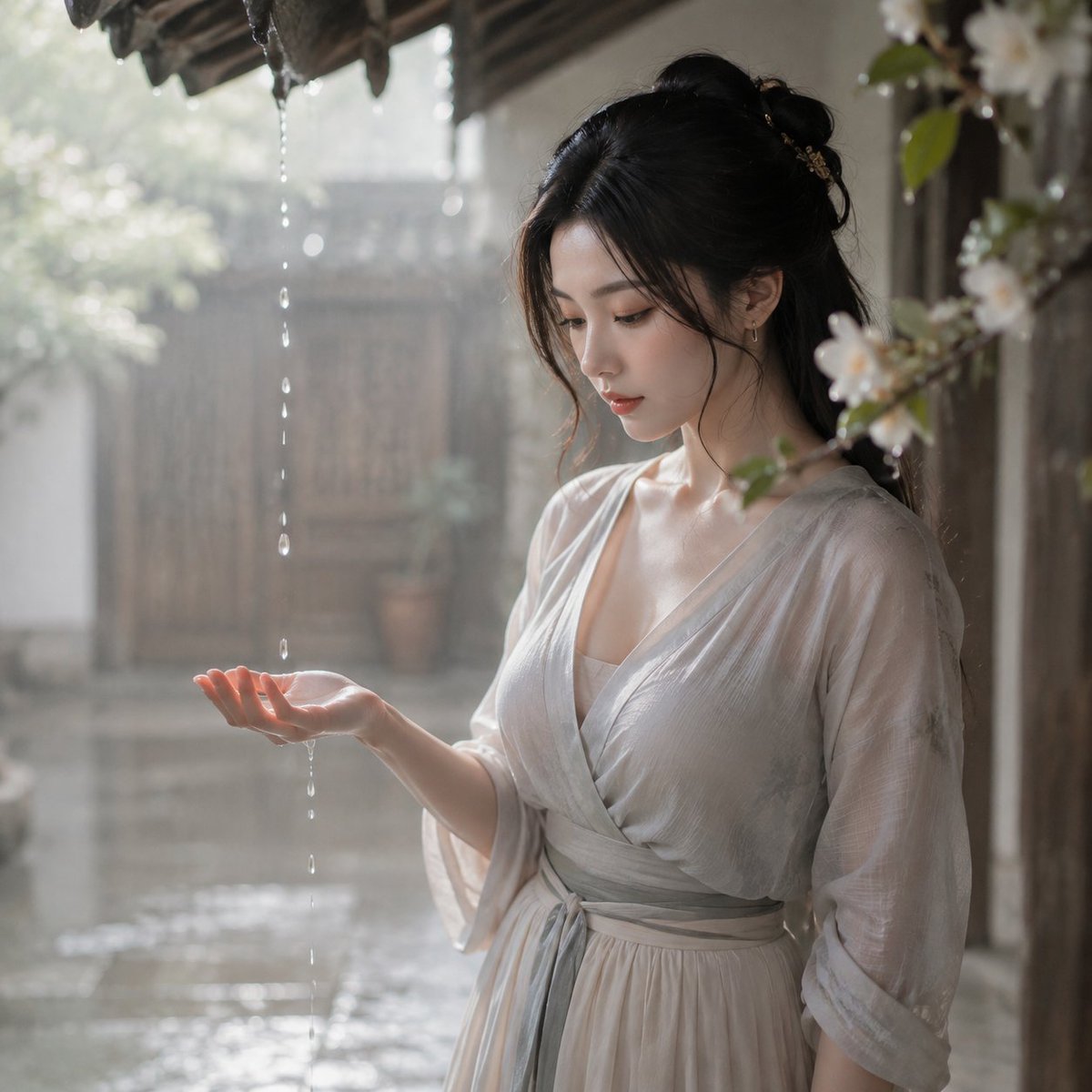
Tang Dynasty Courtyard Rain Scene
A highly detailed prompt for creating a cinematic, high-key portrait of a Tang dynasty woman catching rain under a courtyard roof, inspired by Rinko Kawauchi's photography style.
This is a GPT Image 2 prompt case for Portrait & Character. Use the copy-ready prompt below to generate similar visuals, and review Awesome GPT Image 2 Prompts attribution plus commercial-use rights before reuse.
Free 1K preview
Generate one preview image instantly, no sign-up required.
Prompt
Copy-ready prompt
Theme:
{argument name="theme" default="Tang Dynasty rain under the eaves"}

Subject:
1:1 square aspect ratio. A {argument name="dynasty" default="Tang Dynasty"} courtyard in the morning after rain. Water is still dripping from the eaves, there are shallow puddles on the ground, and wooden doors and flower branches are covered with water droplets. A character stands under the eaves, reaching out to catch a falling raindrop, with only part of her face visible as she looks at her palm. Only one adult woman appears in the frame.

Character and Expression:
The main character from the attached image is translated into a young woman from the Tang Dynasty market, in her twenties, with black hair partially pinned up, wearing a light gray narrow-sleeved short jacket and a light-colored long skirt with slightly rolled-up cuffs. The expression is quiet and soft, as if feeling the morning moisture.

Clothing and Pose:
Light gray narrow-sleeved short jacket, light-colored long skirt. The character stands under the eaves, reaching out one hand to catch the rain, while the other hand hangs naturally at her side. The movement is captured mid-action, not posed, and does not overtly showcase the body.

Camera and Composition:
Eye-level slightly high angle, shallow depth of field close to the hand; close-up to medium shot, where the palm, water droplets, eaves, and the character's profile form the main visual. The subject is slightly off-center to the bottom right, leaving ample negative space at the top and left; the reflection of the water droplets serves as continuous soft light, avoiding point highlights on the face.

Background and Lighting:
Wooden doors, flower branches, water droplets, and shallow puddles. Morning light from outside the eaves forms single-direction soft light, with continuous highlights on the face, no point light sources, and no random scattered spots.

Texture and Style:
{argument name="style" default="Rinko Kawauchi style low-light daily lyricism"}. Soft high-key, pale colors, slight overexposure, fine film grain, low contrast, shallow depth of field, and lingering light. Prohibit commercial-style centered headshots and high-contrast advertising lighting.

Negative:
Do not include male characters, no multiple subjects, no studio shots, no modern elements, no perfect retouching, no point light sources on the face, no multi-directional light cutting the facial features, no complex gestures, no extra fingers, no deformed hands, no text watermarks.
Prompt variables
Editable argument placeholders found in the prompt, with their default values.
Best for
- - Portrait & Character visual exploration
- - Image generation and reference-image edits
- - Reusable briefs that keep source attribution visible
Change these parts
- - Subject, product, character, or scene
- - Aspect ratio, camera, lighting, and background
- - Brand, text, color, and output constraints
Recommended model and settings
- - Model: gpt-image-2
- - Input mode: Text to Image
- - Aspect ratio: source
- - Commercial status: review original source
How to use this prompt
- 1. Copy the prompt and preserve its structure for the first test.
- 2. Replace the subject, context, and publishing channel.
- 3. Change one camera, lighting, or style variable per iteration.
- 4. Inspect the output, source, text, and rights before reuse.
Limitations, source, and reuse cautions
- - Generated output is an editable draft, not factual, legal, or rights evidence.
- - Review the linked source, people, brands, logos, text, and third-party media before commercial use.
More cases in this category
Prioritized by category, input mode compatibility, quality, and lower risk.

Reuse and source notes
Use this prompt safely after previewing the case.
- 1.Copy the prompt or open it directly in Dovoo with the generation button.
- 2.Adjust variables, aspect ratio, and reference images for your own use case.
- 3.Before publishing or paid usage, verify source rights, attribution requirements, and brand or likeness risks.
Can I use this prompt commercially?
Commercial-use status is allowed. Review the original source, license, brand constraints, and legal requirements before paid usage.
Where does this case come from?
This case is imported from Awesome GPT Image 2 Prompts; keep attribution visible and check the source URL before reuse.