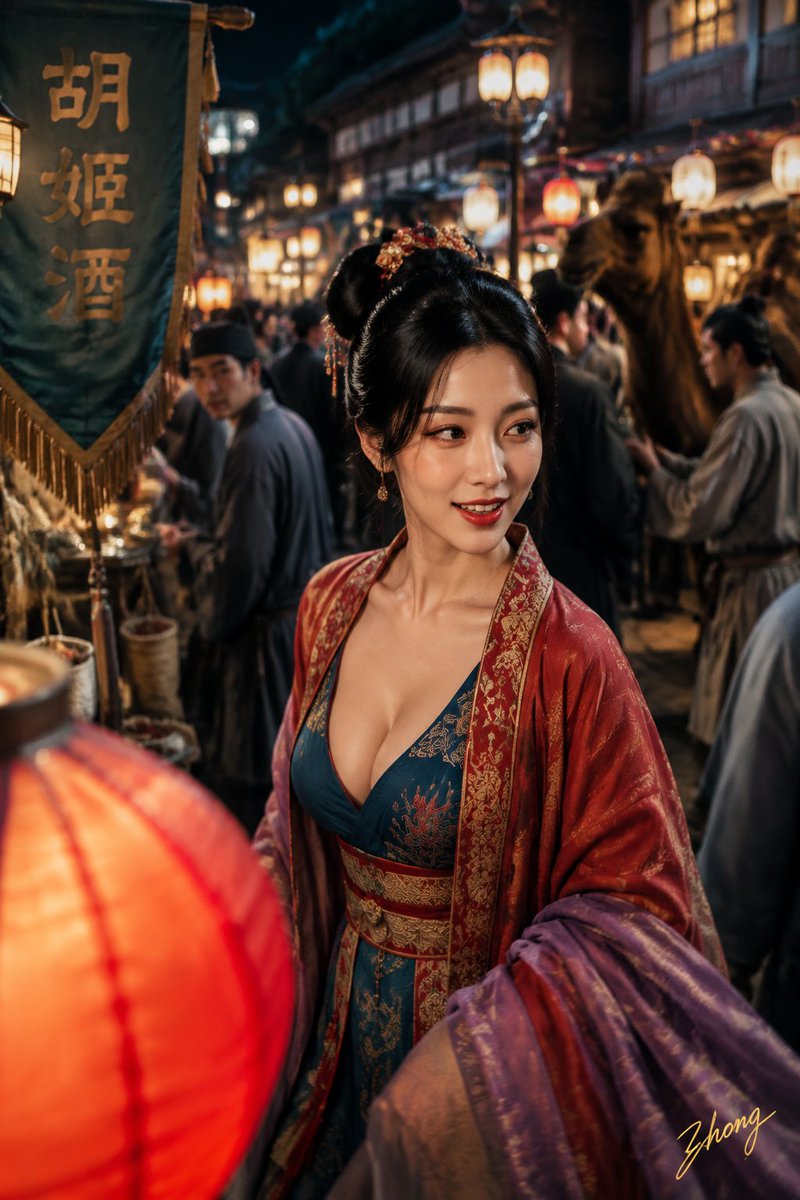
Tang Dynasty Aesthetic Street Photography Set
A detailed multi-part prompt for generating four distinct Tang Dynasty-themed photographic scenes with a consistent character, emphasizing lighting, historical accuracy, and cinematic texture.
This is a GPT Image 2 prompt case for Portrait & Character. Use the copy-ready prompt below to generate similar visuals, and review Awesome GPT Image 2 Prompts attribution plus commercial-use rights before reuse.
Free 1K preview
Generate one preview image instantly, no sign-up required.
Prompt
Copy-ready prompt
Facial Identity: Use the attached facial identity as the sole facial reference. The four photos must be instantly recognizable as the exact same woman. Body: An adult female in her {argument name="age" default="early 20s"}. Use the attached body reference as the sole body proportion reference. Theme: Tang Dynasty color photography experiment: East Market night tour, Quchi boat trip, street Cuju, Qujiang spring banquet. Subject: Generate four independent vertical 2:3 realistic photos respectively, no collages. Character identity remains consistent, but hairstyle, clothing, action, camera position, and photographic language must change reasonably according to their respective scenes. The first: 'A sudden smile in the lamp shadows of the East Market': the character walks through the crowded lamp market of Chang'an East Market, hairstyle is {argument name="hairstyle" default="Tang Dynasty fanwan hairstyle"}, paired with {argument name="outfit color" default="peacock blue brocade inner layer"}. The second... The third... The fourth... Lighting: All character faces use wide and continuous natural light. Texture: Colors are clear but not oversaturated, retaining real grain.Prompt variables
Editable argument placeholders found in the prompt, with their default values.
Best for
- - Portrait & Character visual exploration
- - Image generation and reference-image edits
- - Reusable briefs that keep source attribution visible
Change these parts
- - Subject, product, character, or scene
- - Aspect ratio, camera, lighting, and background
- - Brand, text, color, and output constraints
Recommended model and settings
- - Model: gpt-image-2
- - Input mode: Text to Image
- - Aspect ratio: source
- - Commercial status: review original source
How to use this prompt
- 1. Copy the prompt and preserve its structure for the first test.
- 2. Replace the subject, context, and publishing channel.
- 3. Change one camera, lighting, or style variable per iteration.
- 4. Inspect the output, source, text, and rights before reuse.
Limitations, source, and reuse cautions
- - Generated output is an editable draft, not factual, legal, or rights evidence.
- - Review the linked source, people, brands, logos, text, and third-party media before commercial use.
More cases in this category
Prioritized by category, input mode compatibility, quality, and lower risk.



Reuse and source notes
Use this prompt safely after previewing the case.
- 1.Copy the prompt or open it directly in Dovoo with the generation button.
- 2.Adjust variables, aspect ratio, and reference images for your own use case.
- 3.Before publishing or paid usage, verify source rights, attribution requirements, and brand or likeness risks.
Can I use this prompt commercially?
Commercial-use status is allowed. Review the original source, license, brand constraints, and legal requirements before paid usage.
Where does this case come from?
This case is imported from Awesome GPT Image 2 Prompts; keep attribution visible and check the source URL before reuse.