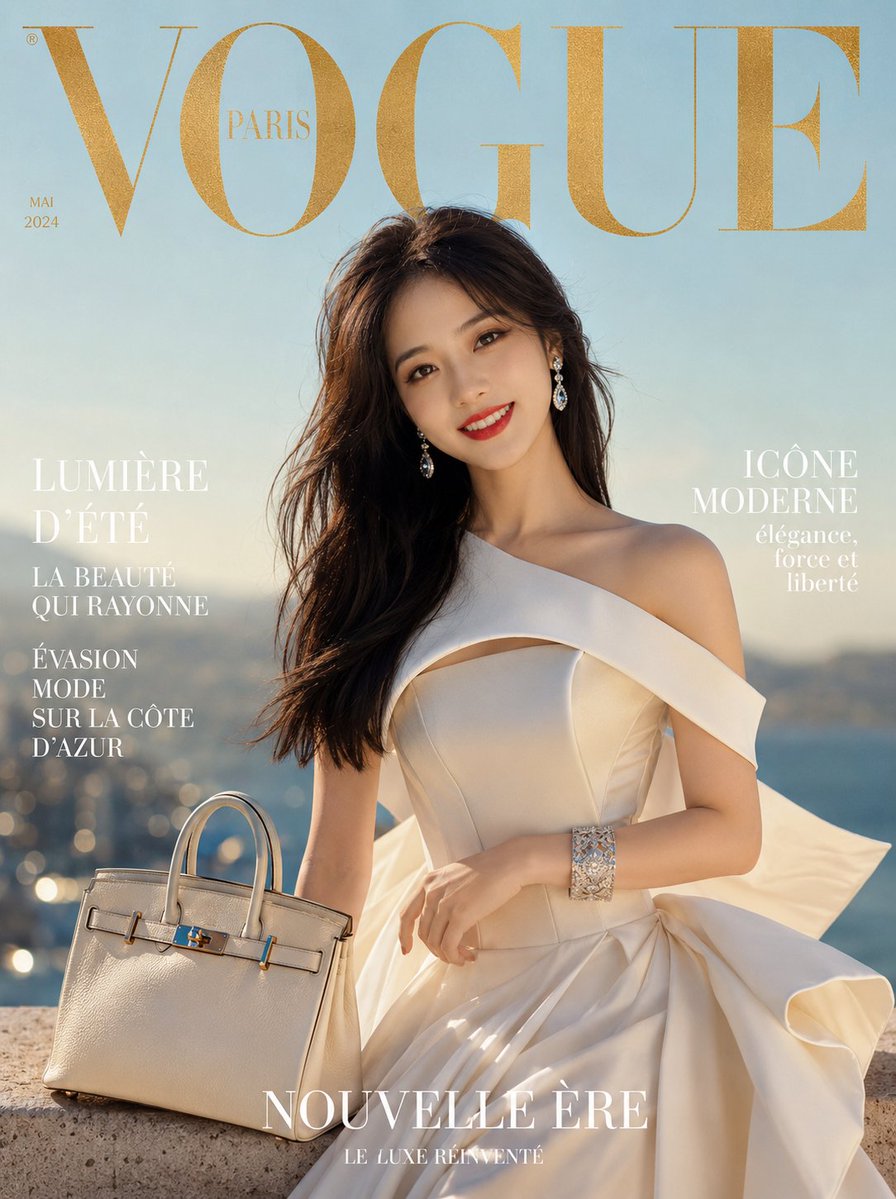
Surrealist Luxury Vogue Cover
A prompt for generating high-fashion magazine covers using a reference person. It features structural ivory gowns, high-fashion makeup, and cinematic lighting with a Vogue Paris aesthetic.
This is a GPT Image 2 prompt case for 时尚美妆. Use the copy-ready prompt below to generate similar visuals, and review Awesome GPT Image 2 Prompts attribution plus commercial-use rights before reuse.
Prompt
Copy-ready prompt
创作一张超现实主义奢华时尚杂志封面。封面主体使用 {argument name="portrait reference" default="上传图片中的人物"},拥有轮廓分明的骨相,自信地穿着 {argument name="clothing style" default="象牙白结构感露肩礼服"},礼服饰有雕塑感荷叶边,裙摆拖地,极具戏剧张力。长而顺滑的黑发侧分,无瑕水光肌,烈焰红唇,烟熏猫眼妆。佩戴钻石吊坠耳环、白金手镯,手提象牙白 Birkin 风格手袋。柔和的地中海黄金时刻光线,{argument name="background" default="浅蓝色天空背景"},带有细腻的虚化效果。顶部印有金色烫金大号衬线字体“VOGUE”,配以法文编辑副标题。电影级 85mm 镜头,8K 照片级真实感,高级时装 Vogue Paris 美学,锐利的面料质感,高端定制氛围。负面提示词:卡通、模糊、解剖结构扭曲、水印、过度饱和、低分辨率。1744x2336Prompt variables
Editable argument placeholders found in the prompt, with their default values.
More cases in this category
Prioritized by category, input mode compatibility, quality, and lower risk.


Reuse and source notes
Use this prompt safely after previewing the case.
- 1.Copy the prompt or open it directly in Dovoo with the generation button.
- 2.Adjust variables, aspect ratio, and reference images for your own use case.
- 3.Before publishing or paid usage, verify source rights, attribution requirements, and brand or likeness risks.
Can I use this prompt commercially?
Commercial-use status is allowed. Review the original source, license, brand constraints, and legal requirements before paid usage.
Where does this case come from?
This case is imported from Awesome GPT Image 2 Prompts; keep attribution visible and check the source URL before reuse.