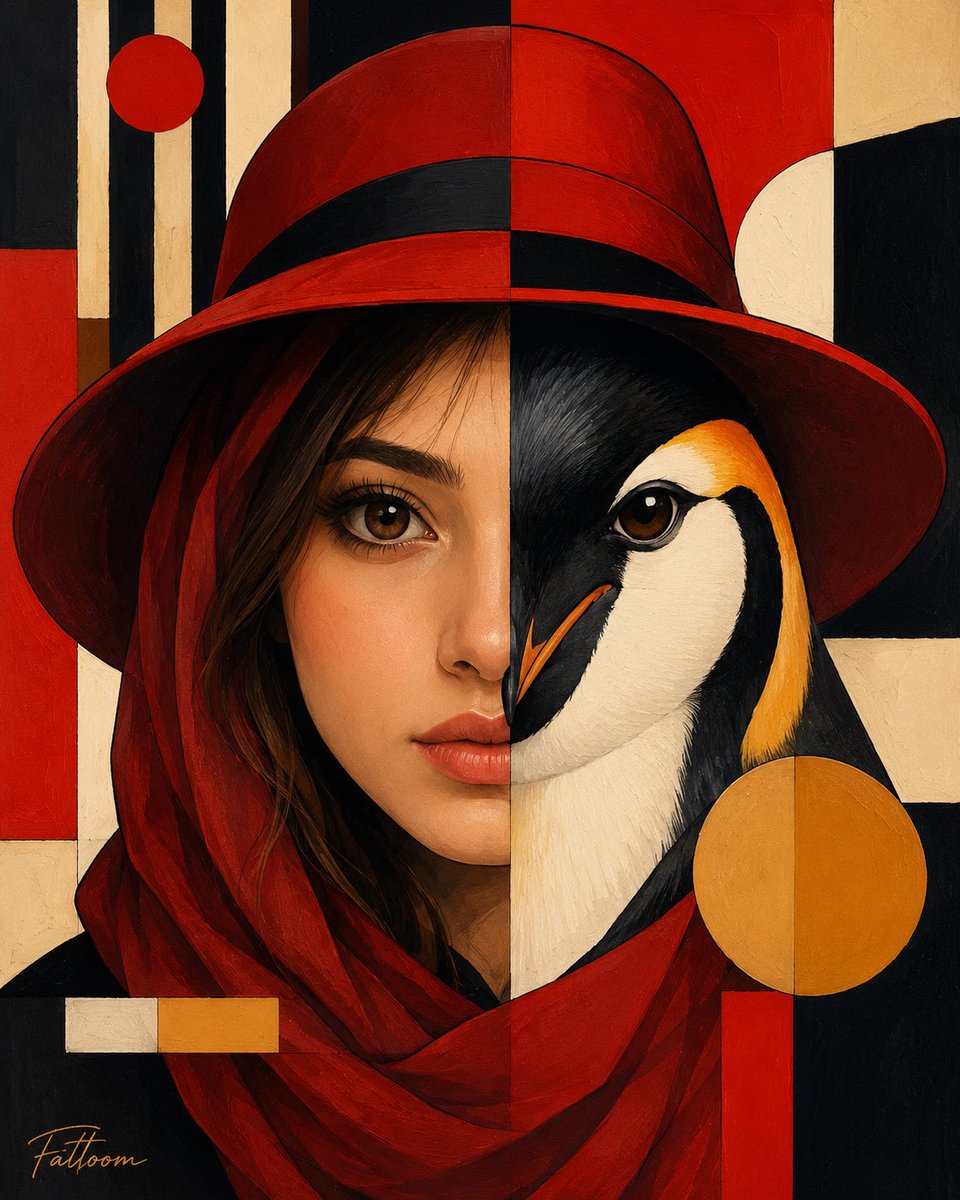
Surreal Human-Penguin Hybrid Portrait
A premium fine-art prompt that creates a symmetrical split portrait of a woman merged with a king penguin in a Bauhaus-inspired style.
This is a GPT Image 2 prompt case for Portrait & Character. Use the copy-ready prompt below to generate similar visuals, and review Awesome GPT Image 2 Prompts attribution plus commercial-use rights before reuse.
Free 1K preview
Generate one preview image instantly, no sign-up required.
Prompt
Copy-ready prompt
Create a premium fine-art surreal portrait inspired by geometric modernism and luxury editorial illustration. The composition is perfectly split vertically down the center.
On the left side: a highly detailed realistic portrait of a beautiful young woman wearing an elegant {argument name="hat color" default="deep crimson-red"} wide-brim hat and a flowing red scarf wrapped around her shoulders. Soft flawless skin, expressive eyes, cinematic beauty photography, ultra-realistic facial details, delicate makeup, rich textures, dramatic lighting.
On the right side: seamlessly merge the woman's face with the face of a majestic {argument name="animal" default="king penguin"}, perfectly aligned eye-to-eye and beak-to-face. The transition must be clean, symmetrical, artistic, and visually striking, creating a human-animal hybrid portrait.
Background consists of bold geometric {argument name="art style" default="Bauhaus-inspired"} shapes and abstract art elements using red, black, cream, ivory, and golden-yellow tones. Include circles, rectangles, vertical stripes, balanced symmetry, and modern graphic design aesthetics.
Luxury gallery artwork, museum-quality composition, sophisticated color harmony, ultra-detailed brush textures, digital oil painting style, elegant contrast, contemporary surrealism, geometric abstraction, fine-art poster design, centered composition, sharp focus, masterpiece, award-winning artwork, 8K resolution.
Negative Prompt:
signature, watermark, artist name, logo, text, caption, handwriting, frame, border, extra eyes, extra face, asymmetrical face, blurry details, low quality, distorted anatomy, duplicate features, cropped head, messy background, oversaturated colors, noisy image, deformed penguin, cartoon style, low resolution.
Prompt variables
Editable argument placeholders found in the prompt, with their default values.
Best for
- - Portrait & Character visual exploration
- - Image generation and reference-image edits
- - Reusable briefs that keep source attribution visible
Change these parts
- - Subject, product, character, or scene
- - Aspect ratio, camera, lighting, and background
- - Brand, text, color, and output constraints
Recommended model and settings
- - Model: gpt-image-2
- - Input mode: Text to Image
- - Aspect ratio: source
- - Commercial status: review original source
How to use this prompt
- 1. Copy the prompt and preserve its structure for the first test.
- 2. Replace the subject, context, and publishing channel.
- 3. Change one camera, lighting, or style variable per iteration.
- 4. Inspect the output, source, text, and rights before reuse.
Limitations, source, and reuse cautions
- - Generated output is an editable draft, not factual, legal, or rights evidence.
- - Review the linked source, people, brands, logos, text, and third-party media before commercial use.
More cases in this category
Prioritized by category, input mode compatibility, quality, and lower risk.



Reuse and source notes
Use this prompt safely after previewing the case.
- 1.Copy the prompt or open it directly in Dovoo with the generation button.
- 2.Adjust variables, aspect ratio, and reference images for your own use case.
- 3.Before publishing or paid usage, verify source rights, attribution requirements, and brand or likeness risks.
Can I use this prompt commercially?
Commercial-use status is allowed. Review the original source, license, brand constraints, and legal requirements before paid usage.
Where does this case come from?
This case is imported from Awesome GPT Image 2 Prompts; keep attribution visible and check the source URL before reuse.