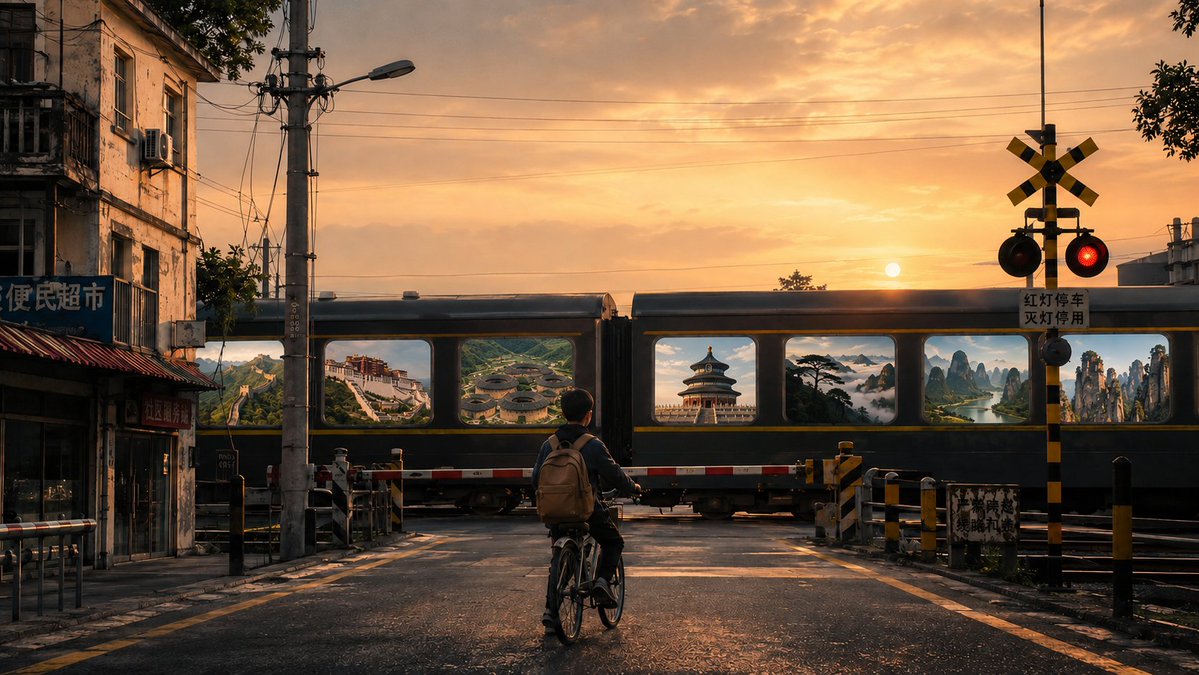
Surreal Train Window Scenery
A poetic and surreal prompt depicting a boy at a railway crossing watching a train pass, where every window reveals a famous Chinese landscape.
This is a GPT Image 2 prompt case for Illustration & Art. Use the copy-ready prompt below to generate similar visuals, and review Awesome GPT Image 2 Prompts attribution plus commercial-use rights before reuse.
Free 1K preview
Generate one preview image instantly, no sign-up required.
Prompt
Copy-ready prompt
A street in a small Chinese city, a road and railway level crossing, a small boy on a bicycle standing with his back to the camera in front of the gate waiting for a train to pass, his back full of cinematic feel and storytelling. The surroundings are urban streetscapes with old residential buildings, small shops, utility poles, street lamps, traffic signs, and railway gates, with a strong atmosphere of real life. A train passes slowly, and each window displays {argument name="scenery" default="famous Chinese scenic spots"}, such as the Great Wall, Potala Palace, Fujian Tulou clusters, Temple of Heaven in Beijing, Huangshan Guest-Greeting Pine sea of clouds, Guilin landscape, Zhangjiajie, Forbidden City, etc. These scenes look like they are actually inside the windows. The atmosphere is romantic, strange, and poetic. Surrealism, cinematic composition, soft morning or evening light, high-end artistic photography, rich in details, 4K 16:9.Prompt variables
Editable argument placeholders found in the prompt, with their default values.
Best for
- - Illustration & Art visual exploration
- - Image generation and reference-image edits
- - Reusable briefs that keep source attribution visible
Change these parts
- - Subject, product, character, or scene
- - Aspect ratio, camera, lighting, and background
- - Brand, text, color, and output constraints
Recommended model and settings
- - Model: gpt-image-2
- - Input mode: Text to Image
- - Aspect ratio: source
- - Commercial status: review original source
How to use this prompt
- 1. Copy the prompt and preserve its structure for the first test.
- 2. Replace the subject, context, and publishing channel.
- 3. Change one camera, lighting, or style variable per iteration.
- 4. Inspect the output, source, text, and rights before reuse.
Limitations, source, and reuse cautions
- - Generated output is an editable draft, not factual, legal, or rights evidence.
- - Review the linked source, people, brands, logos, text, and third-party media before commercial use.
More cases in this category
Prioritized by category, input mode compatibility, quality, and lower risk.




Reuse and source notes
Use this prompt safely after previewing the case.
- 1.Copy the prompt or open it directly in Dovoo with the generation button.
- 2.Adjust variables, aspect ratio, and reference images for your own use case.
- 3.Before publishing or paid usage, verify source rights, attribution requirements, and brand or likeness risks.
Can I use this prompt commercially?
Commercial-use status is allowed. Review the original source, license, brand constraints, and legal requirements before paid usage.
Where does this case come from?
This case is imported from Awesome GPT Image 2 Prompts; keep attribution visible and check the source URL before reuse.