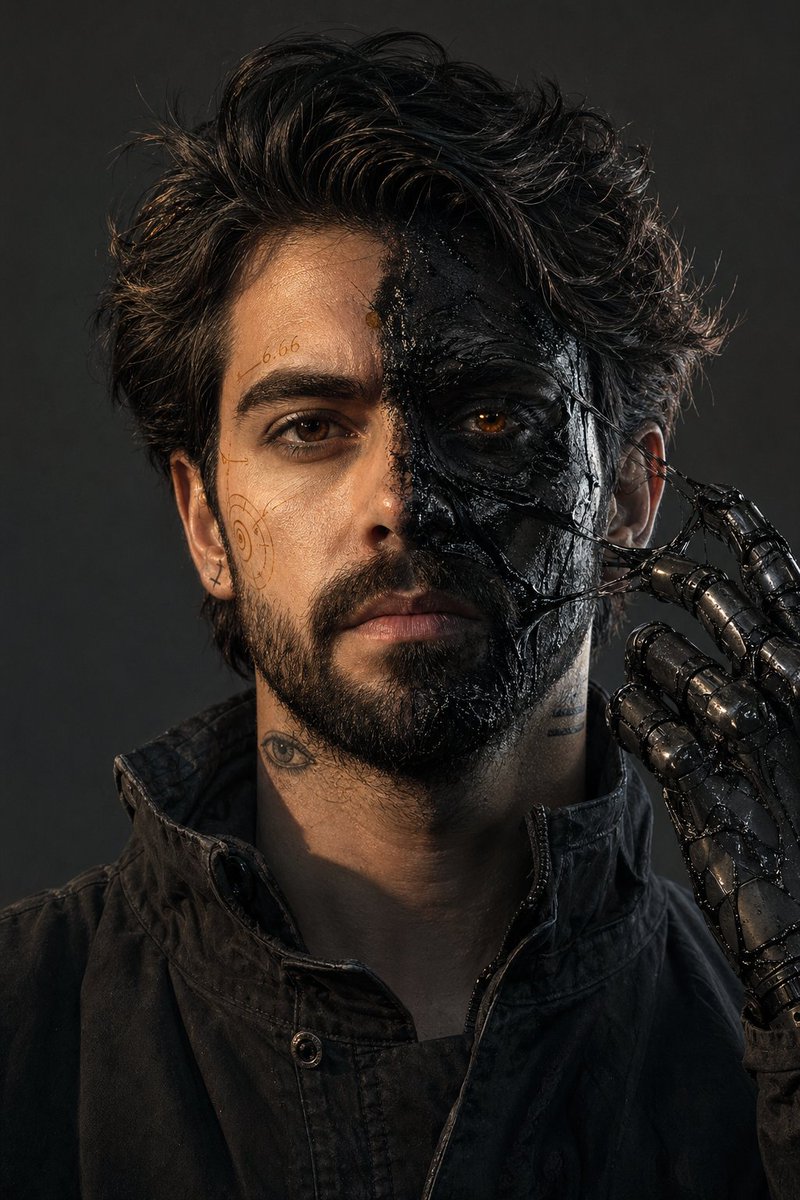
Surreal Resin-Split Portrait
An incredibly detailed and technical prompt for a split-face portrait featuring black resin textures, amber markings, and highly specific camera settings.
This is a GPT Image 2 prompt case for Portrait & Character. Use the copy-ready prompt below to generate similar visuals, and review Awesome GPT Image 2 Prompts attribution plus commercial-use rights before reuse.
Free 1K preview
Generate one preview image instantly, no sign-up required.
Prompt
Copy-ready prompt
Ultra-photorealistic 8K RAW, 35mm, f/8, deep focus, no blur, no DOF, no noise, no grain, no haze, no dust, no volumetric light, no soft light, no glow. IMAX stage, 2:3 aspect ratio. Male with my exact face, 181cm 73kg, {argument name="hair style" default="messy dark hair"}, short stubble. Face split: left side — clean skin with {argument name="markings" default="thin amber technical markings (numbers \"6.66\", spiral symbols, hand-drawn)"}; right side — {argument name="skin effect" default="matte black skin covered in thick black resin (glossy, wet-looking, partially dried with stretched glossy strings between skin and fingers)"}. One eye natural dark brown, other faint amber glow (subtle, like light through honey, no beam). Tattoos: small eye on left neck, two horizontal lines on right jaw, tiny cross behind right ear. One mechanical prosthetic hand (black steel with sticky resin residue) raised to chin, fingers pulling a glossy resin string away from right cheek. Clothing: matte black worn jacket, high collar, no hood. Lighting: hard warm amber key from upper left, cool grey fill from lower right, sharp shadows. Color: desaturated grey-black, only amber as accent in resin reflections. Background: solid charcoal grey wall. Clean dry air, no particles. All surfaces sharp.Prompt variables
Editable argument placeholders found in the prompt, with their default values.
Best for
- - Portrait & Character visual exploration
- - Image generation and reference-image edits
- - Reusable briefs that keep source attribution visible
Change these parts
- - Subject, product, character, or scene
- - Aspect ratio, camera, lighting, and background
- - Brand, text, color, and output constraints
Recommended model and settings
- - Model: gpt-image-2
- - Input mode: Text to Image
- - Aspect ratio: source
- - Commercial status: review original source
How to use this prompt
- 1. Copy the prompt and preserve its structure for the first test.
- 2. Replace the subject, context, and publishing channel.
- 3. Change one camera, lighting, or style variable per iteration.
- 4. Inspect the output, source, text, and rights before reuse.
Limitations, source, and reuse cautions
- - Generated output is an editable draft, not factual, legal, or rights evidence.
- - Review the linked source, people, brands, logos, text, and third-party media before commercial use.
More cases in this category
Prioritized by category, input mode compatibility, quality, and lower risk.





Reuse and source notes
Use this prompt safely after previewing the case.
- 1.Copy the prompt or open it directly in Dovoo with the generation button.
- 2.Adjust variables, aspect ratio, and reference images for your own use case.
- 3.Before publishing or paid usage, verify source rights, attribution requirements, and brand or likeness risks.
Can I use this prompt commercially?
Commercial-use status is allowed. Review the original source, license, brand constraints, and legal requirements before paid usage.
Where does this case come from?
This case is imported from Awesome GPT Image 2 Prompts; keep attribution visible and check the source URL before reuse.