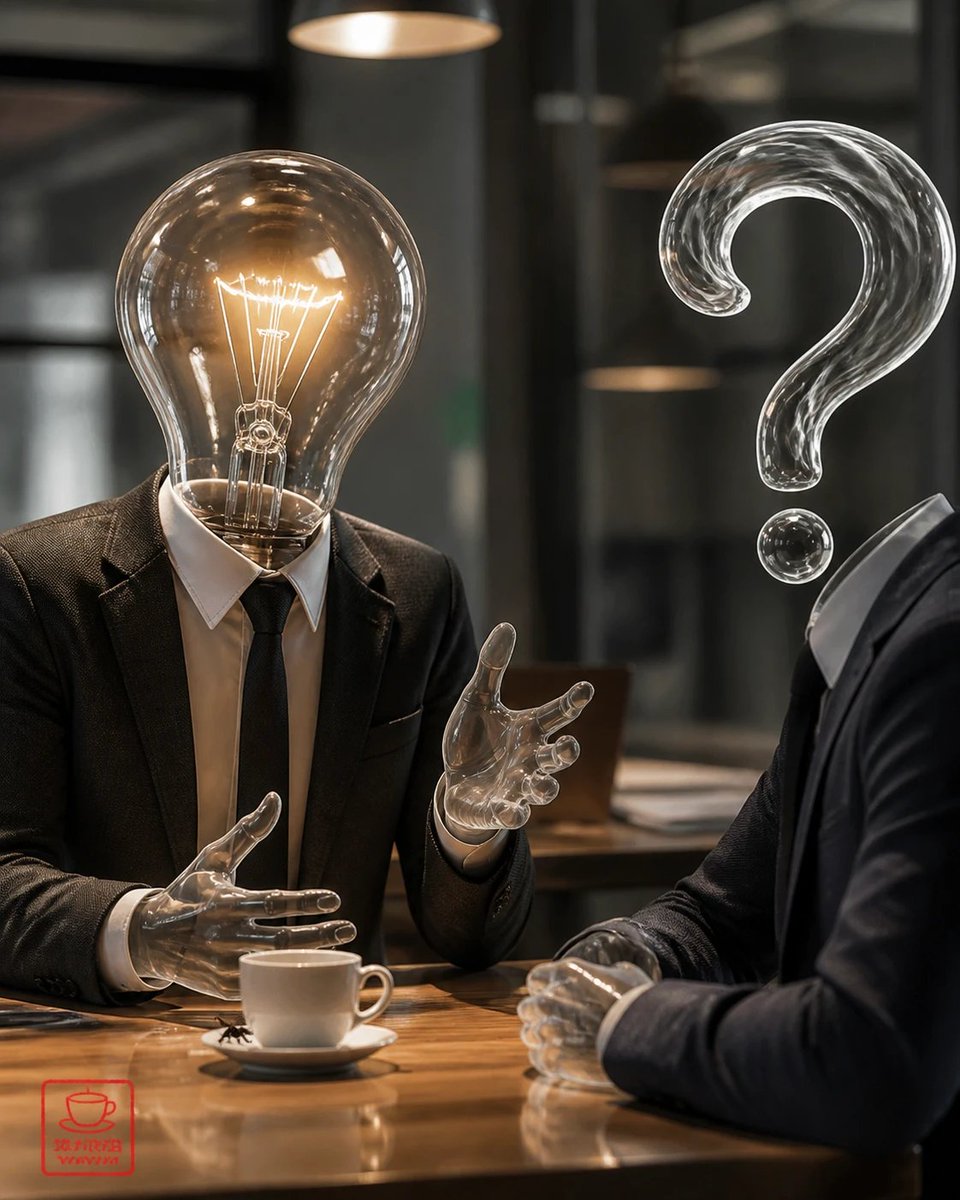
Surreal Light Bulb Business Meeting
A photorealistic surreal corporate conversation between an idea-headed figure and a question-headed figure, useful for concepts about innovation, uncertainty, and strategy.
This is a GPT Image 2 prompt case for Illustration & Art. Use the copy-ready prompt below to generate similar visuals, and review Awesome GPT Image 2 Prompts attribution plus commercial-use rights before reuse.
Free 1K preview
Generate one preview image instantly, no sign-up required.
Prompt
Copy-ready prompt
Create a photorealistic surreal business meeting scene in a dim modern cafe or office lounge. Show exactly 2 human figures seated across a polished wooden table: on the left, a person in a dark suit, white shirt, and black tie with a glowing transparent incandescent light bulb for a head, including visible tungsten filament and warm amber light; on the right, a person in a dark suit shown mostly from the side/back with a large transparent glass question mark floating where the head should be, plus a separate small glass dot below it. Both figures have transparent glass-like hands, and the left figure is gesturing mid-conversation while the right figure clasps their hands on the table. Place exactly 1 white coffee cup on exactly 1 white saucer near the center foreground. Include exactly 2 warm pendant lamps visible in the blurred background, glass walls and dark architectural lines, shallow depth of field, cinematic lighting, realistic reflections on the table, high-detail glass refraction, moody corporate atmosphere, 4:5 vertical composition. Add a small red square stamp-like watermark in the lower-left corner with a simple cup icon and tiny unreadable characters. Customize the left figure as {argument name="idea symbol" default="glowing incandescent light bulb head"}, the right figure as {argument name="question symbol" default="transparent glass question mark head"}, the setting as {argument name="meeting location" default="dim modern cafe or office lounge"}, the clothing as {argument name="business attire" default="dark suits with white shirts"}, and the mood as {argument name="visual mood" default="cinematic, thoughtful, mysterious corporate discussion"}.Prompt variables
Editable argument placeholders found in the prompt, with their default values.
Best for
- - Illustration & Art visual exploration
- - Image generation and reference-image edits
- - Reusable briefs that keep source attribution visible
Change these parts
- - Subject, product, character, or scene
- - Aspect ratio, camera, lighting, and background
- - Brand, text, color, and output constraints
Recommended model and settings
- - Model: gpt-image-2
- - Input mode: Text to Image
- - Aspect ratio: source
- - Commercial status: review original source
How to use this prompt
- 1. Copy the prompt and preserve its structure for the first test.
- 2. Replace the subject, context, and publishing channel.
- 3. Change one camera, lighting, or style variable per iteration.
- 4. Inspect the output, source, text, and rights before reuse.
Limitations, source, and reuse cautions
- - Generated output is an editable draft, not factual, legal, or rights evidence.
- - Review the linked source, people, brands, logos, text, and third-party media before commercial use.
More cases in this category
Prioritized by category, input mode compatibility, quality, and lower risk.

Reuse and source notes
Use this prompt safely after previewing the case.
- 1.Copy the prompt or open it directly in Dovoo with the generation button.
- 2.Adjust variables, aspect ratio, and reference images for your own use case.
- 3.Before publishing or paid usage, verify source rights, attribution requirements, and brand or likeness risks.
Can I use this prompt commercially?
Commercial-use status is allowed. Review the original source, license, brand constraints, and legal requirements before paid usage.
Where does this case come from?
This case is imported from Awesome GPT Image 2 Prompts; keep attribution visible and check the source URL before reuse.