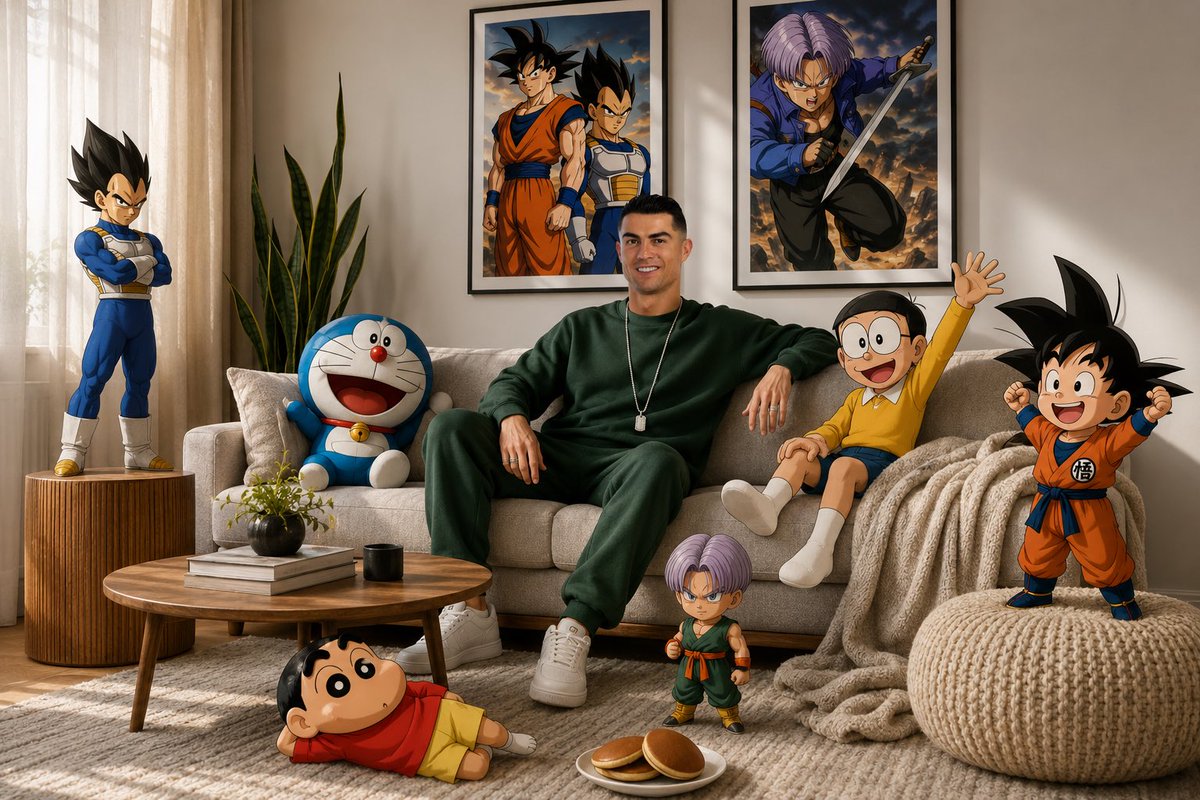
Surreal Anime & Reality Living Room
A surreal mixed-media prompt blending a photorealistic interior with cel-shaded anime characters like Doraemon and Shinchan.
This is a GPT Image 2 prompt case for Illustration & Art. Use the copy-ready prompt below to generate similar visuals, and review Awesome GPT Image 2 Prompts attribution plus commercial-use rights before reuse.
Free 1K preview
Generate one preview image instantly, no sign-up required.
Prompt
Copy-ready prompt
A high-fidelity, wide-angle interior shot captures a surreal, mixed-media composition within a modern living room. It features a man resembling the face in the reference photo—using an uploaded face as a reference—wearing a {argument name="clothing" default="dark green sweatshirt, sweatpant and white sneakers"}, sitting centrally on a {argument name="furniture" default="plush light gray sofa"}. The scene seamlessly blends photorealistic 3D environments with cel-shaded 2D anime and cartoon characters interacting directly with the physical space. On the right side of the subject on the sofa, {argument name="character 1" default="Nobita"} sits casually waving his hand, while on the left side, Doraemon leans casually on a pillow. Behind the sofa, two framed posters hang on the white wall—one featuring Son Goku and Vegeta, and the other featuring Trunks in a dynamic anime style. In the foreground, Shinchan lies relaxed on a textured gray carpet near a plate of dorayaki, while a chibi version of Son Goku stands triumphantly on a cream-colored knit pouf. On the left side of the room, Vegeta stands tall on a grooved wooden side table in a confident pose, while a miniature version of Trunks is near the wooden coffee table in the center, as if observing the scene with a curious expression. Soft natural light streams in from the left side through sheer curtains, creating subtle volumetric lighting that accentuates the texture of the blanket, the wood grain of the tiered table, and the leaves of the snake plant in the corner of the room. The entire scene is rendered in 8K resolution with sharp focus, vivid colors, and a dreamy, cinematic, and playful aesthetic blending between the real world and the anime world, with no AI visible.Prompt variables
Editable argument placeholders found in the prompt, with their default values.
Best for
- - Illustration & Art visual exploration
- - Image generation and reference-image edits
- - Reusable briefs that keep source attribution visible
Change these parts
- - Subject, product, character, or scene
- - Aspect ratio, camera, lighting, and background
- - Brand, text, color, and output constraints
Recommended model and settings
- - Model: gpt-image-2
- - Input mode: Text to Image
- - Aspect ratio: source
- - Commercial status: review original source
How to use this prompt
- 1. Copy the prompt and preserve its structure for the first test.
- 2. Replace the subject, context, and publishing channel.
- 3. Change one camera, lighting, or style variable per iteration.
- 4. Inspect the output, source, text, and rights before reuse.
Limitations, source, and reuse cautions
- - Generated output is an editable draft, not factual, legal, or rights evidence.
- - Review the linked source, people, brands, logos, text, and third-party media before commercial use.
More cases in this category
Prioritized by category, input mode compatibility, quality, and lower risk.

Reuse and source notes
Use this prompt safely after previewing the case.
- 1.Copy the prompt or open it directly in Dovoo with the generation button.
- 2.Adjust variables, aspect ratio, and reference images for your own use case.
- 3.Before publishing or paid usage, verify source rights, attribution requirements, and brand or likeness risks.
Can I use this prompt commercially?
Commercial-use status is allowed. Review the original source, license, brand constraints, and legal requirements before paid usage.
Where does this case come from?
This case is imported from Awesome GPT Image 2 Prompts; keep attribution visible and check the source URL before reuse.