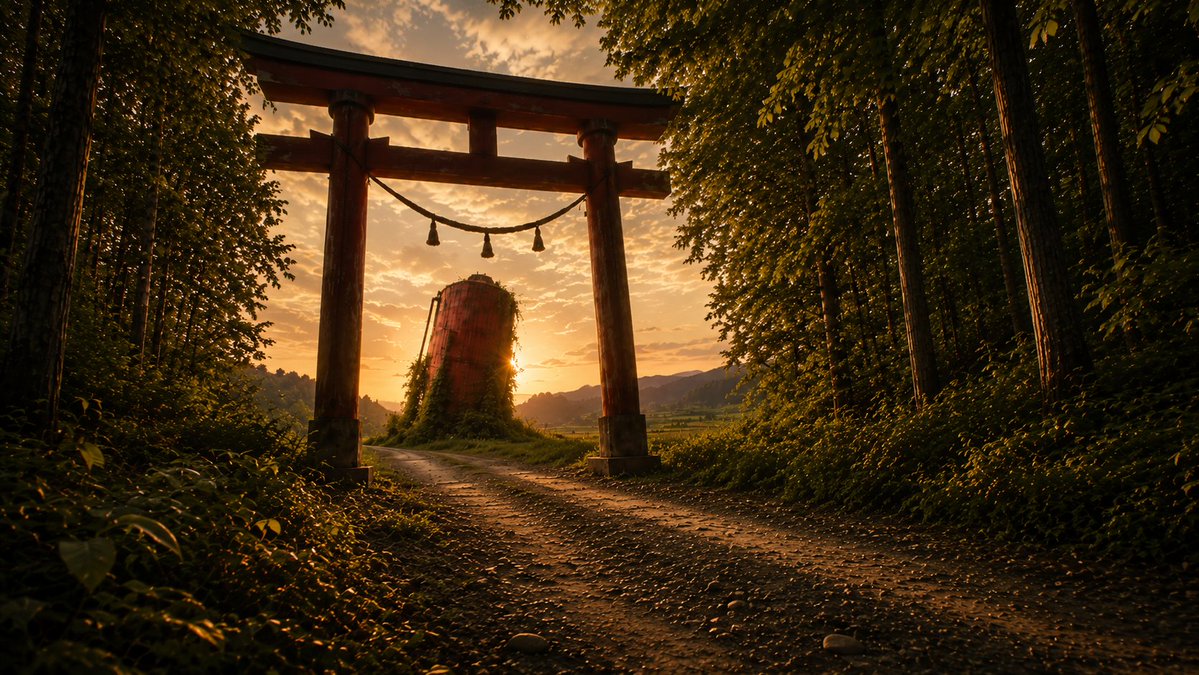
Sunset Torii Forest Path
A cinematic photorealistic shrine-path landscape prompt for generating a warm sunset scene with a torii gate, forest, and vine-covered silo.
This is a GPT Image 2 prompt case for Landscape & Nature. Use the copy-ready prompt below to generate similar visuals, and review Awesome GPT Image 2 Prompts attribution plus commercial-use rights before reuse.
Free 1K preview
Generate one preview image instantly, no sign-up required.
Prompt
Copy-ready prompt
Create a cinematic photorealistic landscape of a quiet Japanese shrine approach at golden hour. A wide horizontal 16:9 frame shows a large weathered wooden torii gate standing slightly left of center over a dirt-and-gravel path, with two thick vertical pillars, a dark curved top beam, a lower crossbeam, and a sacred shimenawa rope hanging between the pillars with exactly 3 tassels. The path begins in the foreground and curves gently left through the gate toward a rural valley. Dense forest frames both sides: tall dark tree trunks and thick green foliage on the left and right, with leafy branches forming a partial canopy along the top edge. Behind the gate, place a single cylindrical abandoned concrete silo or tower covered with vines, backlit by the low sun peeking from its right side. In the distance show soft layered hills, fields, and a warm orange sky with scattered small clouds. Use {argument name="time of day" default="sunset golden hour"}, {argument name="main landmark" default="weathered wooden torii gate"}, {argument name="secondary structure" default="vine-covered cylindrical concrete silo"}, {argument name="setting" default="rural Japanese forest shrine path"}, and {argument name="color mood" default="warm amber, deep green, high-contrast cinematic"}. Emphasize realistic natural lighting, long shadows, sun flare, atmospheric depth, detailed gravel and leaves, moody contrast, anamorphic widescreen composition, no people, no animals, no text, no watermark.Prompt variables
Editable argument placeholders found in the prompt, with their default values.
Best for
- - Landscape & Nature visual exploration
- - Image generation and reference-image edits
- - Reusable briefs that keep source attribution visible
Change these parts
- - Subject, product, character, or scene
- - Aspect ratio, camera, lighting, and background
- - Brand, text, color, and output constraints
Recommended model and settings
- - Model: gpt-image-2
- - Input mode: Text to Image
- - Aspect ratio: source
- - Commercial status: review original source
How to use this prompt
- 1. Copy the prompt and preserve its structure for the first test.
- 2. Replace the subject, context, and publishing channel.
- 3. Change one camera, lighting, or style variable per iteration.
- 4. Inspect the output, source, text, and rights before reuse.
Limitations, source, and reuse cautions
- - Generated output is an editable draft, not factual, legal, or rights evidence.
- - Review the linked source, people, brands, logos, text, and third-party media before commercial use.
More cases in this category
Prioritized by category, input mode compatibility, quality, and lower risk.

Reuse and source notes
Use this prompt safely after previewing the case.
- 1.Copy the prompt or open it directly in Dovoo with the generation button.
- 2.Adjust variables, aspect ratio, and reference images for your own use case.
- 3.Before publishing or paid usage, verify source rights, attribution requirements, and brand or likeness risks.
Can I use this prompt commercially?
Commercial-use status is allowed. Review the original source, license, brand constraints, and legal requirements before paid usage.
Where does this case come from?
This case is imported from Awesome GPT Image 2 Prompts; keep attribution visible and check the source URL before reuse.