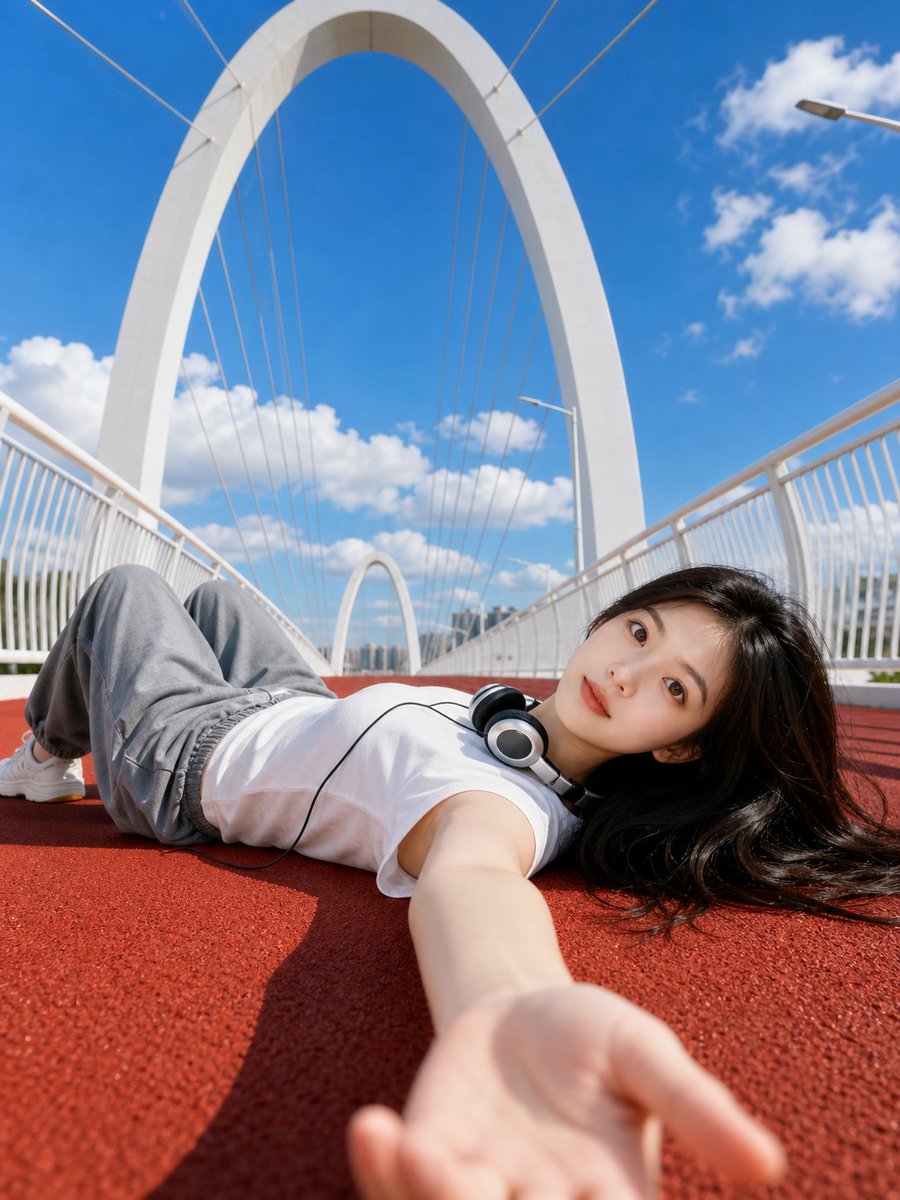
Summer Bridge Track Portrait
A bright, low-angle outdoor portrait of a woman on a red running track atop a modern white bridge, focusing on architectural symmetry and skin texture.
This is a GPT Image 2 prompt case for 人像角色. Use the copy-ready prompt below to generate similar visuals, and review Awesome GPT Image 2 Prompts attribution plus commercial-use rights before reuse.
Prompt
Copy-ready prompt
使用上传的人像照片作为人物外观参考。创作一张明亮的超写实户外人像,拍摄对象为一名年轻女性 {argument name="pose" default="躺在红色跑道上"},位于一座现代 {argument name="bridge" default="白色拱形人行天桥"} 上。超广角低角度自拍视角,她的手臂在前景中伸向镜头,姿势放松,脖子上挂着有线耳机,身穿 {argument name="outfit" default="白色无袖上衣"},搭配宽松灰色长裤,黑发铺散在地面上。干净的蓝天配以柔软的白云,强烈的午后阳光,清晰的阴影,高清晰度,清新青春的氛围,建筑对称性,真实的皮肤质感,电影级构图,3:4 竖向图像

负面提示词:

水印,标志,文字,标题,签名,AI 标签,多余的手指,畸形的手,扭曲的脸,身份错误,重复的人物,模糊的脸,低分辨率,过度磨皮,塑料感皮肤,不自然的解剖结构,错误的透视,杂乱的背景,严重的伪影,过度曝光,曝光不足
Prompt variables
Editable argument placeholders found in the prompt, with their default values.
More cases in this category
Prioritized by category, input mode compatibility, quality, and lower risk.






Reuse and source notes
Use this prompt safely after previewing the case.
- 1.Copy the prompt or open it directly in Dovoo with the generation button.
- 2.Adjust variables, aspect ratio, and reference images for your own use case.
- 3.Before publishing or paid usage, verify source rights, attribution requirements, and brand or likeness risks.
Can I use this prompt commercially?
Commercial-use status is allowed. Review the original source, license, brand constraints, and legal requirements before paid usage.
Where does this case come from?
This case is imported from Awesome GPT Image 2 Prompts; keep attribution visible and check the source URL before reuse.