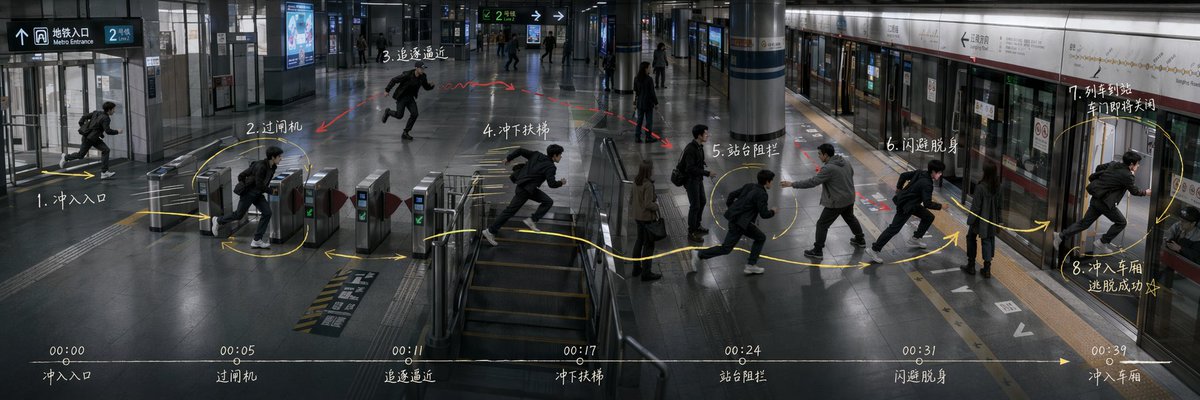
Subway Escape Storyboard Route
Generates an ultra-wide cinematic subway action storyboard with route arrows, numbered movement beats, and a bottom timeline for directing scene blocking.
This is a GPT Image 2 prompt case for Illustration & Art. Use the copy-ready prompt below to generate similar visuals, and review Awesome GPT Image 2 Prompts attribution plus commercial-use rights before reuse.
Free 1K preview
Generate one preview image instantly, no sign-up required.
Prompt
Copy-ready prompt
Goal: Create an ultra-wide 3:1 cinematic story-routing board for an action sequence in a modern subway station, showing the same protagonist repeated across one continuous space as a movement plan for directing and blocking. The scene is {argument name="story scenario" default="Subway station escape"}.

Canvas: 1200×400 or similar 3:1 panoramic frame, realistic film still style, cool gray-blue lighting, high-detail interior architecture, glossy dark floor reflections, glass walls, metal ticket gates, central stair/escalator area, columns, platform screen doors, subway train on the right, overhead wayfinding signs. Use a slightly elevated wide-angle security-camera/cinematic perspective so the whole route is visible from entrance to platform.

Layout: One continuous station environment from left to right: entrance at far left, ticket gates left-center, stair/escalator area center, open concourse mid-right, platform and train doors on the right. Show the same male protagonist repeated at each action beat, wearing a black jacket, dark pants, white sneakers, and a backpack, running or dodging. Add a pursuing man in a gray jacket near the platform blocking him, plus a few bystanders as background silhouettes.

Action route annotations: Draw a bright hand-drawn yellow route line with arrows and loops across the floor, connecting exactly 8 numbered action nodes. Add small red arrows/scribbles for danger or pursuit. The 8 visible action nodes are: 1. rush into entrance; 2. pass ticket gate; 3. pursuit approaching; 4. rush down stairs; 5. platform blockage; 6. dodge and slip past; 7. train arriving and doors about to close; 8. rush into carriage, escape succeeds. Place these labels as white handwritten notes near the corresponding positions, using Chinese-style handwritten storyboard labeling if possible.

Timeline strip: Along the bottom edge, draw one thin horizontal white timeline with a yellow arrow pointing right. Include exactly 7 timestamp markers and captions: 00:00 entrance, 00:05 ticket gate, 00:11 pursuit approaching, 00:17 rush down stairs, 00:24 platform blockage, 00:31 dodge and slip past, 00:39 enter carriage. Keep the strip subtle but legible, like a director's action planning board.

Text and signage: Include realistic station signage such as Metro Entrance, platform direction arrows, route signs, and train line panels, but keep them secondary to the storyboard marks. Main handwritten annotations may use {argument name="annotation language" default="Chinese"}; keep the writing chalky white, slightly imperfect, and integrated into the image.

Visual style: Photorealistic, moody, cinematic, documentary-like, with motion-blurred runners, crisp architectural details, reflective floors, cool fluorescent lighting, and overlay graphics that look manually drawn on top of a still frame. Avoid cartoon styling, avoid split panels, avoid extra action nodes, avoid logos or watermarks.
Prompt variables
Editable argument placeholders found in the prompt, with their default values.
Best for
- - Illustration & Art visual exploration
- - Image generation and reference-image edits
- - Reusable briefs that keep source attribution visible
Change these parts
- - Subject, product, character, or scene
- - Aspect ratio, camera, lighting, and background
- - Brand, text, color, and output constraints
Recommended model and settings
- - Model: gpt-image-2
- - Input mode: Text to Image
- - Aspect ratio: source
- - Commercial status: review original source
How to use this prompt
- 1. Copy the prompt and preserve its structure for the first test.
- 2. Replace the subject, context, and publishing channel.
- 3. Change one camera, lighting, or style variable per iteration.
- 4. Inspect the output, source, text, and rights before reuse.
Limitations, source, and reuse cautions
- - Generated output is an editable draft, not factual, legal, or rights evidence.
- - Review the linked source, people, brands, logos, text, and third-party media before commercial use.
More cases in this category
Prioritized by category, input mode compatibility, quality, and lower risk.


Reuse and source notes
Use this prompt safely after previewing the case.
- 1.Copy the prompt or open it directly in Dovoo with the generation button.
- 2.Adjust variables, aspect ratio, and reference images for your own use case.
- 3.Before publishing or paid usage, verify source rights, attribution requirements, and brand or likeness risks.
Can I use this prompt commercially?
Commercial-use status is allowed. Review the original source, license, brand constraints, and legal requirements before paid usage.
Where does this case come from?
This case is imported from Awesome GPT Image 2 Prompts; keep attribution visible and check the source URL before reuse.