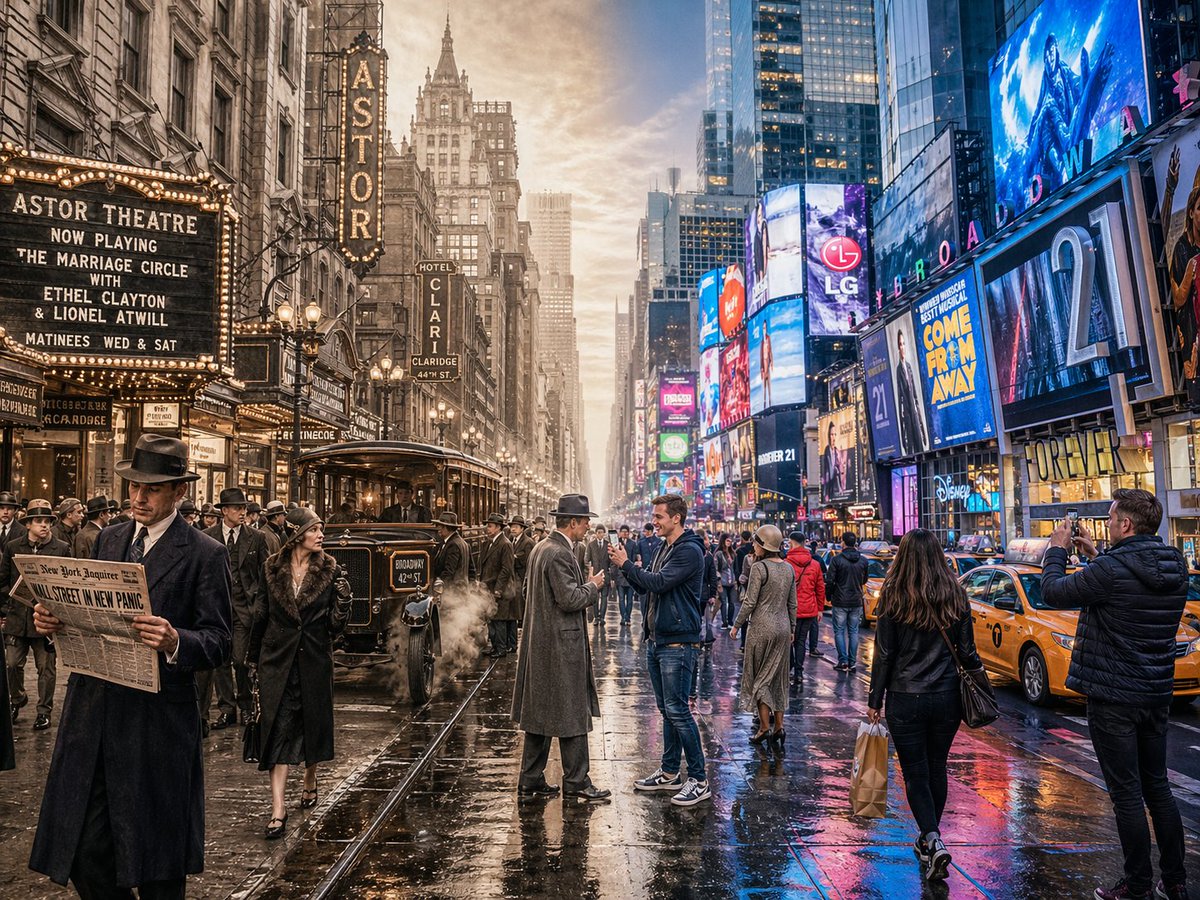
Split-Screen Time Travel Scene
A complex prompt designed to generate a seamless horizontal split-screen image blending historical and modern eras within a single scene.
This is a GPT Image 2 prompt case for Other Inspiration. Use the copy-ready prompt below to generate similar visuals, and review Awesome GPT Image 2 Prompts attribution plus commercial-use rights before reuse.
Free 1K preview
Generate one preview image instantly, no sign-up required.
Prompt
Copy-ready prompt
A horizontal split-screen cinematic shot of {argument name="scene" default="Times Square, New York"}, seamlessly blending two different eras: {argument name="first era" default="1920s"} on the left and {argument name="second era" default="present day"} on the right (default: about 100 years ago vs. present day). On the left side: show era-appropriate architecture, interior or environment design, materials, vehicles, and props that clearly belong to that historical period. People wear authentic clothing from the era, including hairstyles, accessories, and typical items in their hands. The overall mood feels nostalgic and historically accurate. On the right side: show the same scene in the modern era, with updated architecture or renovated structures, contemporary materials (glass, steel, LED screens, modern furniture), modern vehicles or equipment, and current technology. People wear contemporary fashion that matches today’s style in this setting. In the center: the two eras merge and overlap organically, without a hard dividing line. Elements from both eras visually interact: people from different times look at each other, walk through each other’s space, or seem surprised by the other era’s technology and objects. Architecture and environment smoothly morph from old to new. Make sure the scene is not just a simple left/right comparison but a dynamic time-travel interaction. Photorealistic, 8k resolution, cinematic lighting, wide angle, highly detailed textures, rich sense of time-travel storytelling. Aspect Ratio: 4:3Prompt variables
Editable argument placeholders found in the prompt, with their default values.
Best for
- - Other Inspiration visual exploration
- - Image generation and reference-image edits
- - Reusable briefs that keep source attribution visible
Change these parts
- - Subject, product, character, or scene
- - Aspect ratio, camera, lighting, and background
- - Brand, text, color, and output constraints
Recommended model and settings
- - Model: gpt-image-2
- - Input mode: Text to Image
- - Aspect ratio: source
- - Commercial status: review original source
How to use this prompt
- 1. Copy the prompt and preserve its structure for the first test.
- 2. Replace the subject, context, and publishing channel.
- 3. Change one camera, lighting, or style variable per iteration.
- 4. Inspect the output, source, text, and rights before reuse.
Limitations, source, and reuse cautions
- - Generated output is an editable draft, not factual, legal, or rights evidence.
- - Review the linked source, people, brands, logos, text, and third-party media before commercial use.
More cases in this category
Prioritized by category, input mode compatibility, quality, and lower risk.


Reuse and source notes
Use this prompt safely after previewing the case.
- 1.Copy the prompt or open it directly in Dovoo with the generation button.
- 2.Adjust variables, aspect ratio, and reference images for your own use case.
- 3.Before publishing or paid usage, verify source rights, attribution requirements, and brand or likeness risks.
Can I use this prompt commercially?
Commercial-use status is allowed. Review the original source, license, brand constraints, and legal requirements before paid usage.
Where does this case come from?
This case is imported from Awesome GPT Image 2 Prompts; keep attribution visible and check the source URL before reuse.