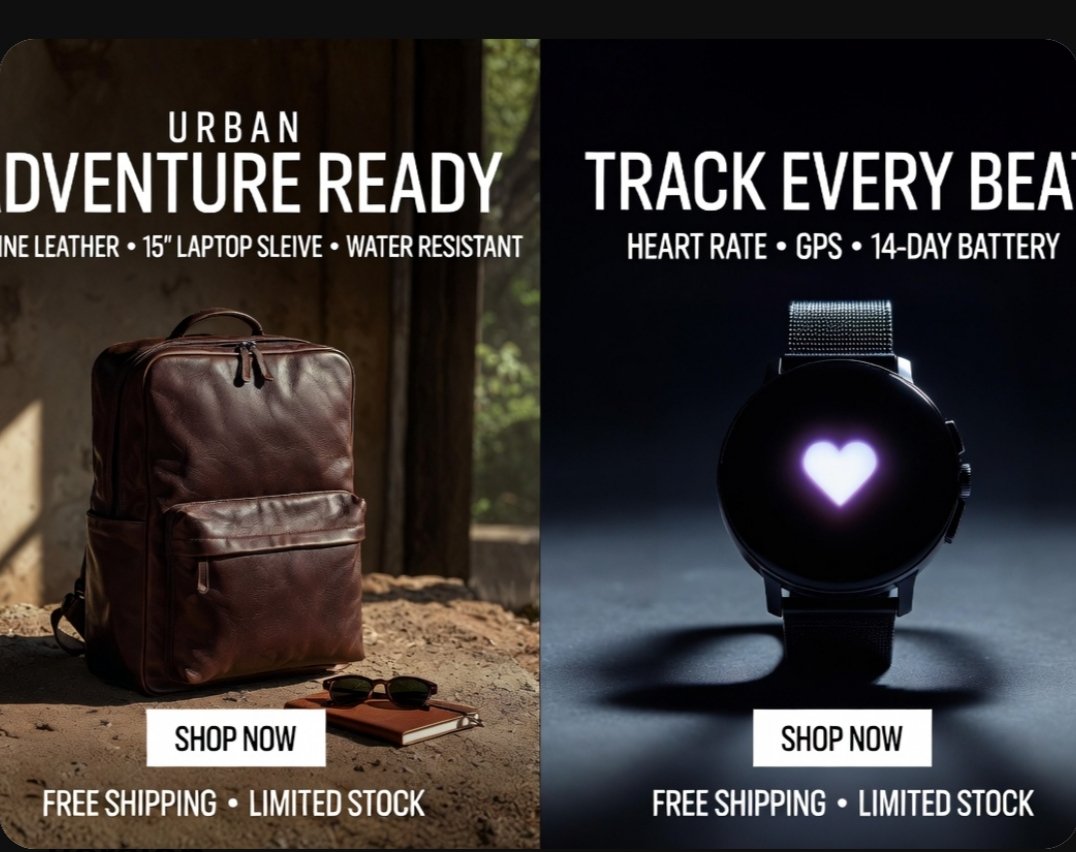
Split-Screen Product Ad Poster
A photorealistic dual-panel e-commerce ad showcasing a leather backpack and a smartwatch, ideal for social promos, marketplace banners, and online store marketing.
This is a GPT Image 2 prompt case for Product & Commercial. Use the copy-ready prompt below to generate similar visuals, and review Awesome GPT Image 2 Prompts attribution plus commercial-use rights before reuse.
Free 1K preview
Generate one preview image instantly, no sign-up required.
Prompt
Copy-ready prompt
{
  "type": "split-screen e-commerce advertisement poster",
  "style": "premium photorealistic retail marketing graphic, high contrast, polished commercial lighting, clean bold typography, modern direct-response ad design",
  "canvas": {
    "aspect_ratio": "4:3",
    "background": "black outer border with rounded-corner poster"
  },
  "layout": {
    "orientation": "vertical split",
    "sections": [
      {
        "title": "left product ad",
        "position": "left half",
        "count": 1,
        "product": "backpack",
        "headline_lines_count": 2,
        "cta_count": 1,
        "footer_count": 1
      },
      {
        "title": "right product ad",
        "position": "right half",
        "count": 1,
        "product": "smartwatch",
        "headline_lines_count": 2,
        "cta_count": 1,
        "footer_count": 1
      }
    ],
    "divider": "hard vertical split down the center"
  },
  "text": {
    "left": {
      "eyebrow": "{argument name=\"left eyebrow text\" default=\"URBAN\"}",
      "headline": "{argument name=\"left headline text\" default=\"ADVENTURE READY\"}",
      "features": "GENUINE LEATHER • 15\" LAPTOP SLEEVE • WATER RESISTANT",
      "button": "SHOP NOW",
      "footer": "FREE SHIPPING • LIMITED STOCK"
    },
    "right": {
      "headline": "{argument name=\"right headline text\" default=\"TRACK EVERY BEAT\"}",
      "features": "HEART RATE • GPS • 14-DAY BATTERY",
      "button": "SHOP NOW",
      "footer": "FREE SHIPPING • LIMITED STOCK"
    }
  },
  "left_panel": {
    "scene": "rustic indoor setting with warm natural sunlight entering from the side",
    "background_details_count": 3,
    "background_details": [
      "aged wall or wooden interior surface",
      "window opening with soft greenery visible outside",
      "dusty textured ground floor"
    ],
    "product": {
      "type": "{argument name=\"left product\" default=\"brown leather backpack\"}",
      "position": "lower left-center standing upright on the ground",
      "material": "rich polished leather",
      "color": "deep brown",
      "details_count": 5,
      "details": [
        "top carry handle",
        "double zipper top opening",
        "large front zip pocket",
        "side pocket visible on the left",
        "structured rectangular silhouette"
      ]
    },
    "supporting_props_count": 2,
    "supporting_props": [
      "a pair of dark sunglasses",
      "a small brown notebook placed near the backpack"
    ],
    "lighting": "warm cinematic sunlight from upper left creating soft highlights and earthy shadows",
    "button_style": "white rectangular button centered near lower middle of the left panel with black uppercase text"
  },
  "right_panel": {
    "scene": "dark studio product shot with cool moody spotlight",
    "background": "deep navy-to-black gradient",
    "product": {
      "type": "round black smartwatch",
      "position": "centered vertically and horizontally in right half",
      "details_count": 5,
      "details": [
        "circular black face",
        "glowing white-purple heart icon in the center of the screen",
        "dark metal case",
        "two side buttons visible on the right edge",
        "fine mesh metal strap"
      ]
    },
    "surface": "smooth studio floor with a soft circular shadow beneath the watch",
    "lighting": "cool spotlight from above and slightly behind, creating rim light and dramatic shadow",
    "button_style": "white rectangular button centered near lower middle of the right panel with black uppercase text"
  },
  "typography": {
    "font": "bold condensed sans-serif uppercase",
    "color": "white",
    "alignment": "centered within each panel",
    "feature_line_style": "smaller uppercase subheadline with bullet separators"
  }
}
Prompt variables
Editable argument placeholders found in the prompt, with their default values.
Best for
- - Product & Commercial visual exploration
- - Image generation and reference-image edits
- - Reusable briefs that keep source attribution visible
Change these parts
- - Subject, product, character, or scene
- - Aspect ratio, camera, lighting, and background
- - Brand, text, color, and output constraints
Recommended model and settings
- - Model: gpt-image-2
- - Input mode: Text to Image
- - Aspect ratio: source
- - Commercial status: review original source
How to use this prompt
- 1. Copy the prompt and preserve its structure for the first test.
- 2. Replace the subject, context, and publishing channel.
- 3. Change one camera, lighting, or style variable per iteration.
- 4. Inspect the output, source, text, and rights before reuse.
Limitations, source, and reuse cautions
- - Generated output is an editable draft, not factual, legal, or rights evidence.
- - Review the linked source, people, brands, logos, text, and third-party media before commercial use.
More cases in this category
Prioritized by category, input mode compatibility, quality, and lower risk.





Reuse and source notes
Use this prompt safely after previewing the case.
- 1.Copy the prompt or open it directly in Dovoo with the generation button.
- 2.Adjust variables, aspect ratio, and reference images for your own use case.
- 3.Before publishing or paid usage, verify source rights, attribution requirements, and brand or likeness risks.
Can I use this prompt commercially?
Commercial-use status is allowed. Review the original source, license, brand constraints, and legal requirements before paid usage.
Where does this case come from?
This case is imported from Awesome GPT Image 2 Prompts; keep attribution visible and check the source URL before reuse.