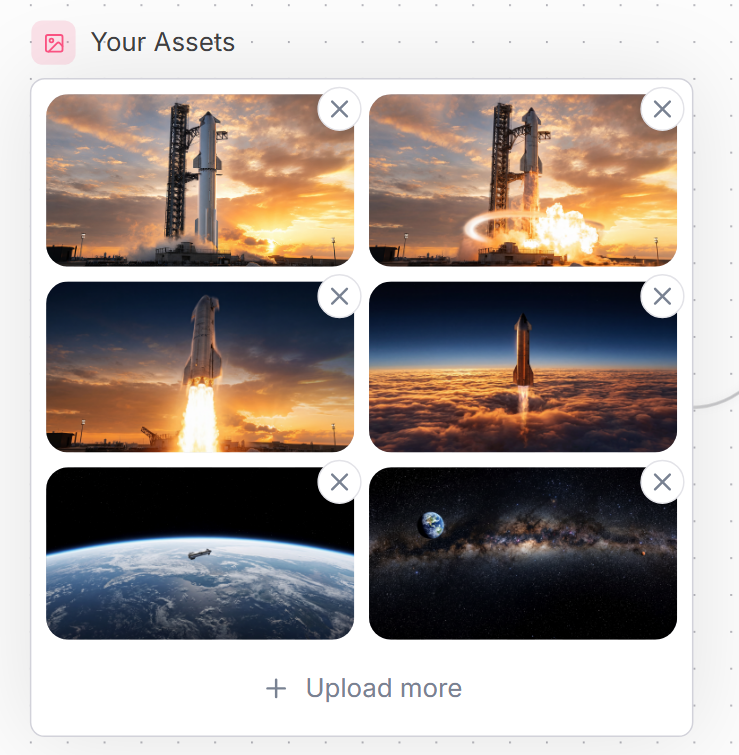
Space Asset Gallery UI
A polished SaaS-style asset upload gallery mockup with six spaceflight thumbnails and delete controls for website interface design.
This is a GPT Image 2 prompt case for 其他灵感. Use the copy-ready prompt below to generate similar visuals, and review Awesome GPT Image 2 Prompts attribution plus commercial-use rights before reuse.
Prompt
Copy-ready prompt
目标:创建一个简洁的网站 UI 资产管理面板,标题为 {argument name="headline text" default="Your Assets"},展示一个已上传航天图像的网格。

画布:正方形的网页模型,背景为极浅的颜色,带有微妙的点状网格图案,右侧边缘有淡淡的弧形装饰线。采用现代 SaaS 风格,配以柔和的阴影、圆角和柔和的蓝灰色文本。

布局:在左上角放置一个小的圆形粉色方形图标,内含简单的轮廓图像/照片符号,后跟标题。在其下方,创建一个大的白色圆角矩形卡片,带有细浅灰色边框。在卡片内部,放置 6 个图像缩略图,排列为 2 列 3 行的网格,每个缩略图均带有圆角。每个缩略图的右上角都有一个悬浮的圆形删除按钮;共有 6 个删除按钮,均为白色,带有灰色 X 图标。在卡片底部,居中放置一行上传操作,包含一个加号和文本 {argument name="upload text" default="Upload more"}。

缩略图内容,共 6 个:1) 左上:一枚高耸的火箭矗立在日落时的发射台上,背景是橙色的云;2) 右上:同样的火箭发射台场景,带有明亮的爆炸/火焰和发光的圆形冲击波效果;3) 中左:一枚火箭在日落天空的背景下垂直升空,带有巨大的明亮烟柱;4) 中右:一枚火箭穿过厚厚的橙色云层,上升到深蓝色的高层大气中;5) 下左:从低轨道俯瞰地球,地平线弧线上方有一艘小型航天器;6) 下右:星光熠熠的深空全景,可见银河带,左上方可见地球。

视觉风格:精致的网页组件截图,逼真的电影级空间缩略图,清晰的 UI 边缘,宽敞的间距,16px 圆角缩略图,微妙的阴影,柔和的中性色调。小图标背景使用 {argument name="accent color" default="soft pink"},标题和上传文本使用 {argument name="text color" default="slate blue-gray"}。

约束:保持所有文本为英文,不包含额外标签、水印、浏览器边框或光标。严格保持数量:1 个标题,1 个图标,1 个带边框卡片,6 个缩略图,6 个圆形 X 删除按钮,以及 1 个底部上传操作。
Prompt variables
Editable argument placeholders found in the prompt, with their default values.
More cases in this category
Prioritized by category, input mode compatibility, quality, and lower risk.

Reuse and source notes
Use this prompt safely after previewing the case.
- 1.Copy the prompt or open it directly in Dovoo with the generation button.
- 2.Adjust variables, aspect ratio, and reference images for your own use case.
- 3.Before publishing or paid usage, verify source rights, attribution requirements, and brand or likeness risks.
Can I use this prompt commercially?
Commercial-use status is allowed. Review the original source, license, brand constraints, and legal requirements before paid usage.
Where does this case come from?
This case is imported from Awesome GPT Image 2 Prompts; keep attribution visible and check the source URL before reuse.