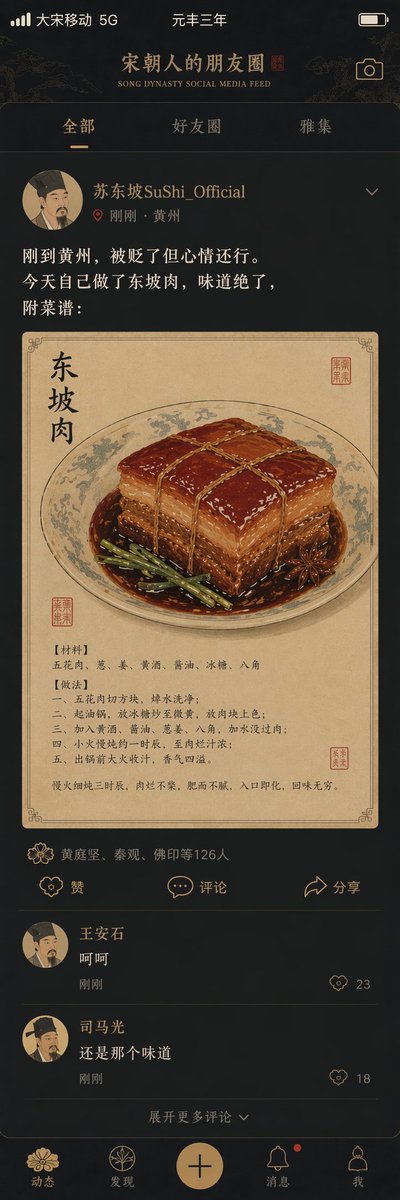
Song Dynasty Social Media Feed
A creative prompt that imagines what a social media feed would look like during the Song Dynasty, featuring Su Shi.
This is a GPT Image 2 prompt case for Illustration & Art. Use the copy-ready prompt below to generate similar visuals, and review Awesome GPT Image 2 Prompts attribution plus commercial-use rights before reuse.
Free 1K preview
Generate one preview image instantly, no sign-up required.
Prompt
Copy-ready prompt
"{argument name="title" default="Song Dynasty Social Media Feed"}", a humorous fusion of ancient and modern interface design style. The image simulates a mobile social media interface, but the content is entirely Song Dynasty scenes. The profile picture is a portrait of a Song Dynasty scholar. Username: "{argument name="username" default="Su Shi SuShi_Official"}". Posted content: "Just arrived in Huangzhou; exiled but in a decent mood. Made Dongpo Pork myself today, the taste is amazing. Recipe attached:". The attached picture is a close-up of Dongpo Pork in a traditional fine-brush painting style. Like list: "Huang Tingjian, Qin Guan, Foyin and 126 others". Comment section: "Wang Anshi: Hehe", "Sima Guang: Still that same flavor". Interface elements like the like icon are replaced with Song Dynasty patterns. Status bar shows "Great Song Mobile 5G" and "Third Year of Yuanfeng". The color scheme is a mobile dark mode paired with elegant Song Dynasty tones. A masterpiece of historical and social media collision.Prompt variables
Editable argument placeholders found in the prompt, with their default values.
Best for
- - Illustration & Art visual exploration
- - Image generation and reference-image edits
- - Reusable briefs that keep source attribution visible
Change these parts
- - Subject, product, character, or scene
- - Aspect ratio, camera, lighting, and background
- - Brand, text, color, and output constraints
Recommended model and settings
- - Model: gpt-image-2
- - Input mode: Text to Image
- - Aspect ratio: source
- - Commercial status: review original source
How to use this prompt
- 1. Copy the prompt and preserve its structure for the first test.
- 2. Replace the subject, context, and publishing channel.
- 3. Change one camera, lighting, or style variable per iteration.
- 4. Inspect the output, source, text, and rights before reuse.
Limitations, source, and reuse cautions
- - Generated output is an editable draft, not factual, legal, or rights evidence.
- - Review the linked source, people, brands, logos, text, and third-party media before commercial use.
More cases in this category
Prioritized by category, input mode compatibility, quality, and lower risk.

Reuse and source notes
Use this prompt safely after previewing the case.
- 1.Copy the prompt or open it directly in Dovoo with the generation button.
- 2.Adjust variables, aspect ratio, and reference images for your own use case.
- 3.Before publishing or paid usage, verify source rights, attribution requirements, and brand or likeness risks.
Can I use this prompt commercially?
Commercial-use status is allowed. Review the original source, license, brand constraints, and legal requirements before paid usage.
Where does this case come from?
This case is imported from Awesome GPT Image 2 Prompts; keep attribution visible and check the source URL before reuse.