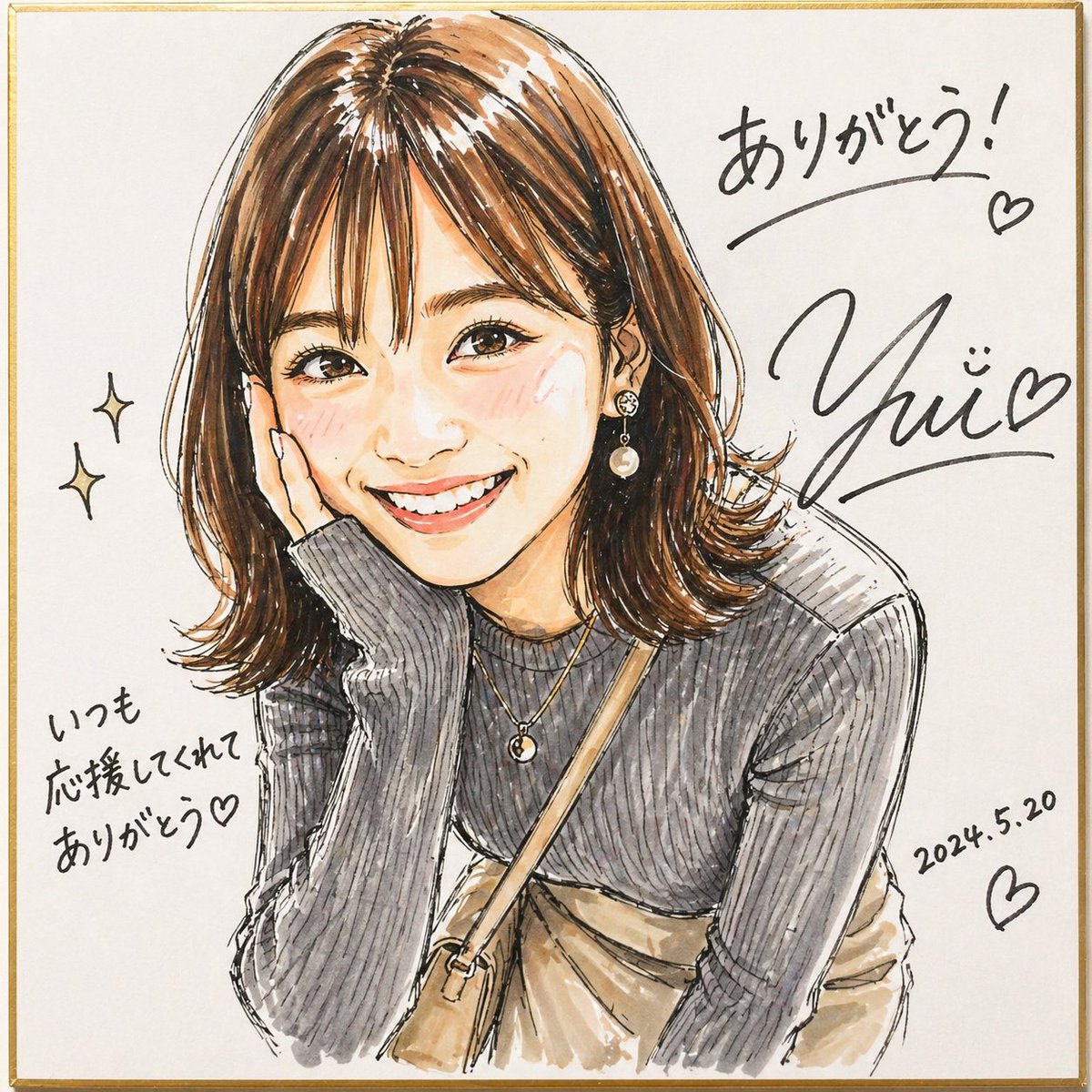
Signed Marker Portrait on Shikishi
This generates a lively signed marker-style portrait on a square shikishi board, useful for fan-art autographs, commemorative illustration posts, and personalized thank-you visuals.
This is a GPT Image 2 prompt case for Illustration & Art. Use the copy-ready prompt below to generate similar visuals, and review Awesome GPT Image 2 Prompts attribution plus commercial-use rights before reuse.
Free 1K preview
Generate one preview image instantly, no sign-up required.
Prompt
Copy-ready prompt
A lively hand-drawn fashion portrait in a changed illustration style, made to look like a signed fan-art sketch drawn with markers on a square white shikishi board with a thin gold border. Show a stylish young woman from about the waist up, leaning slightly forward with one elbow resting up near her face in a casual, friendly pose. Her face area is covered by a simple rectangular censor block in a muted beige tone. She has shoulder-length medium brown hair with warm highlights, soft volume, side-swept bangs, and flipped-out ends. Render the art with expressive black ink outlines, visible marker strokes, watercolor-like blending, sketchy hatching, and an energetic, vivid handmade feel. She wears a fitted dark gray ribbed long-sleeve knit top with subtle puffed shoulders, layered delicate gold necklaces, a dangling pearl earring, a beige crossbody bag strap running diagonally across her chest, and a light beige skirt or dress visible at the waist. Leave plenty of clean white background around the figure. Add 2 small sparkle doodles on the left side. Add handwritten Japanese thank-you messages and signature-style black ink writing around the portrait: at upper right write {argument name="top message" default="ありがとう!"} with an underline and a small heart, beneath it place a large stylized autograph reading {argument name="signature name" default="Yui"} with a smiling face mark and a heart, at lower left write {argument name="side message" default="いつも応援してくれてありがとう♡"}, and at lower right write the date {argument name="date" default="2024.5.20"} with another heart. The overall image should feel warm, personal, lively, and like a celebratory signed illustration on a square autograph board.Prompt variables
Editable argument placeholders found in the prompt, with their default values.
Best for
- - Illustration & Art visual exploration
- - Image generation and reference-image edits
- - Reusable briefs that keep source attribution visible
Change these parts
- - Subject, product, character, or scene
- - Aspect ratio, camera, lighting, and background
- - Brand, text, color, and output constraints
Recommended model and settings
- - Model: gpt-image-2
- - Input mode: Text to Image
- - Aspect ratio: source
- - Commercial status: review original source
How to use this prompt
- 1. Copy the prompt and preserve its structure for the first test.
- 2. Replace the subject, context, and publishing channel.
- 3. Change one camera, lighting, or style variable per iteration.
- 4. Inspect the output, source, text, and rights before reuse.
Limitations, source, and reuse cautions
- - Generated output is an editable draft, not factual, legal, or rights evidence.
- - Review the linked source, people, brands, logos, text, and third-party media before commercial use.
More cases in this category
Prioritized by category, input mode compatibility, quality, and lower risk.




Reuse and source notes
Use this prompt safely after previewing the case.
- 1.Copy the prompt or open it directly in Dovoo with the generation button.
- 2.Adjust variables, aspect ratio, and reference images for your own use case.
- 3.Before publishing or paid usage, verify source rights, attribution requirements, and brand or likeness risks.
Can I use this prompt commercially?
Commercial-use status is allowed. Review the original source, license, brand constraints, and legal requirements before paid usage.
Where does this case come from?
This case is imported from Awesome GPT Image 2 Prompts; keep attribution visible and check the source URL before reuse.