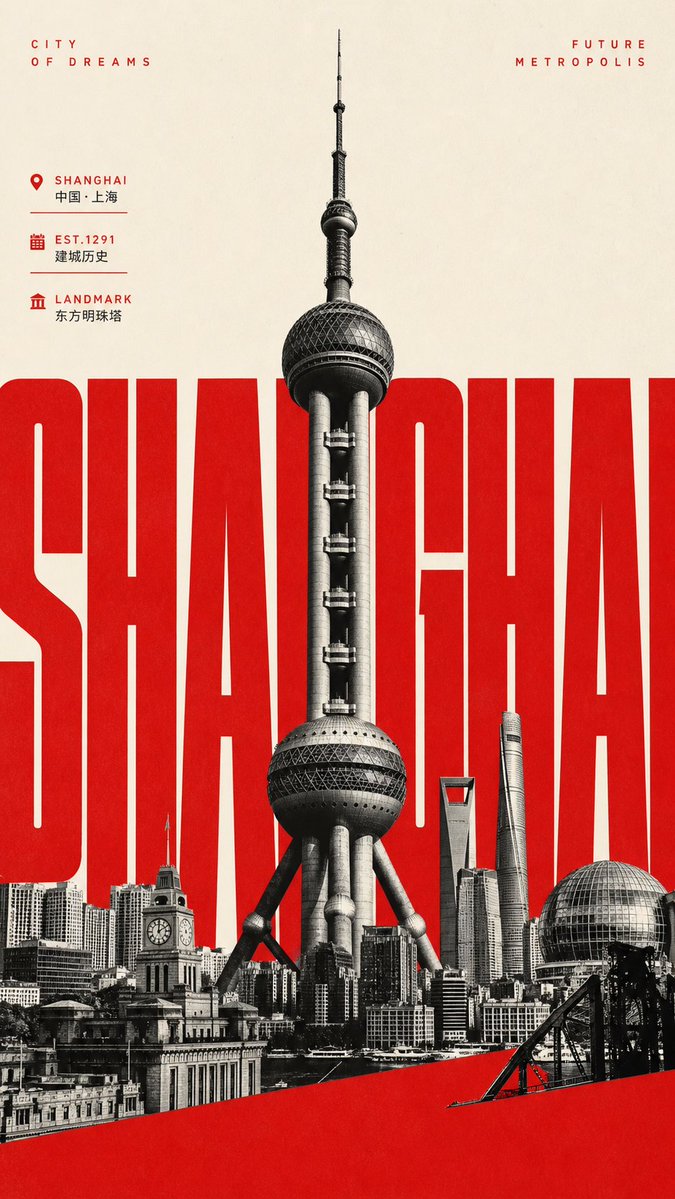
Giant Typography Shanghai Travel Poster
A bold vertical cultural tourism poster featuring Shanghai landmarks, oversized red city typography, and minimalist vintage print styling.
This is a GPT Image 2 prompt case for Graphic & Poster. Use the copy-ready prompt below to generate similar visuals, and review Awesome GPT Image 2 Prompts attribution plus commercial-use rights before reuse.
Free 1K preview
Generate one preview image instantly, no sign-up required.
Prompt
Copy-ready prompt
Objective: Create a vertical cultural tourism poster for {argument name="city name" default="Shanghai"}, combining oversized typography, landmark photography, and minimalist tourism poster aesthetics.

Canvas: Tall vertical poster, 9:16 aspect ratio. Warm off-white paper background with subtle grain and a slight vintage print texture, using a high-contrast color scheme of red, black, and cream.

Main Layout: Place a massive, compressed, bold sans-serif word in the center of the image, reading {argument name="giant city text" default="SHANGHAI"}. The letters must be bright red, extremely large and tightly spaced, extending to the left and right edges, with some letters cropped. In front of the red word, center a black and white silhouette of the Oriental Pearl Tower, rising vertically from the lower skyline to almost the top edge, showcasing sharp architectural details and a realistic photo collage texture.

Foreground Skyline: Create a dense black and white collage of the Shanghai skyline at the bottom, including 6 clearly visible landmark/building elements: 1) The Oriental Pearl Tower as the central subject, 2) A historical clock tower building in the lower left, 3) The Shanghai World Financial Center with a trapezoidal top near the center-right, 4) The Shanghai Tower with a spiral shape to its right, 5) A spherical glass pavilion/dome in the lower right, and 6) Various low-rise buildings along the Bund forming a continuous base. Add a solid red diagonal band across the bottom of the image, extending from the lower left to the middle right, partially obscuring the skyline.

Top Text: In the upper left corner, place small, widely spaced red capital letters “CITY / OF DREAMS” arranged in two lines. In the upper right corner, place the corresponding red capital letters “FUTURE / METROPOLIS” arranged in two lines.

Information Panel: On the upper left side below the title, include 3 lines of compact tourism information with red icons, red English labels, smaller black Chinese text, and thin dividers: 1) A map location icon, label “SHANGHAI”, text “China · Shanghai”; 2) A calendar icon, label “EST.1291”, text “Founding History”; 3) A classic landmark icon, label “LANDMARK”, text “Oriental Pearl Tower”.

Style: Modern Chinese tourism poster, influenced by Swiss grid design, brutalist oversized typography, black and white architectural photography, simple negative space, sharp edges, ink graininess similar to letterpress printing, high-end tourism promotional design.

Constraints: Use only red, black, grayscale, and warm cream colors. Keep the poster simple. Do not add people, cars, logos, QR codes, watermarks, or additional paragraph text. Retain the above specified exact English and Chinese text, unless customized through the city name slot.
Prompt variables
Editable argument placeholders found in the prompt, with their default values.
Best for
- - Graphic & Poster visual exploration
- - Image generation and reference-image edits
- - Reusable briefs that keep source attribution visible
Change these parts
- - Subject, product, character, or scene
- - Aspect ratio, camera, lighting, and background
- - Brand, text, color, and output constraints
Recommended model and settings
- - Model: gpt-image-2
- - Input mode: Text to Image
- - Aspect ratio: source
- - Commercial status: review original source
How to use this prompt
- 1. Copy the prompt and preserve its structure for the first test.
- 2. Replace the subject, context, and publishing channel.
- 3. Change one camera, lighting, or style variable per iteration.
- 4. Inspect the output, source, text, and rights before reuse.
Limitations, source, and reuse cautions
- - Generated output is an editable draft, not factual, legal, or rights evidence.
- - Review the linked source, people, brands, logos, text, and third-party media before commercial use.
More cases in this category
Prioritized by category, input mode compatibility, quality, and lower risk.






Reuse and source notes
Use this prompt safely after previewing the case.
- 1.Copy the prompt or open it directly in Dovoo with the generation button.
- 2.Adjust variables, aspect ratio, and reference images for your own use case.
- 3.Before publishing or paid usage, verify source rights, attribution requirements, and brand or likeness risks.
Can I use this prompt commercially?
Commercial-use status is allowed. Review the original source, license, brand constraints, and legal requirements before paid usage.
Where does this case come from?
This case is imported from Awesome GPT Image 2 Prompts; keep attribution visible and check the source URL before reuse.