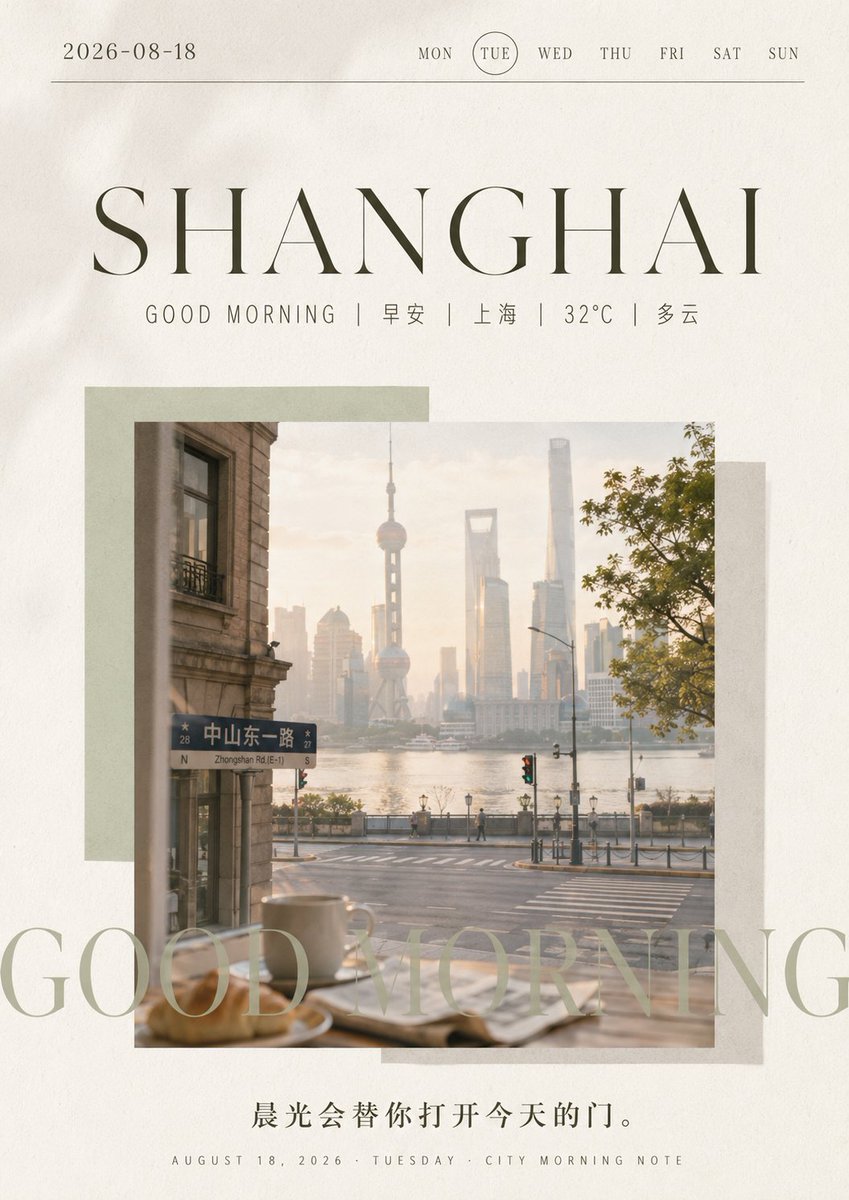
Shanghai Morning Calendar Poster
A sophisticated vertical good-morning city daily poster with Shanghai skyline photography, calendar details, and elegant editorial typography.
This is a GPT Image 2 prompt case for Graphic & Poster. Use the copy-ready prompt below to generate similar visuals, and review Awesome GPT Image 2 Prompts attribution plus commercial-use rights before reuse.
Free 1K preview
Generate one preview image instantly, no sign-up required.
Prompt
Copy-ready prompt
目标:为 {argument name="city name" default="SHANGHAI"} 创建一款精致的竖版晨间日历海报,将编辑风格的旅行摄影与极简日期卡片设计相结合。

画布:4:5 竖版海报,采用带有细微颗粒感和轻微暗角的暖米白色纸张背景,留白优雅,色调为柔和的米色、橄榄色和灰色。

顶部标题:在左上角放置日期 “{argument name="date" default="2026-08-18"}”。在右上角横向排列 7 个小号大写衬线体星期标签:MON, TUE, WED, THU, FRI, SAT, SUN,其中 TUE 用细线圆圈标出。在标题下方绘制一条几乎横跨全宽的细水平线。

主要排版:在上方三分之一处居中放置一个巨大的高对比度细衬线体标题 “{argument name="city name" default="SHANGHAI"}”,采用深橄榄灰色,字间距宽。正下方添加一行小号且字间距宽的副标题:“GOOD MORNING | 早安 | 上海 | 32°C | 多云”。保持Chinese字体清晰且极简。

照片拼贴:在中间放置一张带有柔和晨光感的正方形大照片。照片展示了从咖啡馆或窗内向外望去的宁静上海街道:前景桌上模糊的咖啡杯和糕点,窗外是街道交叉口和滨江大道,东方明珠塔和陆家嘴现代天际线在朦胧的日出光线下若隐若现,左侧可见 “中山东一路 / Zhongshan Rd.(E-1)” 路牌,右侧有树叶点缀,氛围温暖柔和。在照片后方添加 3 个错位半透明矩形纸块:左上方为淡鼠尾草绿矩形,右侧为浅灰色矩形,右下方为米灰色矩形。

叠加文字:在照片下半部分及延伸区域,添加超大号半透明衬线体文字 “GOOD MORNING”,颜色为淡鼠尾草绿,被海报边缘和照片裁剪,呈现出装饰性水印的效果。

底部文字:在图像下方居中放置一句Chinese引言:“{argument name="morning quote" default="晨光会替你打开今天的门。"}”,颜色为深灰色。在最底部添加一行极小号大写页脚:“AUGUST 18, 2026 · TUESDAY · CITY MORNING NOTE”。

视觉风格:高端生活方式杂志排版,静谧奢华,柔和胶片摄影感,写实但略带梦幻,浅景深,优雅衬线字体,排版简洁,画面中无人物主体,无 Logo 或水印,保留精确的视觉文字层级和单张照片拼贴构图。
Prompt variables
Editable argument placeholders found in the prompt, with their default values.
Best for
- - Graphic & Poster visual exploration
- - Image generation and reference-image edits
- - Reusable briefs that keep source attribution visible
Change these parts
- - Subject, product, character, or scene
- - Aspect ratio, camera, lighting, and background
- - Brand, text, color, and output constraints
Recommended model and settings
- - Model: gpt-image-2
- - Input mode: Text to Image
- - Aspect ratio: source
- - Commercial status: review original source
How to use this prompt
- 1. Copy the prompt and preserve its structure for the first test.
- 2. Replace the subject, context, and publishing channel.
- 3. Change one camera, lighting, or style variable per iteration.
- 4. Inspect the output, source, text, and rights before reuse.
Limitations, source, and reuse cautions
- - Generated output is an editable draft, not factual, legal, or rights evidence.
- - Review the linked source, people, brands, logos, text, and third-party media before commercial use.
More cases in this category
Prioritized by category, input mode compatibility, quality, and lower risk.


Reuse and source notes
Use this prompt safely after previewing the case.
- 1.Copy the prompt or open it directly in Dovoo with the generation button.
- 2.Adjust variables, aspect ratio, and reference images for your own use case.
- 3.Before publishing or paid usage, verify source rights, attribution requirements, and brand or likeness risks.
Can I use this prompt commercially?
Commercial-use status is allowed. Review the original source, license, brand constraints, and legal requirements before paid usage.
Where does this case come from?
This case is imported from Awesome GPT Image 2 Prompts; keep attribution visible and check the source URL before reuse.