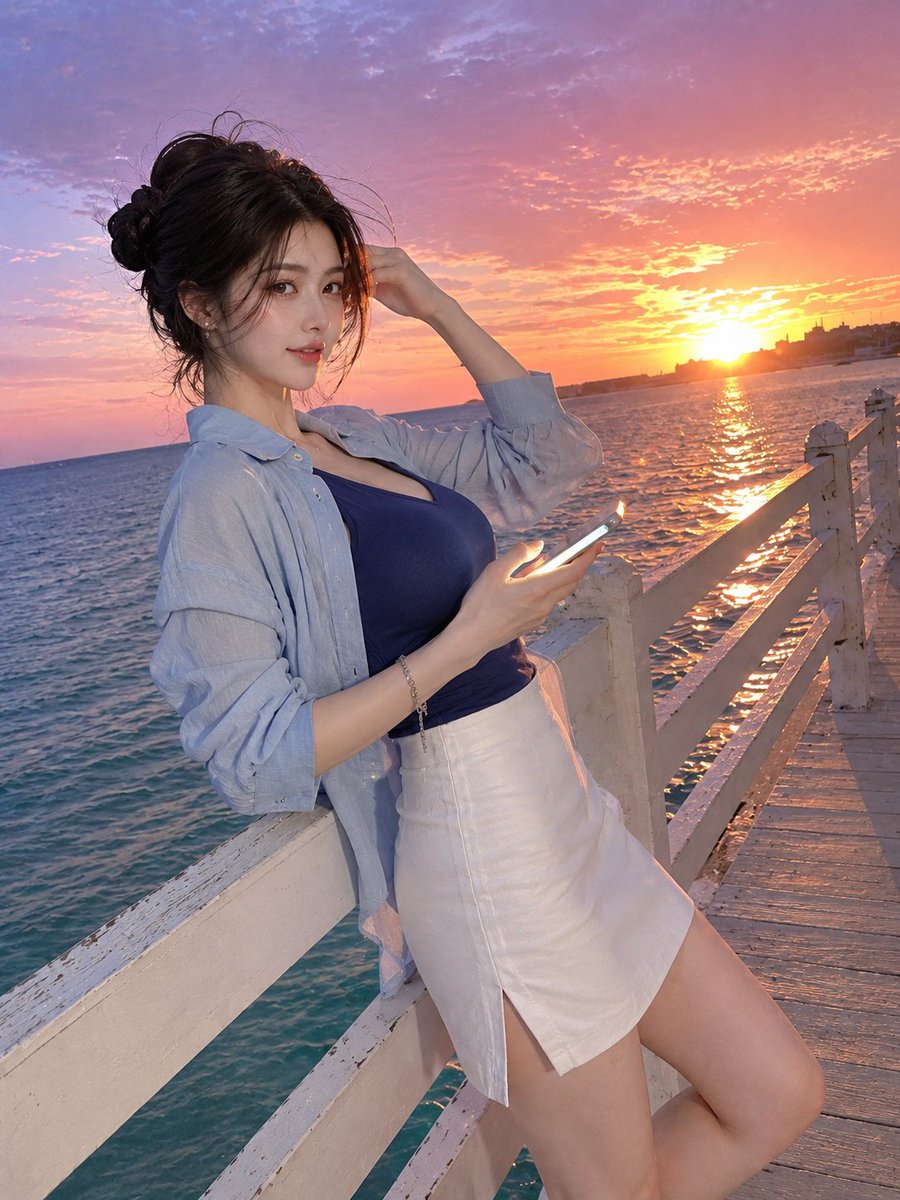
Late Summer Seaside Boardwalk Portrait
A candid-style portrait of a woman leaning against a seaside railing at sunset, captured with the warm tones and soft lighting of a phone snapshot.
This is a GPT Image 2 prompt case for Portrait & Character. Use the copy-ready prompt below to generate similar visuals, and review Awesome GPT Image 2 Prompts attribution plus commercial-use rights before reuse.
Free 1K preview
Generate one preview image instantly, no sign-up required.
Prompt
Copy-ready prompt
On a late summer evening, along a seaside boardwalk, the sky glows in violet-pink and the sea shimmers with golden light. She leans sideways against the white wooden railing, one hand holding a phone—its screen light illuminating her profile—and the other gently brushing back strands of hair lifted by the sea breeze. She looks back toward the camera with a soft, relaxed gaze and a faint smile, as if caught in a candid moment by a friend a few steps away. The frame is slightly tilted, with sea reflections and backlit halos.

She wears a {argument name="shirt" default="light blue-gray cotton-linen shirt"} over a {argument name="camisole" default="navy stretch-knit fitted cami"} with a V-neckline that contours her bust and waist. Her bottom is an {argument name="skirt" default="off-white high-waist side-slit mid-thigh skirt"} in soft linen-blend fabric, with a slit extending to the upper thigh that flatters her silhouette.

A thin silver chain wraps around her wrist, and small pearl studs adorn her ears. Light comes from the setting sun on the right, reflected off the water, casting warm golden tones across her face and skirt hem with the natural grain of a phone snapshot. The backdrop is a late-summer seaside boardwalk—white railings, light wood planks, blue-green water, and a wide violet-pink sky stretching to the horizon.
Prompt variables
Editable argument placeholders found in the prompt, with their default values.
Best for
- - Portrait & Character visual exploration
- - Image generation and reference-image edits
- - Reusable briefs that keep source attribution visible
Change these parts
- - Subject, product, character, or scene
- - Aspect ratio, camera, lighting, and background
- - Brand, text, color, and output constraints
Recommended model and settings
- - Model: gpt-image-2
- - Input mode: Text to Image
- - Aspect ratio: source
- - Commercial status: review original source
How to use this prompt
- 1. Copy the prompt and preserve its structure for the first test.
- 2. Replace the subject, context, and publishing channel.
- 3. Change one camera, lighting, or style variable per iteration.
- 4. Inspect the output, source, text, and rights before reuse.
Limitations, source, and reuse cautions
- - Generated output is an editable draft, not factual, legal, or rights evidence.
- - Review the linked source, people, brands, logos, text, and third-party media before commercial use.
More cases in this category
Prioritized by category, input mode compatibility, quality, and lower risk.




Reuse and source notes
Use this prompt safely after previewing the case.
- 1.Copy the prompt or open it directly in Dovoo with the generation button.
- 2.Adjust variables, aspect ratio, and reference images for your own use case.
- 3.Before publishing or paid usage, verify source rights, attribution requirements, and brand or likeness risks.
Can I use this prompt commercially?
Commercial-use status is allowed. Review the original source, license, brand constraints, and legal requirements before paid usage.
Where does this case come from?
This case is imported from Awesome GPT Image 2 Prompts; keep attribution visible and check the source URL before reuse.