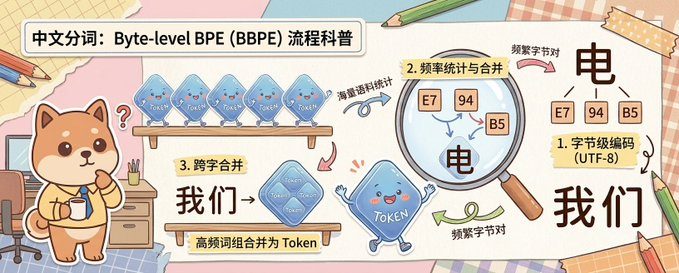
Scrapbook Byte-level BPE Explainer
This prompt generates a wide hand-drawn educational infographic with cute mascot characters to explain byte-level BPE tokenization in a friendly Chinese science-pop style.
This is a GPT Image 2 prompt case for Illustration & Art. Use the copy-ready prompt below to generate similar visuals, and review Awesome GPT Image 2 Prompts attribution plus commercial-use rights before reuse.
Free 1K preview
Generate one preview image instantly, no sign-up required.
Prompt
Copy-ready prompt
A cute horizontal educational infographic in a hand-drawn scrapbook style, with a soft desktop and paper collage background, designed to explain the principle of Chinese word segmentation based on byte-level BPE. The picture is divided into 3 clear teaching areas, spanning the entire width of the banner from left to right. On the far left stands a cute Shiba Inu mascot, {argument name="character name" default="Chai Xiaoqi"}, with warm brown and cream fur, a round face, small triangular ears, rosy cheeks, and a curious expression, holding a cup and standing next to a desk with drawers, pencils, and a chair. Above the Shiba Inu is a bold, rounded white title box containing black Chinese characters: {argument name="headline text" default="Chinese Word Segmentation: A Popular Science Explanation of Byte-level BPE (BBPE) Process"}. In the first teaching area near the top, 4 translucent blue Token-shaped squares are displayed on a wooden shelf, each labeled “Token” and accompanied by a curved arrow and handwritten Chinese annotation “word frequency corpus statistics” pointing to the next step. In the second area, a large magnifying glass highlights 3 frequency squares labeled “E7”, “94”, and “B5”, with a regional label written on a yellow sticky note that reads “2. Frequency Statistics and Merging”; below and inside the magnified area is a large black Chinese character “electricity”, accompanied by handwritten notes “frequent byte pairs”. In the lower middle of the third area, add a wooden sign and a larger merged translucent blue Token square labeled “Token”, with a yellow sticky note that reads “3. Cross-word Merging”, large black Chinese characters “we→”, and a description strip below “high-frequency word combinations are merged into Tokens”. On the far right, the final explanation result is displayed, with 3 small byte squares labeled “E7”, “94”, and “B5” located above a large black Chinese character “electricity”, next to a sticky note card that reads “1. Byte-level Encoding (UTF-8)”, and below a large black Chinese vocabulary “we”. Connect the areas with pink, blue, and green curved arrows to show the process flow. Near the bottom center, include a blue Token mascot with small limbs, a smiling face, and waving hands. Use soft cream, pink, beige, and light blue colors, with thick and clear lines, sticker-like cut-out shapes, tape corners, notebook textures, scattered pencils, and a friendly handwritten illustration style suitable for popular science charts.Prompt variables
Editable argument placeholders found in the prompt, with their default values.
Best for
- - Illustration & Art visual exploration
- - Image generation and reference-image edits
- - Reusable briefs that keep source attribution visible
Change these parts
- - Subject, product, character, or scene
- - Aspect ratio, camera, lighting, and background
- - Brand, text, color, and output constraints
Recommended model and settings
- - Model: gpt-image-2
- - Input mode: Text to Image
- - Aspect ratio: source
- - Commercial status: review original source
How to use this prompt
- 1. Copy the prompt and preserve its structure for the first test.
- 2. Replace the subject, context, and publishing channel.
- 3. Change one camera, lighting, or style variable per iteration.
- 4. Inspect the output, source, text, and rights before reuse.
Limitations, source, and reuse cautions
- - Generated output is an editable draft, not factual, legal, or rights evidence.
- - Review the linked source, people, brands, logos, text, and third-party media before commercial use.
More cases in this category
Prioritized by category, input mode compatibility, quality, and lower risk.




Reuse and source notes
Use this prompt safely after previewing the case.
- 1.Copy the prompt or open it directly in Dovoo with the generation button.
- 2.Adjust variables, aspect ratio, and reference images for your own use case.
- 3.Before publishing or paid usage, verify source rights, attribution requirements, and brand or likeness risks.
Can I use this prompt commercially?
Commercial-use status is allowed. Review the original source, license, brand constraints, and legal requirements before paid usage.
Where does this case come from?
This case is imported from Awesome GPT Image 2 Prompts; keep attribution visible and check the source URL before reuse.