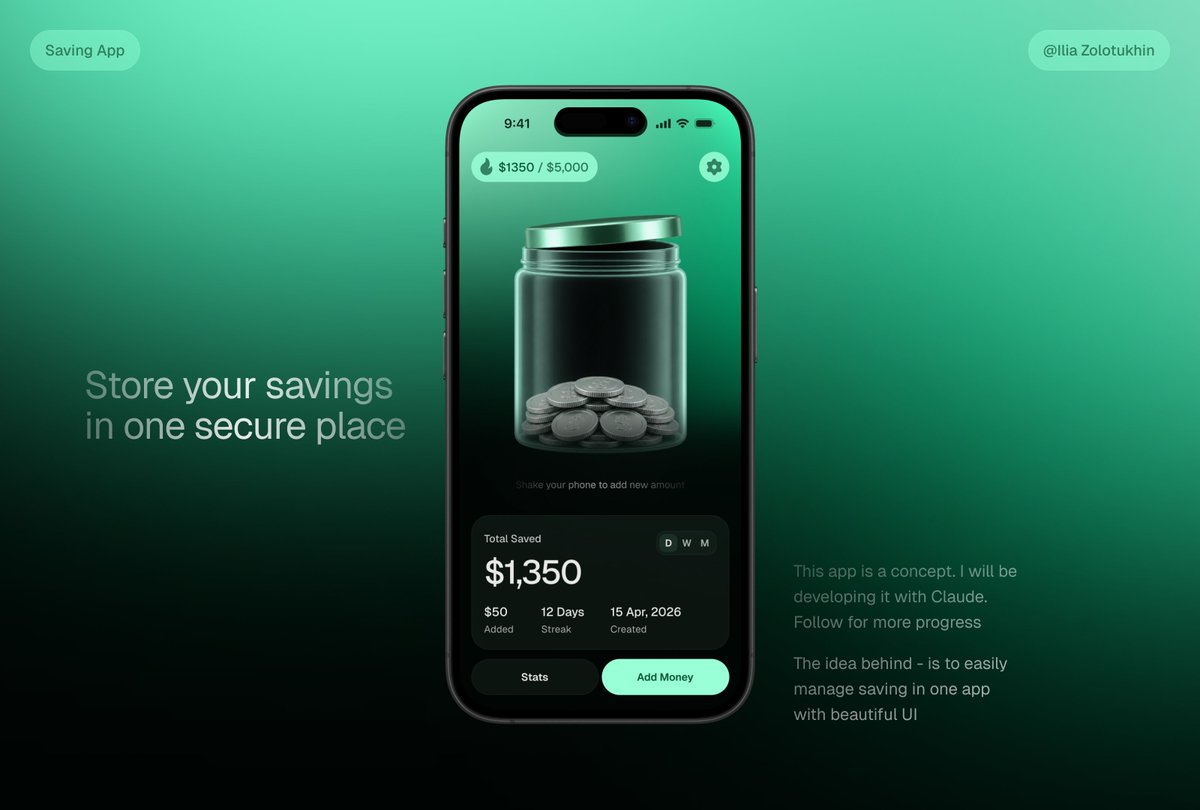
3D Savings App Jar UI Mockup
Generates a polished fintech savings app concept featuring a smartphone UI with a glass coin jar and marketing text for portfolio or launch visuals.
This is a GPT Image 2 prompt case for Product & Commercial. Use the copy-ready prompt below to generate similar visuals, and review Awesome GPT Image 2 Prompts attribution plus commercial-use rights before reuse.
Free 1K preview
Generate one preview image instantly, no sign-up required.
Prompt
Copy-ready prompt
{
  "type": "premium fintech app concept hero mockup",
  "style": "sleek 3D glassmorphism UI, dark mint green gradients, realistic smartphone render, soft studio lighting, high contrast, polished product-design presentation, subtle blur and glow, cinematic shadows",
  "canvas": {
    "aspect_ratio": "16:9 landscape",
    "background": "smooth teal-to-emerald gradient fading to near-black at the bottom, minimalist tech presentation backdrop"
  },
  "layout": {
    "centerpiece": "one large black iPhone-style smartphone centered slightly right, front-facing, rounded corners, dynamic-island camera cutout, thin black bezel, realistic side buttons and reflections",
    "left_text_block": {
      "position": "left middle",
      "headline": "{argument name=\"headline text\" default=\"Store your savings in one secure place\"}",
      "style": "large light-gray sans-serif text, two lines, soft opacity"
    },
    "right_text_block": {
      "position": "lower right",
      "paragraph_count": 2,
      "text": [
        "This app is a concept. I will be developing it with Claude. Follow for more progress",
        "The idea behind - is to easily manage saving in one app with beautiful UI"
      ],
      "style": "small muted gray sans-serif text"
    },
    "top_badges": {
      "count": 2,
      "items": [
        {
          "position": "top left",
          "text": "Saving App",
          "shape": "rounded translucent mint pill"
        },
        {
          "position": "top right",
          "text": "{argument name=\"creator handle\" default=\"@Ilia Zolotukhin\"}",
          "shape": "rounded translucent mint pill"
        }
      ]
    }
  },
  "phone_screen": {
    "status_bar": {
      "time": "9:41",
      "icons": "cell signal, Wi-Fi, battery",
      "count": 4
    },
    "top_controls": {
      "count": 2,
      "items": [
        {
          "position": "top left",
          "text": "{argument name=\"savings progress\" default=\"$1350 / $5,000\"}",
          "icon": "small flame or droplet icon",
          "shape": "mint translucent rounded pill"
        },
        {
          "position": "top right",
          "icon": "settings gear",
          "shape": "mint circular button"
        }
      ]
    },
    "main_visual": "large translucent glass jar with metallic mint lid, centered on screen, jar filled at the bottom with stacked silver coins; glossy refractions, vertical highlights, 3D depth, dark green interior background",
    "micro_instruction": "Shake your phone to add new amount",
    "stats_card": {
      "position": "bottom of phone screen",
      "shape": "large dark rounded rectangle glass card",
      "title": "Total Saved",
      "main_amount": "{argument name=\"saved amount\" default=\"$1,350\"}",
      "time_toggle": {
        "count": 3,
        "labels": [
          "D",
          "W",
          "M"
        ],
        "active": "D"
      },
      "metrics": {
        "count": 3,
        "items": [
          {
            "value": "$50",
            "label": "Added"
          },
          {
            "value": "12 Days",
            "label": "Streak"
          },
          {
            "value": "15 Apr, 2026",
            "label": "Created"
          }
        ]
      }
    },
    "bottom_buttons": {
      "count": 2,
      "items": [
        {
          "text": "Stats",
          "style": "dark rounded button"
        },
        {
          "text": "Add Money",
          "style": "bright mint rounded button"
        }
      ]
    }
  },
  "rendering_notes": "make the jar the visual focus, realistic glass transparency and coin geometry, clean modern typography, balanced negative space, no clutter, product-shot quality, suitable for a savings app landing-page teaser"
}
Prompt variables
Editable argument placeholders found in the prompt, with their default values.
Best for
- - Product & Commercial visual exploration
- - Image generation and reference-image edits
- - Reusable briefs that keep source attribution visible
Change these parts
- - Subject, product, character, or scene
- - Aspect ratio, camera, lighting, and background
- - Brand, text, color, and output constraints
Recommended model and settings
- - Model: gpt-image-2
- - Input mode: Text to Image
- - Aspect ratio: source
- - Commercial status: review original source
How to use this prompt
- 1. Copy the prompt and preserve its structure for the first test.
- 2. Replace the subject, context, and publishing channel.
- 3. Change one camera, lighting, or style variable per iteration.
- 4. Inspect the output, source, text, and rights before reuse.
Limitations, source, and reuse cautions
- - Generated output is an editable draft, not factual, legal, or rights evidence.
- - Review the linked source, people, brands, logos, text, and third-party media before commercial use.
More cases in this category
Prioritized by category, input mode compatibility, quality, and lower risk.


Reuse and source notes
Use this prompt safely after previewing the case.
- 1.Copy the prompt or open it directly in Dovoo with the generation button.
- 2.Adjust variables, aspect ratio, and reference images for your own use case.
- 3.Before publishing or paid usage, verify source rights, attribution requirements, and brand or likeness risks.
Can I use this prompt commercially?
Commercial-use status is allowed. Review the original source, license, brand constraints, and legal requirements before paid usage.
Where does this case come from?
This case is imported from Awesome GPT Image 2 Prompts; keep attribution visible and check the source URL before reuse.