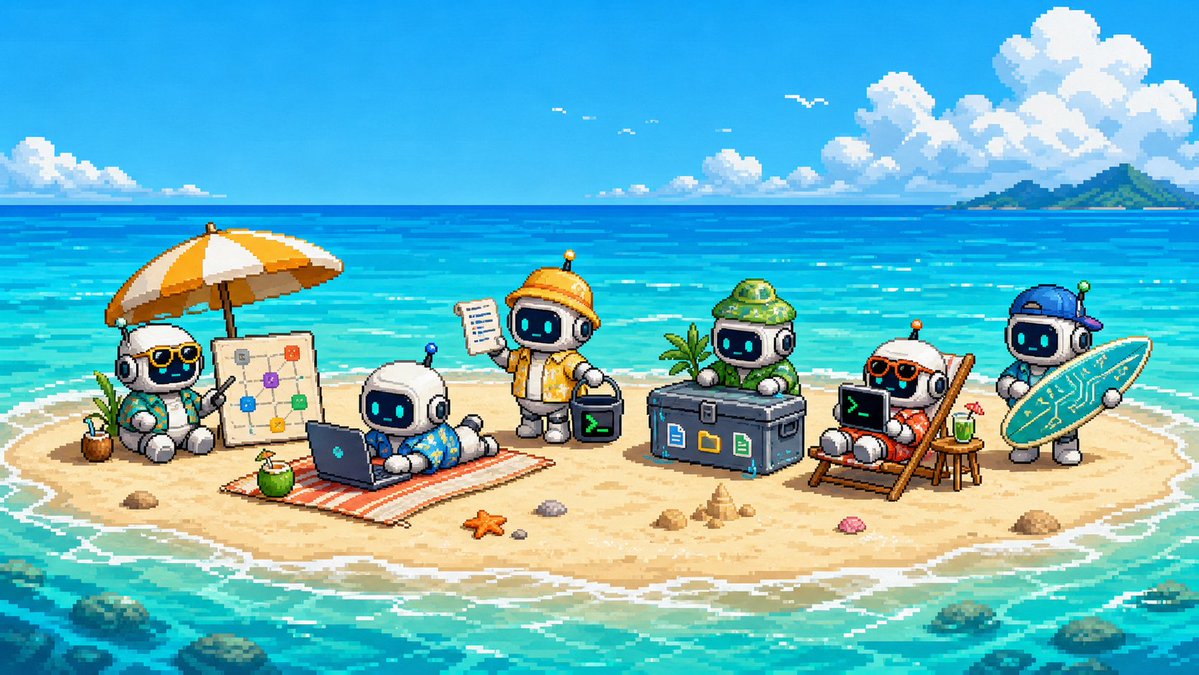
Cute Pixel Art Sandbank Robot Team
A wide retro pixel-art beach scene featuring six cute developer robots collaborating on a tiny tropical sandbank, ideal for a playful tech project promo visual.
This is a GPT Image 2 prompt case for Anime & Game. Use the copy-ready prompt below to generate similar visuals, and review Awesome GPT Image 2 Prompts attribution plus commercial-use rights before reuse.
Free 1K preview
Generate one preview image instantly, no sign-up required.
Prompt
Copy-ready prompt
Create a cute, wide-screen pixel art promotional illustration for {argument name="project name" default="Sandbank Agent"}, depicting a tiny tropical sandbar island in the middle of a bright turquoise ocean under a sunny blue sky. Canvas: 16:9 landscape, retro 16-bit pixel art, clear blocky pixels, high saturation, charming game art aesthetics, no text overlays or watermarks. Scene: A small, oval-shaped sand island surrounded by shallow teal water with white wavelets, coral and rocks visible underwater, a green small island on the horizon to the right, large pixelated fluffy clouds, a few white birds, shimmering water surface. Subject: 6 chubby, cute chibi robots with white rounded bodies, black glass screen faces, {argument name="robot face glow color" default="cyan"} glowing eyes, small antennas, and beach/workstation accessories arranged from left to right on the beach. Robot 1 is sitting under an orange and white striped umbrella, wearing sunglasses and a turquoise Hawaiian shirt, with a coconut drink and a vertical project displaying connected colorful nodes next to it. Robot 2 is lying on a striped beach towel using a laptop, wearing blue tropical swim trunks, with a coconut drink next to the towel. Robot 3 is standing in the center, wearing a yellow-orange adventure jacket and a yellow hard hat, holding a clipboard in one hand and a small black terminal cube with a green command-line prompt symbol in the other. Robot 4 is sitting behind a large black equipment case, wearing a green fisherman's hat and a green suit; the case front has three colorful file/application icons. Robot 5 is lying on a wooden beach chair, wearing orange sunglasses and a red swimsuit, using a black laptop with a green command-line prompt symbol; a green drink is on a small table next to it, and a vertical project or paddle leans against the chair. Robot 6 is standing on the far right, wearing a blue hat and holding a turquoise surfboard decorated with circuit board lines, hinting at fun developer infrastructure. Add beach details: 1 orange starfish, a few small shells and pebbles near the center foreground, a small sandcastle near the equipment case, and soft shadows under each object. Atmosphere: A cheerful, cute, collaborative, and tech-filled beach vacation workspace atmosphere. Use screen lighting from {argument name="robot face glow color" default="cyan"}, water from {argument name="ocean color" default="bright turquoise"}, an umbrella from {argument name="umbrella color" default="orange and white"}, and {argument name="pixel art style" default="16-bit retro game art"}. Ensure all elements are clearly distinguishable at small sizes, with clean outlines and balanced spacing.Prompt variables
Editable argument placeholders found in the prompt, with their default values.
Best for
- - Anime & Game visual exploration
- - Image generation and reference-image edits
- - Reusable briefs that keep source attribution visible
Change these parts
- - Subject, product, character, or scene
- - Aspect ratio, camera, lighting, and background
- - Brand, text, color, and output constraints
Recommended model and settings
- - Model: gpt-image-2
- - Input mode: Text to Image
- - Aspect ratio: source
- - Commercial status: review original source
How to use this prompt
- 1. Copy the prompt and preserve its structure for the first test.
- 2. Replace the subject, context, and publishing channel.
- 3. Change one camera, lighting, or style variable per iteration.
- 4. Inspect the output, source, text, and rights before reuse.
Limitations, source, and reuse cautions
- - Generated output is an editable draft, not factual, legal, or rights evidence.
- - Review the linked source, people, brands, logos, text, and third-party media before commercial use.
More cases in this category
Prioritized by category, input mode compatibility, quality, and lower risk.
Reuse and source notes
Use this prompt safely after previewing the case.
- 1.Copy the prompt or open it directly in Dovoo with the generation button.
- 2.Adjust variables, aspect ratio, and reference images for your own use case.
- 3.Before publishing or paid usage, verify source rights, attribution requirements, and brand or likeness risks.
Can I use this prompt commercially?
Commercial-use status is allowed. Review the original source, license, brand constraints, and legal requirements before paid usage.
Where does this case come from?
This case is imported from Awesome GPT Image 2 Prompts; keep attribution visible and check the source URL before reuse.