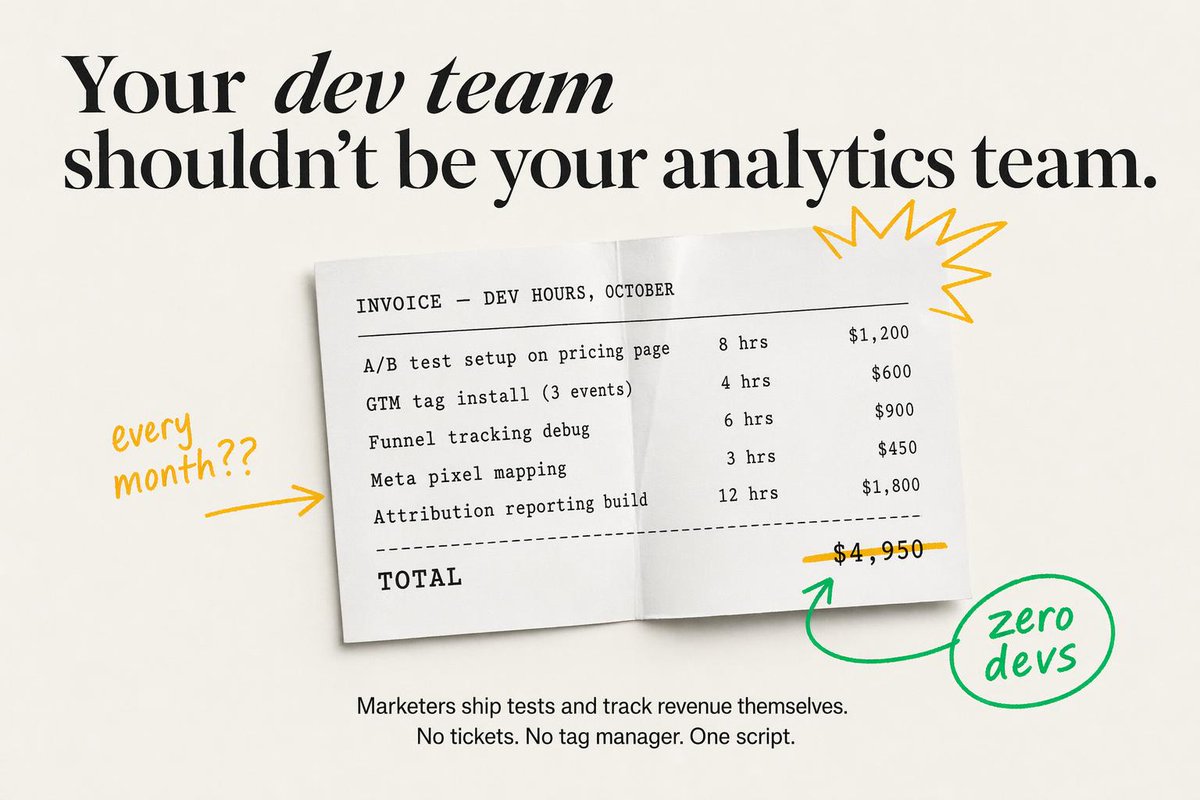
Minimal SaaS Ad With Invoice Mockup
This prompt generates a premium static marketing ad featuring a developer-hours invoice, strong editorial typography, and hand-drawn annotations for SaaS landing pages or paid social creatives.
This is a GPT Image 2 prompt case for Product & Commercial. Use the copy-ready prompt below to generate similar visuals, and review Awesome GPT Image 2 Prompts attribution plus commercial-use rights before reuse.
Free 1K preview
Generate one preview image instantly, no sign-up required.
Prompt
Copy-ready prompt
Create a minimalist static SaaS ad on a warm off-white background with elegant editorial typography and clean, high-fidelity text rendering. At the top, place a large black serif headline in two lines reading: "{argument name="headline text" default="Your dev team shouldn’t be your analytics team."}" The words “dev team” should appear in italic serif while the rest remains bold high-contrast serif, with generous spacing and a luxury magazine-style layout. Centered below, show a slightly tilted white paper invoice sheet with a soft drop shadow and a subtle vertical fold crease down the middle, as if photographed from above. The invoice uses black monospaced typewriter-style text and reads exactly: “INVOICE — DEV HOURS, OCTOBER” as the header, then 5 line items with hours and prices aligned in columns: “A/B test setup on pricing page 8 hrs $1,200”, “GTM tag install (3 events) 4 hrs $600”, “Funnel tracking debug 6 hrs $900”, “Meta pixel mapping 3 hrs $450”, and “Attribution reporting build 12 hrs $1,800”. Under the 5 items, add a dashed divider line, then a bold monospaced “TOTAL” on the lower left and the total price “$4,950” on the lower right. Draw a hand-drawn yellow line striking through the total price. Add 4 doodle-style annotation elements around the invoice: on the left, handwritten yellow text saying “every month??” with a yellow arrow pointing right toward the paper; on the upper right of the paper, a yellow starburst scribble; below the total, a green curved arrow pointing up toward the crossed-out price; and on the lower right, a green hand-drawn circle containing the handwritten words “zero devs,” connected to the green arrow. At the bottom center of the ad, add a smaller black sans-serif body copy in 2 lines reading: “{argument name="body text" default="Marketers ship tests and track revenue themselves.\nNo tickets. No tag manager. One script."}" Keep the composition airy, premium, and conversion-focused, blending modern startup ad design with tactile paper realism and playful marker annotations.Prompt variables
Editable argument placeholders found in the prompt, with their default values.
Best for
- - Product & Commercial visual exploration
- - Image generation and reference-image edits
- - Reusable briefs that keep source attribution visible
Change these parts
- - Subject, product, character, or scene
- - Aspect ratio, camera, lighting, and background
- - Brand, text, color, and output constraints
Recommended model and settings
- - Model: gpt-image-2
- - Input mode: Text to Image
- - Aspect ratio: source
- - Commercial status: review original source
How to use this prompt
- 1. Copy the prompt and preserve its structure for the first test.
- 2. Replace the subject, context, and publishing channel.
- 3. Change one camera, lighting, or style variable per iteration.
- 4. Inspect the output, source, text, and rights before reuse.
Limitations, source, and reuse cautions
- - Generated output is an editable draft, not factual, legal, or rights evidence.
- - Review the linked source, people, brands, logos, text, and third-party media before commercial use.
More cases in this category
Prioritized by category, input mode compatibility, quality, and lower risk.


Reuse and source notes
Use this prompt safely after previewing the case.
- 1.Copy the prompt or open it directly in Dovoo with the generation button.
- 2.Adjust variables, aspect ratio, and reference images for your own use case.
- 3.Before publishing or paid usage, verify source rights, attribution requirements, and brand or likeness risks.
Can I use this prompt commercially?
Commercial-use status is allowed. Review the original source, license, brand constraints, and legal requirements before paid usage.
Where does this case come from?
This case is imported from Awesome GPT Image 2 Prompts; keep attribution visible and check the source URL before reuse.