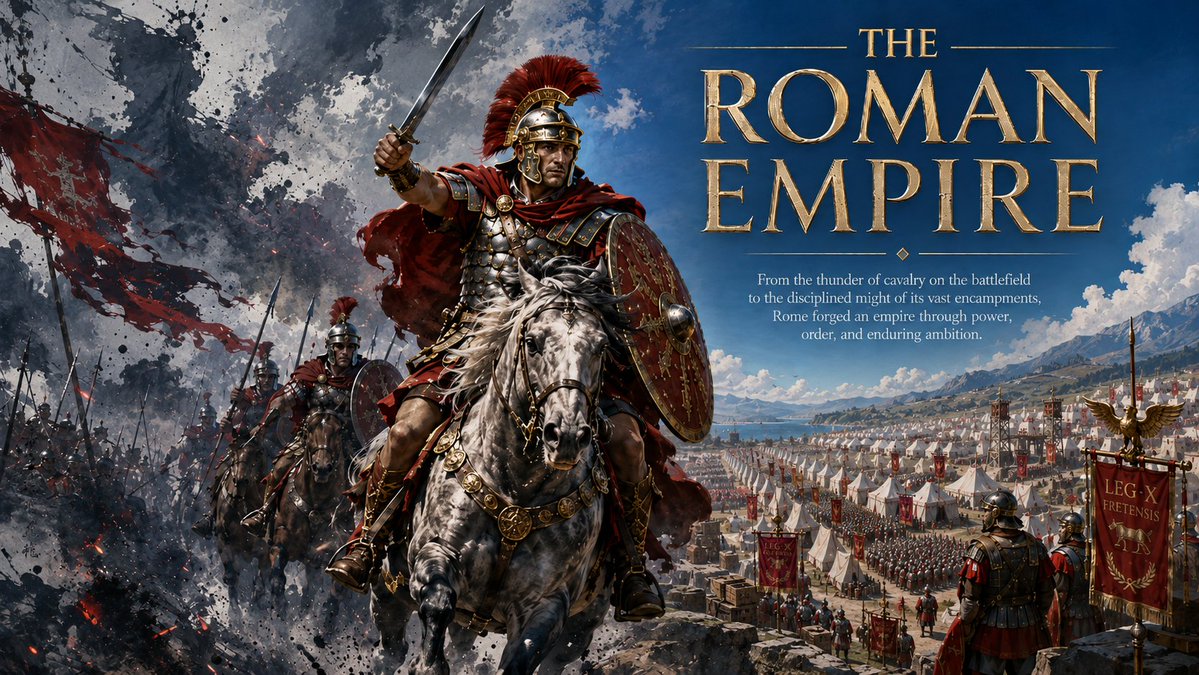
Roman Empire Dual-World Poster
A cinematic editorial poster showing Roman cavalry emerging from battlefield chaos beside an orderly imperial encampment, ideal for historical cover art or promotional visuals.
This is a GPT Image 2 prompt case for Graphic & Poster. Use the copy-ready prompt below to generate similar visuals, and review Awesome GPT Image 2 Prompts attribution plus commercial-use rights before reuse.
Free 1K preview
Generate one preview image instantly, no sign-up required.
Prompt
Copy-ready prompt
Create a cinematic dual-world editorial poster about {argument name="historical subject" default="the Roman Empire"}. Use a wide 16:9 landscape canvas with a dramatic vertical split in mood: the left half is chaotic battlefield action with black smoke, ash, red torn banners, spear silhouettes, fire sparks, and dark painterly ink splatter textures; the right half is a clear imperial encampment beside a blue lake and distant mountains under a bright sky, filled with orderly white tents, marching formations, standards, supply crates, watchtowers, and disciplined Roman soldiers. In the foreground, place exactly 3 mounted Roman cavalrymen: the central dominant commander rides a powerful dapple-gray horse toward the viewer, wearing ornate segmented armor, red cloak, gold-trimmed helmet with a red crest, holding a raised sword in his right hand and a large decorated oval shield on his left; behind him to the lower left are exactly 2 additional mounted legionaries with helmets, shields, spears, and red accents, partially obscured by smoke. Add exactly 2 prominent foreground standing soldiers on the lower right, seen from behind, watching the camp. Include multiple Roman standards, with one large red banner on the far right showing gold eagle decoration and pseudo-Latin legion text. Typography: on the upper right, set a monumental metallic gold Roman-serif title reading {argument name="headline text" default="THE ROMAN EMPIRE"}, with “THE” small above “ROMAN EMPIRE,” thin horizontal gold rules around the small word, engraved bevels, subtle shadow, and classical monumental spacing. Beneath it, add a small centered white editorial subtitle reading {argument name="subtitle text" default="From the thunder of cavalry on the battlefield to the disciplined might of its vast encampments, Rome forged an empire through power, order, and enduring ambition."}. Color palette: crimson red, antique gold, smoke black, steel gray, parchment beige, and deep imperial blue. Style: ultra-detailed epic historical concept art, dramatic lighting, realistic armor and horses, high contrast between war chaos and imperial order, sharp foreground detail with atmospheric depth, no modern objects, no watermark, no extra text beyond the title, subtitle, and banner markings.Prompt variables
Editable argument placeholders found in the prompt, with their default values.
Best for
- - Graphic & Poster visual exploration
- - Image generation and reference-image edits
- - Reusable briefs that keep source attribution visible
Change these parts
- - Subject, product, character, or scene
- - Aspect ratio, camera, lighting, and background
- - Brand, text, color, and output constraints
Recommended model and settings
- - Model: gpt-image-2
- - Input mode: Text to Image
- - Aspect ratio: source
- - Commercial status: review original source
How to use this prompt
- 1. Copy the prompt and preserve its structure for the first test.
- 2. Replace the subject, context, and publishing channel.
- 3. Change one camera, lighting, or style variable per iteration.
- 4. Inspect the output, source, text, and rights before reuse.
Limitations, source, and reuse cautions
- - Generated output is an editable draft, not factual, legal, or rights evidence.
- - Review the linked source, people, brands, logos, text, and third-party media before commercial use.
More cases in this category
Prioritized by category, input mode compatibility, quality, and lower risk.





Reuse and source notes
Use this prompt safely after previewing the case.
- 1.Copy the prompt or open it directly in Dovoo with the generation button.
- 2.Adjust variables, aspect ratio, and reference images for your own use case.
- 3.Before publishing or paid usage, verify source rights, attribution requirements, and brand or likeness risks.
Can I use this prompt commercially?
Commercial-use status is allowed. Review the original source, license, brand constraints, and legal requirements before paid usage.
Where does this case come from?
This case is imported from Awesome GPT Image 2 Prompts; keep attribution visible and check the source URL before reuse.