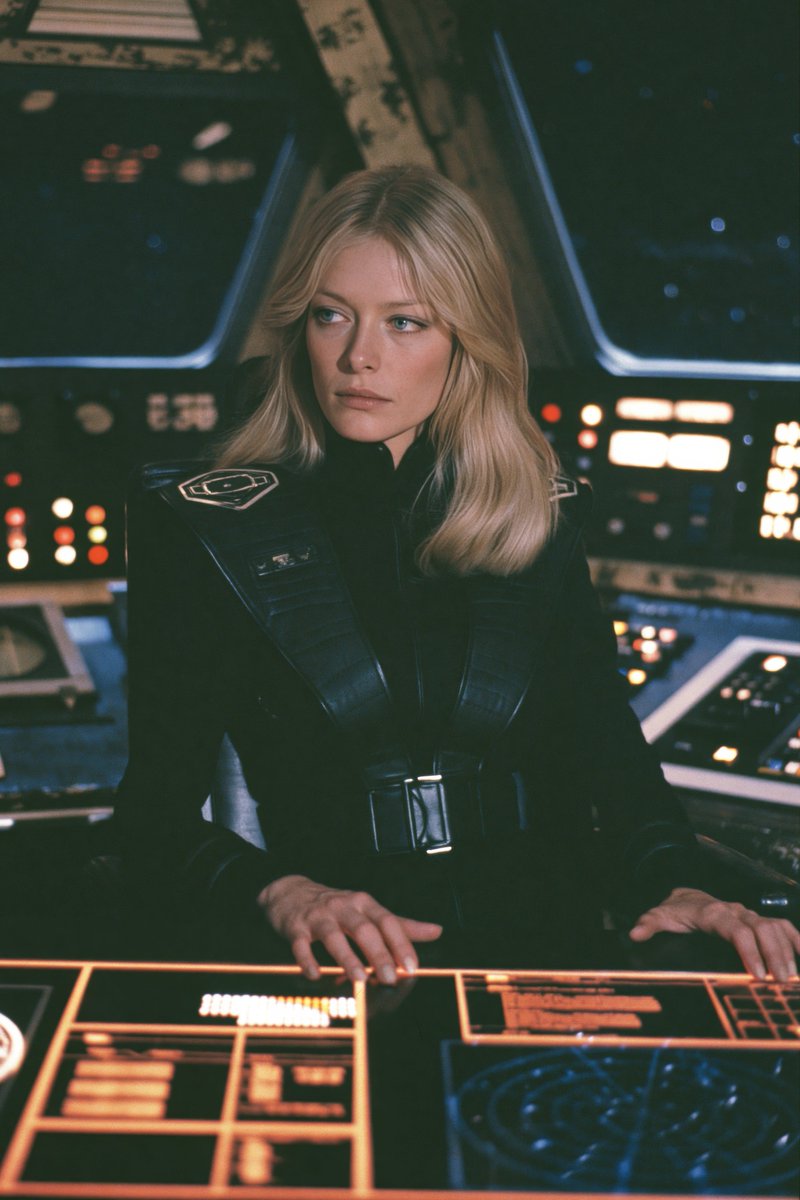
Retro Sci-Fi Starship Officer
A cinematic portrait prompt for generating a vintage sci-fi spaceship cockpit scene with a serious female officer at glowing controls.
This is a GPT Image 2 prompt case for Portrait & Character. Use the copy-ready prompt below to generate similar visuals, and review Awesome GPT Image 2 Prompts attribution plus commercial-use rights before reuse.
Free 1K preview
Generate one preview image instantly, no sign-up required.
Prompt
Copy-ready prompt
Create a cinematic retro-futuristic sci-fi film still of {argument name="character description" default="a young blonde woman with shoulder-length softly waved hair, pale skin, and blue eyes"} seated at the command console of a spaceship cockpit. She wears {argument name="uniform description" default="a fitted black high-collar space officer uniform with structured shoulder panels, ribbed harness straps, a wide belt buckle, and subtle silver insignia patches on the shoulders"}. Frame her from the waist up, centered slightly left, with both hands resting on a glowing orange holographic control panel in the foreground. Her expression is serious, calm, and focused, gazing off to the left rather than at the camera. The background is a dim starship bridge with exactly three main cockpit window areas visible: one large dark window behind her right side, one angled window behind her left side, and one partial window at the far left, showing deep space with small blue stars. Surround her with many softly blurred illuminated control panels, buttons, and rectangular displays in warm amber, red, and cool blue light. Use {argument name="visual style" default="1970s analog sci-fi cinema, practical set design, soft film grain, muted colors, shallow depth of field, slightly dreamy lens softness"}. Lighting should be low-key and atmospheric, with warm console glow on her hands and face, cool blue rim light from the windows, and a dark green-black cockpit ambiance. Vertical portrait composition, 2:3 aspect ratio, realistic photography, vintage film still quality, no text, no watermark, no modern touchscreen minimalism, no cartoon style.Prompt variables
Editable argument placeholders found in the prompt, with their default values.
Best for
- - Portrait & Character visual exploration
- - Image generation and reference-image edits
- - Reusable briefs that keep source attribution visible
Change these parts
- - Subject, product, character, or scene
- - Aspect ratio, camera, lighting, and background
- - Brand, text, color, and output constraints
Recommended model and settings
- - Model: gpt-image-2
- - Input mode: Text to Image
- - Aspect ratio: source
- - Commercial status: review original source
How to use this prompt
- 1. Copy the prompt and preserve its structure for the first test.
- 2. Replace the subject, context, and publishing channel.
- 3. Change one camera, lighting, or style variable per iteration.
- 4. Inspect the output, source, text, and rights before reuse.
Limitations, source, and reuse cautions
- - Generated output is an editable draft, not factual, legal, or rights evidence.
- - Review the linked source, people, brands, logos, text, and third-party media before commercial use.
More cases in this category
Prioritized by category, input mode compatibility, quality, and lower risk.

Reuse and source notes
Use this prompt safely after previewing the case.
- 1.Copy the prompt or open it directly in Dovoo with the generation button.
- 2.Adjust variables, aspect ratio, and reference images for your own use case.
- 3.Before publishing or paid usage, verify source rights, attribution requirements, and brand or likeness risks.
Can I use this prompt commercially?
Commercial-use status is allowed. Review the original source, license, brand constraints, and legal requirements before paid usage.
Where does this case come from?
This case is imported from Awesome GPT Image 2 Prompts; keep attribution visible and check the source URL before reuse.