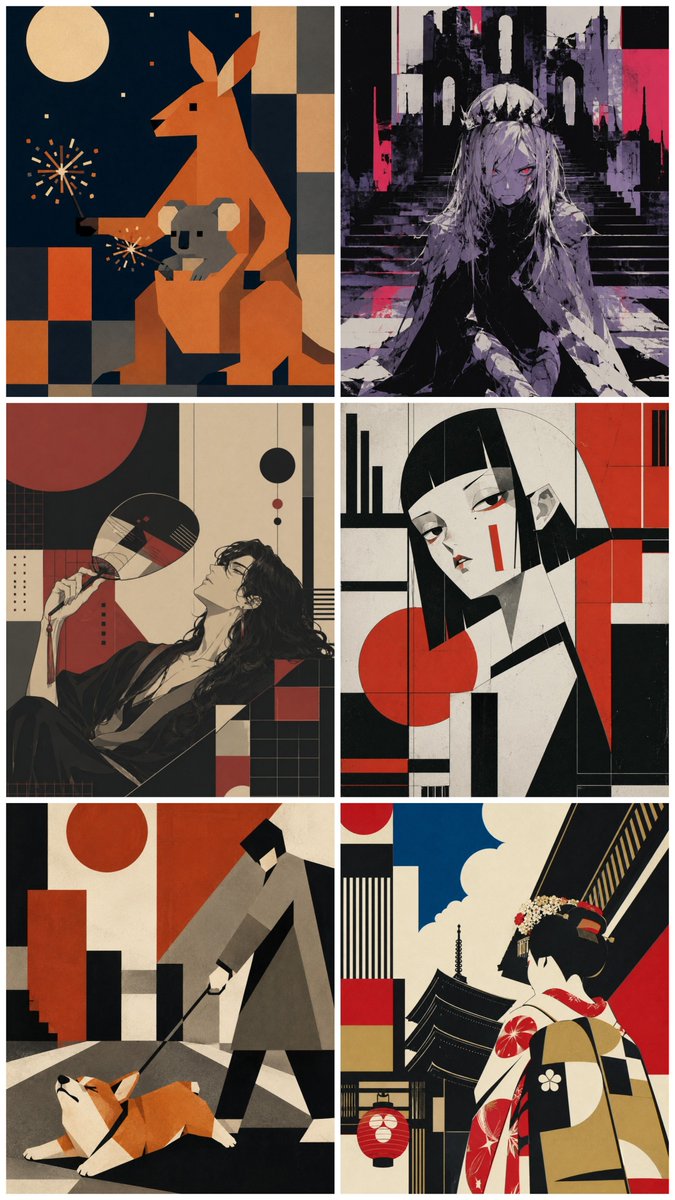
Six-Panel Retro Japanese Poster Collage
Generates a six-panel collage of varied retro Japanese modernist illustrations sharing one cohesive poster-art style.
This is a GPT Image 2 prompt case for Illustration & Art. Use the copy-ready prompt below to generate similar visuals, and review Awesome GPT Image 2 Prompts attribution plus commercial-use rights before reuse.
Free 1K preview
Generate one preview image instantly, no sign-up required.
Prompt
Copy-ready prompt
Goal: Create a vertical 2-column by 3-row collage of exactly 6 separate illustration panels, all in a unified retro Japanese modernist poster style with flat geometric shapes, hard-edged composition, limited palettes, subtle paper grain, ink texture, and strong black/cream/red/orange accents. Each panel should look like a distinct generated artwork sharing the same visual language.

Canvas: Tall portrait canvas, approximately 675 × 1024 px or 2:3 ratio. Use thin white gutters between panels and a narrow white outer border. No captions, no logos, no watermark.

Visual style: A fusion of mid-century graphic design, Japanese printmaking, Constructivist geometry, art deco poster composition, and contemporary anime/editorial illustration. Use flattened perspective, blocky shapes, textured paper, muted cream backgrounds, deep black shadows, burnt orange, vermilion red, slate gray, charcoal, and occasional navy blue. Keep details stylized rather than realistic.

Layout: Arrange exactly 6 panels:
1. Top-left panel: A geometric night scene with an orange kangaroo-like animal standing upright beside a gray koala-like animal, a cream full moon in the upper left, small star/firework dots, and a grid of orange, beige, black, and gray rectangles in the background. The animals should be angular and origami-like.
2. Top-right panel: A dark gothic anime-style girl with long pale hair sitting on stone steps before ruined cathedral arches. Use black, gray, lavender, and hot magenta accents, with one red eye visible and a moody ruined-city atmosphere.
3. Middle-left panel: A reclining elegant long-haired person in black clothing holding a round fan near their face, surrounded by red and black geometric circles, grids, rectangles, and cream negative space. The mood is languid and stylish.
4. Middle-right panel: A close-up portrait of a pale bob-haired girl with straight black bangs, red eyes, small red vertical face markings, and a black-white-red abstract geometric background with circles and rectangular blocks.
5. Bottom-left panel: A minimalist city-walking scene with a person in a long gray coat holding a leash attached to a low, stretching orange-and-white corgi. Background includes red circles, black blocks, cream walls, stairs, and sharp architectural geometry.
6. Bottom-right panel: A back-view portrait of a traditional Japanese woman or geisha in a patterned kimono, standing before pagoda rooftops and a lantern. Include a bright blue sky with cream clouds and bold black, red, cream, and tan architectural shapes.

Subject customization: Keep the collage structure fixed, but allow the overall subject set to be interpreted as {argument name="theme" default="six unrelated retro Japanese poster scenes"}. Use {argument name="main palette" default="cream, black, vermilion red, burnt orange, charcoal gray, navy blue"}. Set the mood to {argument name="mood" default="stylish, mysterious, nostalgic, graphic"}. Use {argument name="art style" default="retro Japanese modernist poster illustration with anime influence"}. Make the image suitable for {argument name="use case" default="a social media showcase of varied GPT Image 2 outputs from one consistent style prompt"}.

Constraints: Exactly 6 panels, exactly 2 columns and 3 rows, no text inside the artwork, no photorealism, no extra panels, no floating UI, no frame labels. Maintain consistent texture and design language across all six panels while making every panel visually distinct.
Prompt variables
Editable argument placeholders found in the prompt, with their default values.
Best for
- - Illustration & Art visual exploration
- - Image generation and reference-image edits
- - Reusable briefs that keep source attribution visible
Change these parts
- - Subject, product, character, or scene
- - Aspect ratio, camera, lighting, and background
- - Brand, text, color, and output constraints
Recommended model and settings
- - Model: gpt-image-2
- - Input mode: Text to Image
- - Aspect ratio: source
- - Commercial status: review original source
How to use this prompt
- 1. Copy the prompt and preserve its structure for the first test.
- 2. Replace the subject, context, and publishing channel.
- 3. Change one camera, lighting, or style variable per iteration.
- 4. Inspect the output, source, text, and rights before reuse.
Limitations, source, and reuse cautions
- - Generated output is an editable draft, not factual, legal, or rights evidence.
- - Review the linked source, people, brands, logos, text, and third-party media before commercial use.
More cases in this category
Prioritized by category, input mode compatibility, quality, and lower risk.



Reuse and source notes
Use this prompt safely after previewing the case.
- 1.Copy the prompt or open it directly in Dovoo with the generation button.
- 2.Adjust variables, aspect ratio, and reference images for your own use case.
- 3.Before publishing or paid usage, verify source rights, attribution requirements, and brand or likeness risks.
Can I use this prompt commercially?
Commercial-use status is allowed. Review the original source, license, brand constraints, and legal requirements before paid usage.
Where does this case come from?
This case is imported from Awesome GPT Image 2 Prompts; keep attribution visible and check the source URL before reuse.