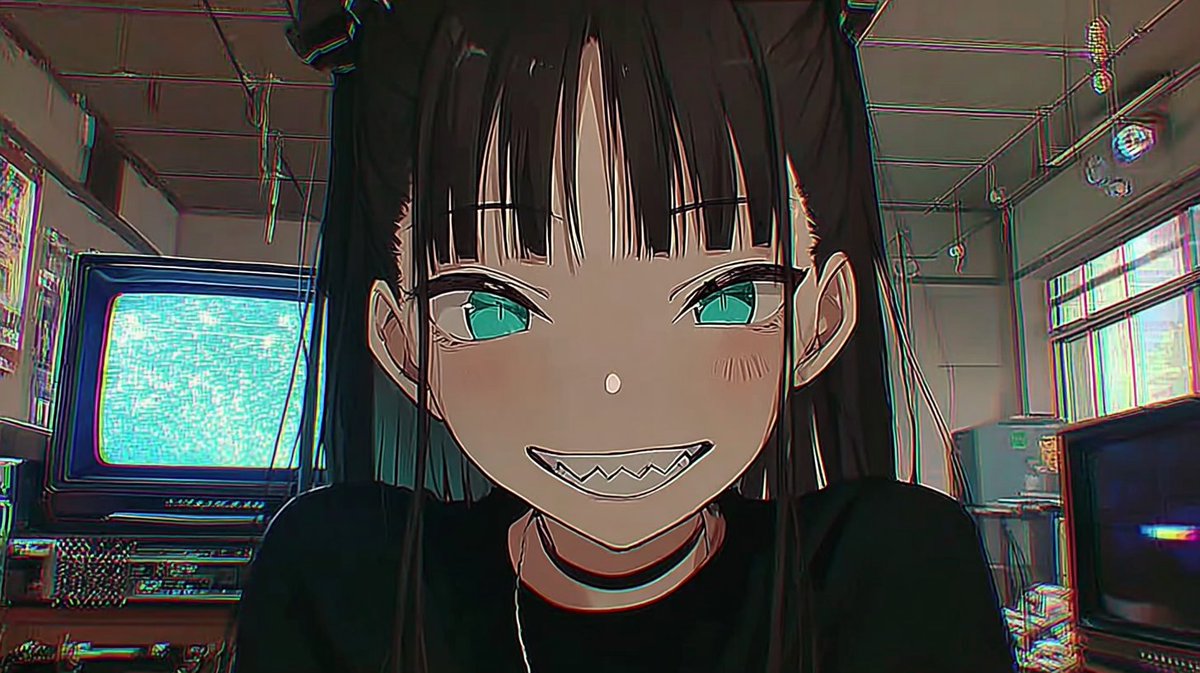
Retro 2.5D Anime CRT Girl
A cinematic retro anime thumbnail featuring a sharp-toothed gothic girl in a VHS-styled analog electronics room.
This is a GPT Image 2 prompt case for Anime & Game. Use the copy-ready prompt below to generate similar visuals, and review Awesome GPT Image 2 Prompts attribution plus commercial-use rights before reuse.
Free 1K preview
Generate one preview image instantly, no sign-up required.
Prompt
Copy-ready prompt
Create a retro 2.5D anime thumbnail in a cinematic 16:9 frame, showing a close-up of {argument name="character name" default="a mischievous gothic anime girl"} leaning toward the camera in a cluttered analog electronics room. She has long straight {argument name="hair color" default="black hair"} with blunt bangs, teal-green eyes, pale skin, small blush marks, pointed ears, and a wide unsettling grin with sharp triangular teeth. She wears a black top and a thin black choker, with her face centered and dominating the composition, shoulders cropped at the bottom, direct eye contact, playful but eerie expression. The background is a dim retro tech studio with exactly two visible CRT televisions: one large CRT on the left displaying bright cyan static and one darker CRT on the lower right with a small blue glow; include shelves, cables, ceiling pipes, hanging wires, old equipment, and a high window with washed-out daylight. Use a NORINORI CORE-inspired retro 2.5D aesthetic: cel-shaded anime character over a semi-realistic grungy room, thick ink outlines, muted olive-gray shadows, teal and magenta chromatic aberration along edges, VHS scanline noise, slight fisheye wide-angle distortion, low-light atmosphere, crisp face details, gritty analog texture, 1990s cyberpunk anime mood. Keep the image text-free, no logos, no watermark, no extra characters.Prompt variables
Editable argument placeholders found in the prompt, with their default values.
Best for
- - Anime & Game visual exploration
- - Image generation and reference-image edits
- - Reusable briefs that keep source attribution visible
Change these parts
- - Subject, product, character, or scene
- - Aspect ratio, camera, lighting, and background
- - Brand, text, color, and output constraints
Recommended model and settings
- - Model: gpt-image-2
- - Input mode: Text to Image
- - Aspect ratio: source
- - Commercial status: review original source
How to use this prompt
- 1. Copy the prompt and preserve its structure for the first test.
- 2. Replace the subject, context, and publishing channel.
- 3. Change one camera, lighting, or style variable per iteration.
- 4. Inspect the output, source, text, and rights before reuse.
Limitations, source, and reuse cautions
- - Generated output is an editable draft, not factual, legal, or rights evidence.
- - Review the linked source, people, brands, logos, text, and third-party media before commercial use.
More cases in this category
Prioritized by category, input mode compatibility, quality, and lower risk.



Reuse and source notes
Use this prompt safely after previewing the case.
- 1.Copy the prompt or open it directly in Dovoo with the generation button.
- 2.Adjust variables, aspect ratio, and reference images for your own use case.
- 3.Before publishing or paid usage, verify source rights, attribution requirements, and brand or likeness risks.
Can I use this prompt commercially?
Commercial-use status is allowed. Review the original source, license, brand constraints, and legal requirements before paid usage.
Where does this case come from?
This case is imported from Awesome GPT Image 2 Prompts; keep attribution visible and check the source URL before reuse.