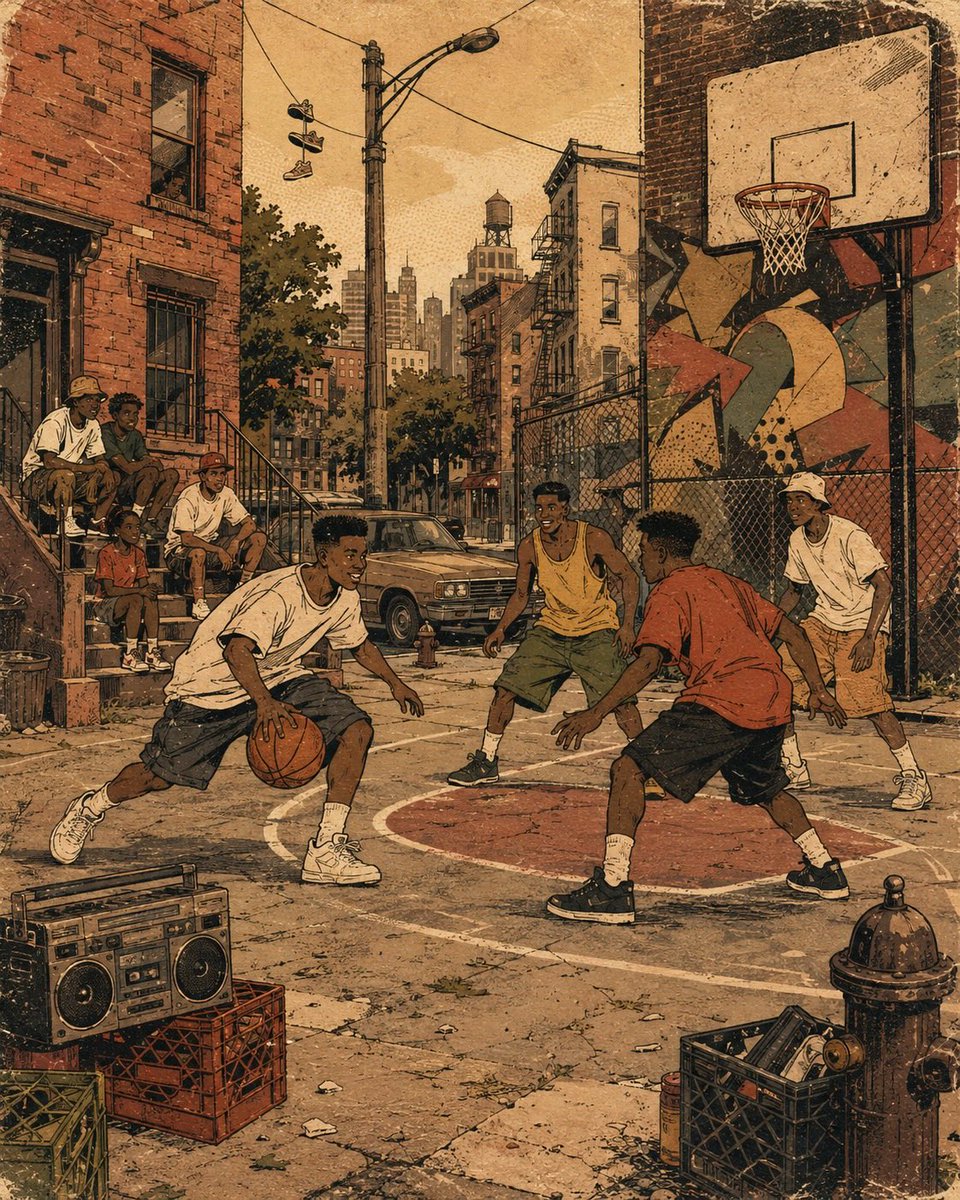
Retro 90s Urban Album Art Prompt
A highly customizable prompt for creating nostalgic 1990s-style urban illustration album covers with flat colors and ink textures.
This is a GPT Image 2 prompt case for Illustration & Art. Use the copy-ready prompt below to generate similar visuals, and review Awesome GPT Image 2 Prompts attribution plus commercial-use rights before reuse.
Free 1K preview
Generate one preview image instantly, no sign-up required.
Prompt
Copy-ready prompt
Create a 4:5 vertical retro urban album-art illustration built around {argument name="city block theme" default="neighborhood environment"}. Show {argument name="subject" default="a pedestrian"} naturally interacting within a nostalgic 1990s neighborhood environment. Fill the street with {argument name="street details" default="storefronts, sidewalks, and utility poles"}, arranged as believable foreground, middle-ground, and background elements without making the composition cluttered.

Use a broad city-block composition from slightly above pedestrian eye level, with strong perspective carrying the viewer through storefronts, sidewalks, brick buildings, stoops, parked objects, utility poles, and distant architecture.

Give the figures simplified cartoon-like anatomy, confident poses, expressive gestures, thick black contour lines, rhythmic motion marks, and playful hand-drawn graphic symbols.

Render the scene in {argument name="color palette" default="flat color areas"} using imperfect ink registration, faded halftone shading, rough screen-print edges, paper fibers, tiny scratches, dusty grain, and subtle vintage vinyl-record-sleeve wear.

Add loose graffiti-inspired abstract shapes and energetic marks, but no readable tags or random lettering.

The atmosphere should feel nostalgic, combining neighborhood storytelling, vintage hip-hop visual culture, analog-print character, and handmade editorial illustration.

Keep the artwork original rather than reproducing any specific artist’s identifiable composition. No logos, trademarks, signatures, watermarks, readable brand names, unintended text, borders, grids, collage panels, or photorealism.
Prompt variables
Editable argument placeholders found in the prompt, with their default values.
Best for
- - Illustration & Art visual exploration
- - Image generation and reference-image edits
- - Reusable briefs that keep source attribution visible
Change these parts
- - Subject, product, character, or scene
- - Aspect ratio, camera, lighting, and background
- - Brand, text, color, and output constraints
Recommended model and settings
- - Model: gpt-image-2
- - Input mode: Text to Image
- - Aspect ratio: source
- - Commercial status: review original source
How to use this prompt
- 1. Copy the prompt and preserve its structure for the first test.
- 2. Replace the subject, context, and publishing channel.
- 3. Change one camera, lighting, or style variable per iteration.
- 4. Inspect the output, source, text, and rights before reuse.
Limitations, source, and reuse cautions
- - Generated output is an editable draft, not factual, legal, or rights evidence.
- - Review the linked source, people, brands, logos, text, and third-party media before commercial use.
More cases in this category
Prioritized by category, input mode compatibility, quality, and lower risk.

Reuse and source notes
Use this prompt safely after previewing the case.
- 1.Copy the prompt or open it directly in Dovoo with the generation button.
- 2.Adjust variables, aspect ratio, and reference images for your own use case.
- 3.Before publishing or paid usage, verify source rights, attribution requirements, and brand or likeness risks.
Can I use this prompt commercially?
Commercial-use status is allowed. Review the original source, license, brand constraints, and legal requirements before paid usage.
Where does this case come from?
This case is imported from Awesome GPT Image 2 Prompts; keep attribution visible and check the source URL before reuse.