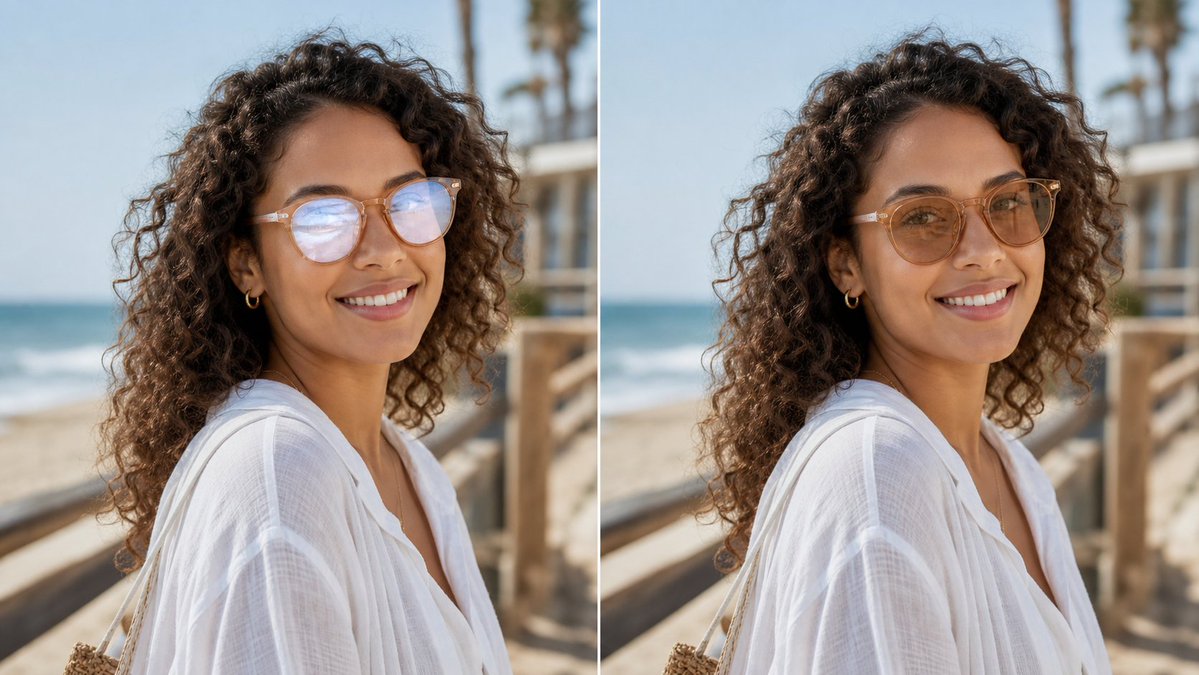
Glasses Glare Removal Comparison
Generates a photorealistic before-and-after portrait comparison showing eyeglasses glare removed while preserving the subject’s identity.
This is a GPT Image 2 prompt case for 人像角色. Use the copy-ready prompt below to generate similar visuals, and review Awesome GPT Image 2 Prompts attribution plus commercial-use rights before reuse.
Prompt
Copy-ready prompt
创建一张逼真的左右对比图,展示同一张户外人像,通过细白线分隔为两个垂直面板。主体为 {argument name="subject description" default="一位留着深色长卷发、身穿宽松白色亚麻沙滩衬衫、佩戴小金圈耳环和浅框眼镜的女性"},在阳光明媚的沙滩木栈道上拍摄,取景范围为肩部以上,呈四分之三侧面。背景左侧可见海浪、淡蓝色天空、木质栏杆以及柔和模糊的棕榈树,具有浅景深和自然的暖色调日光。使用 2 个面板:左侧面板为原始人像,眼镜上有明显的反光/倒影遮挡眼睛;右侧面板为编辑后的版本,去除了反光,眼睛看起来自然,同时脸型、姿势、发型、服装、光影和背景保持不变。不要添加任何标签或说明文字。保留卷发、半透明白色织物、肤色和沙滩环境的照片级逼真质感。构图采用类似社交媒体对比图的横向裁剪,主体居中横跨两个面板,编辑效果应微妙且真实,适合作为头像。使用 {argument name="image ratio" default="16:9 Landscape"}、{argument name="setting" default="阳光明媚的沙滩木栈道"} 以及 {argument name="edit goal" default="在不改变面部特征的前提下去除眼镜反光"}。Prompt variables
Editable argument placeholders found in the prompt, with their default values.
More cases in this category
Prioritized by category, input mode compatibility, quality, and lower risk.



Reuse and source notes
Use this prompt safely after previewing the case.
- 1.Copy the prompt or open it directly in Dovoo with the generation button.
- 2.Adjust variables, aspect ratio, and reference images for your own use case.
- 3.Before publishing or paid usage, verify source rights, attribution requirements, and brand or likeness risks.
Can I use this prompt commercially?
Commercial-use status is allowed. Review the original source, license, brand constraints, and legal requirements before paid usage.
Where does this case come from?
This case is imported from Awesome GPT Image 2 Prompts; keep attribution visible and check the source URL before reuse.