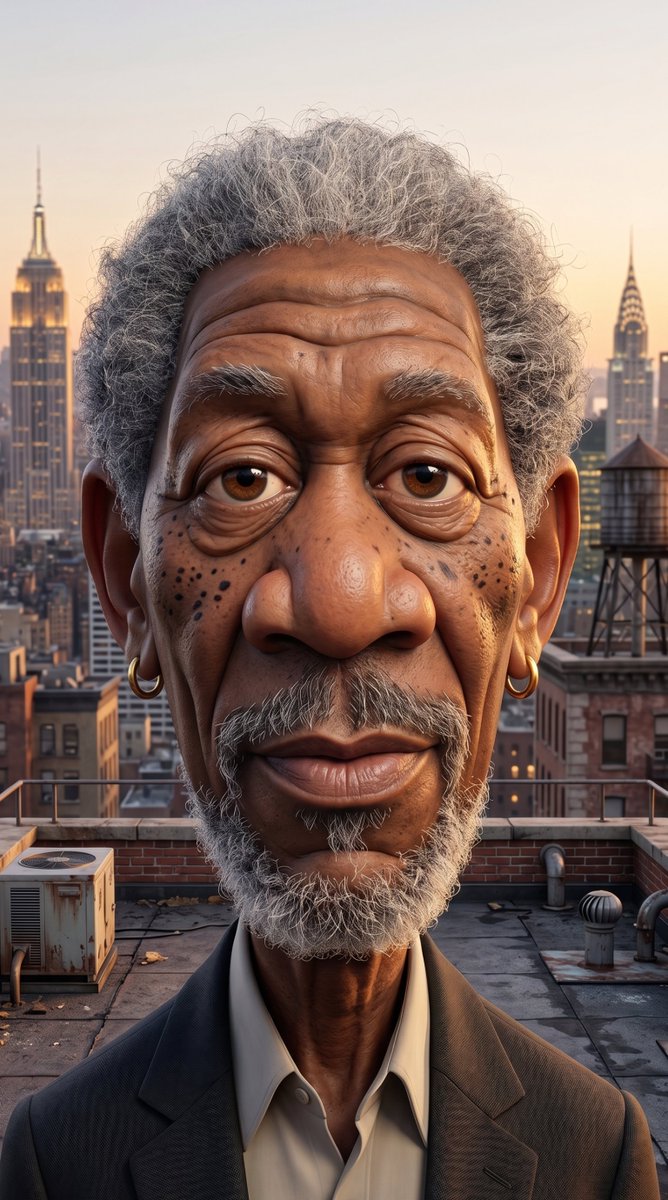
Redacted Rooftop Portrait
This prompt generates a photorealistic editorial-style portrait of an older man on a New York rooftop at sunset with his face concealed by a censor block, useful for anonymity, privacy, or surreal identity-themed visuals.
This is a GPT Image 2 prompt case for Portrait & Character. Use the copy-ready prompt below to generate similar visuals, and review Awesome GPT Image 2 Prompts attribution plus commercial-use rights before reuse.
Free 1K preview
Generate one preview image instantly, no sign-up required.
Prompt
Copy-ready prompt
A cinematic photorealistic rooftop portrait at golden hour of an older man standing centered and facing the camera, Show every face clearly with natural, detailed facial features. Show only the visible parts of him clearly: short dense tightly curled gray hair with silver highlights, both ears visible, a slender aged neck, and the upper torso in a charcoal gray blazer over an open-collar off-white dress shirt with no tie. Compose the image in a vertical portrait crop from mid-chest upward. Place him on a realistic New York City rooftop with exact visible details including 1 weathered HVAC unit on the left foreground, 1 cylindrical rooftop water tower on the right midground, 2 prominent Art Deco skyscrapers in the background resembling the Empire State Building on the left and the Chrysler Building on the right, plus low brick buildings, rooftop pipes, vents, railings, and soft atmospheric haze. Use warm sunset lighting with orange-pink sky tones, subtle rim light on the ears and hair, shallow depth of field on the skyline, and highly detailed textures in the suit fabric, rooftop concrete, metal machinery, and curly hair. The overall mood should feel mysterious, editorial, and slightly surreal, like an identity-redacted magazine cover photo.
Best for
- - Portrait & Character visual exploration
- - Image generation and reference-image edits
- - Reusable briefs that keep source attribution visible
Change these parts
- - Subject, product, character, or scene
- - Aspect ratio, camera, lighting, and background
- - Brand, text, color, and output constraints
Recommended model and settings
- - Model: gpt-image-2
- - Input mode: Text to Image
- - Aspect ratio: source
- - Commercial status: review original source
How to use this prompt
- 1. Copy the prompt and preserve its structure for the first test.
- 2. Replace the subject, context, and publishing channel.
- 3. Change one camera, lighting, or style variable per iteration.
- 4. Inspect the output, source, text, and rights before reuse.
Limitations, source, and reuse cautions
- - Generated output is an editable draft, not factual, legal, or rights evidence.
- - Review the linked source, people, brands, logos, text, and third-party media before commercial use.
More cases in this category
Prioritized by category, input mode compatibility, quality, and lower risk.




Reuse and source notes
Use this prompt safely after previewing the case.
- 1.Copy the prompt or open it directly in Dovoo with the generation button.
- 2.Adjust variables, aspect ratio, and reference images for your own use case.
- 3.Before publishing or paid usage, verify source rights, attribution requirements, and brand or likeness risks.
Can I use this prompt commercially?
Commercial-use status is allowed. Review the original source, license, brand constraints, and legal requirements before paid usage.
Where does this case come from?
This case is imported from Awesome GPT Image 2 Prompts; keep attribution visible and check the source URL before reuse.