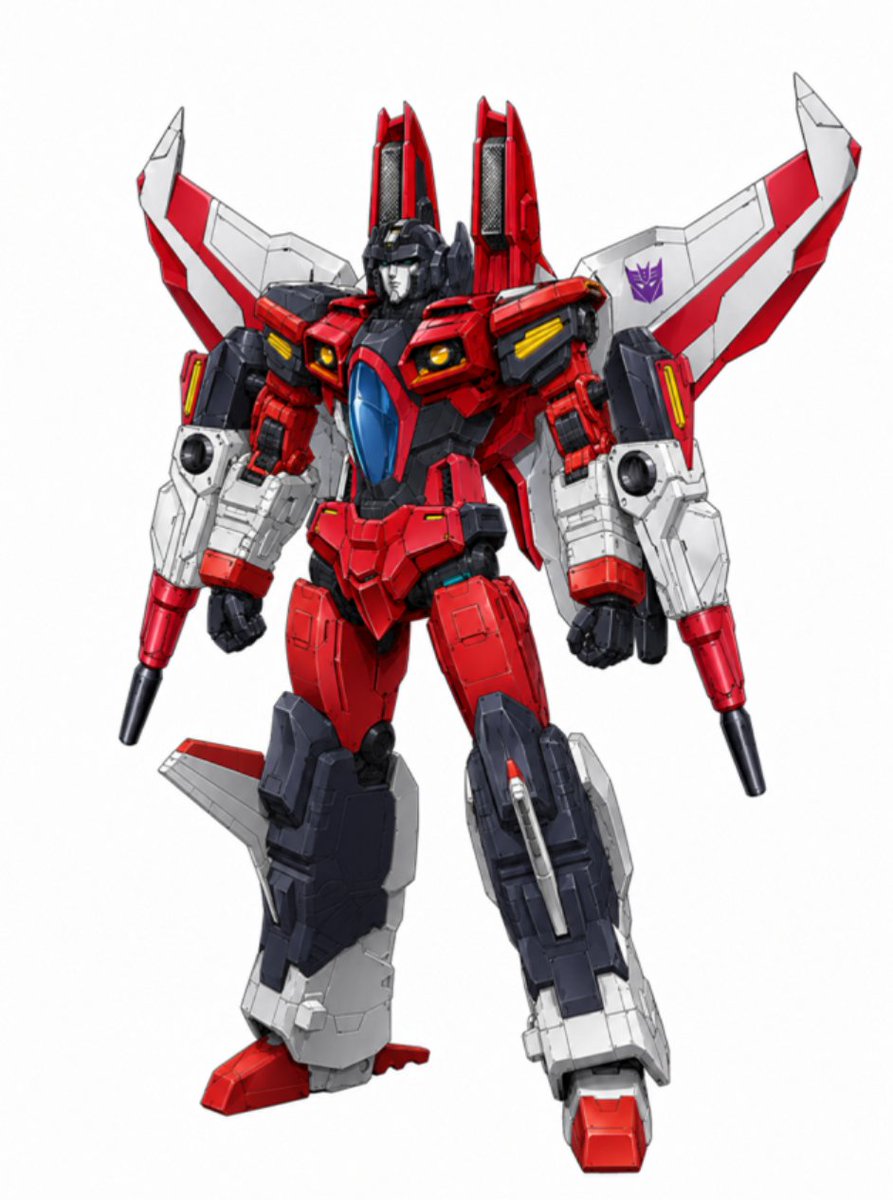
Red Jet Mecha Studio Render
This prompt generates a clean studio-style full-body illustration of a red-and-white jet-themed anime robot, suitable for toy concept art, collectible renders, or mecha design showcases.
This is a GPT Image 2 prompt case for Portrait & Character. Use the copy-ready prompt below to generate similar visuals, and review Awesome GPT Image 2 Prompts attribution plus commercial-use rights before reuse.
Free 1K preview
Generate one preview image instantly, no sign-up required.
Prompt
Copy-ready prompt
A full-body studio render of a high-detail transforming anime mecha inspired by a red jet fighter robot, standing in a confident three-quarter front pose against a clean light gray seamless background. The robot has a heroic, angular silhouette with 2 tall vertical fins rising behind the head, 2 swept-back airplane wings mounted on the back and shoulders, and 2 forearm-mounted blaster cannons pointing downward. The armor is predominantly {argument name="primary armor color" default="bright red"} with white wing panels and lower legs, dark navy-charcoal inner frame and thighs, small yellow vent details on the chest and shoulders, and a glossy translucent blue cockpit canopy centered on the chest. The head is compact and mechanical with a dark faceplate and helmet-like structure, partially recessed between the shoulder assemblies. Add a small purple Decepticon-style insignia printed on the robot’s right wing. Emphasize hard-surface panel lines, layered mechanical plating, realistic joints, pistons, vents, intakes, and premium plastic-and-metal model-kit textures. The wings should have sharp aerodynamic edges with red striping, the shoulders should look like jet engine housings, and the legs should be bulky and armored with asymmetrical aircraft parts attached, including 2 small side fins near the calves and 1 visible missile-like detail on the outer right shin. Use crisp product-photography lighting, ultra-sharp focus, subtle shadow under the feet, and a polished collectible-toy / concept-art presentation in the style of a modern Japanese mecha design sheet.Prompt variables
Editable argument placeholders found in the prompt, with their default values.
Best for
- - Portrait & Character visual exploration
- - Image generation and reference-image edits
- - Reusable briefs that keep source attribution visible
Change these parts
- - Subject, product, character, or scene
- - Aspect ratio, camera, lighting, and background
- - Brand, text, color, and output constraints
Recommended model and settings
- - Model: gpt-image-2
- - Input mode: Text to Image
- - Aspect ratio: source
- - Commercial status: review original source
How to use this prompt
- 1. Copy the prompt and preserve its structure for the first test.
- 2. Replace the subject, context, and publishing channel.
- 3. Change one camera, lighting, or style variable per iteration.
- 4. Inspect the output, source, text, and rights before reuse.
Limitations, source, and reuse cautions
- - Generated output is an editable draft, not factual, legal, or rights evidence.
- - Review the linked source, people, brands, logos, text, and third-party media before commercial use.
More cases in this category
Prioritized by category, input mode compatibility, quality, and lower risk.
Reuse and source notes
Use this prompt safely after previewing the case.
- 1.Copy the prompt or open it directly in Dovoo with the generation button.
- 2.Adjust variables, aspect ratio, and reference images for your own use case.
- 3.Before publishing or paid usage, verify source rights, attribution requirements, and brand or likeness risks.
Can I use this prompt commercially?
Commercial-use status is allowed. Review the original source, license, brand constraints, and legal requirements before paid usage.
Where does this case come from?
This case is imported from Awesome GPT Image 2 Prompts; keep attribution visible and check the source URL before reuse.