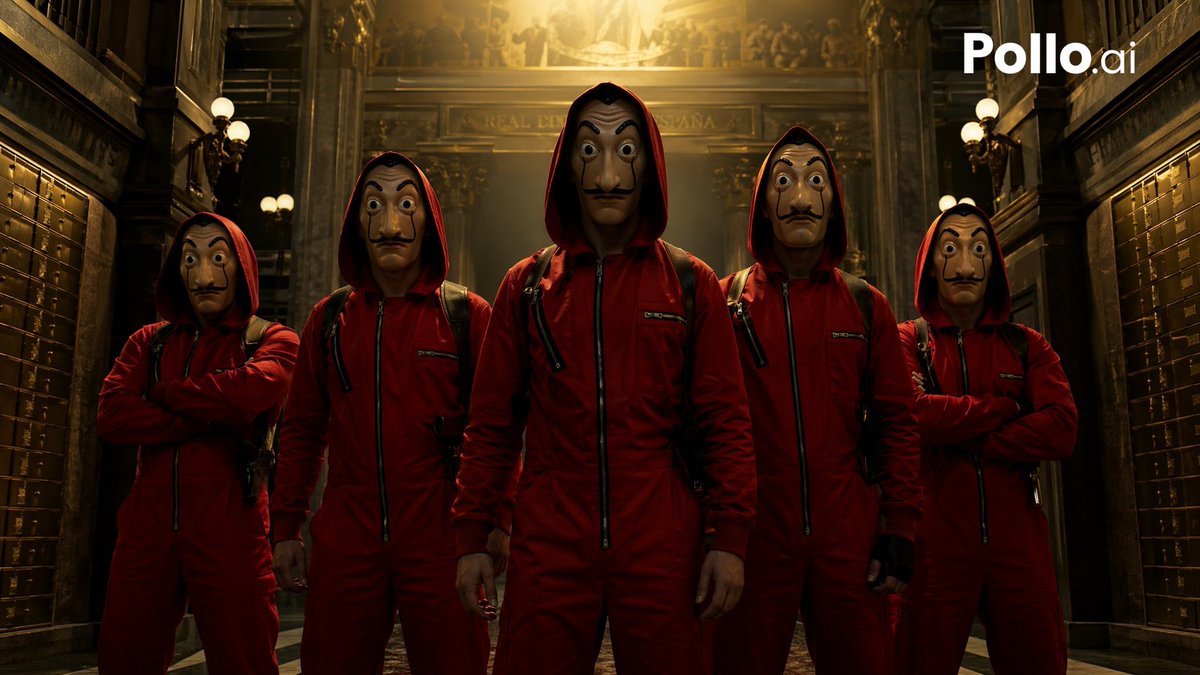
Cinematic Red Heist Team in Bank
This prompt generates a dramatic movie-poster-style image of a five-person masked heist crew in red jumpsuits inside a grand old bank, ideal for thriller promos and crime-series-inspired visuals.
This is a GPT Image 2 prompt case for Portrait & Character. Use the copy-ready prompt below to generate similar visuals, and review Awesome GPT Image 2 Prompts attribution plus commercial-use rights before reuse.
Free 1K preview
Generate one preview image instantly, no sign-up required.
Prompt
Copy-ready prompt
A cinematic, gritty heist-team group portrait inspired by a Spanish crime thriller, showing exactly 5 robbers standing shoulder to shoulder in a grand historic bank interior. The scene is framed symmetrically in a low-angle medium full-body shot, with the tallest figure centered in front as the leader and 2 teammates on each side. All 5 wear identical deep red hooded jumpsuits zipped up the front, black straps and backpack harnesses, and their hoods up, creating a menacing anonymous look. The far-left and far-right robbers stand with arms crossed; the second-left and second-right robbers stand with arms relaxed at their sides; the center robber stands squarely facing camera with hands down and a dominant posture. Show every face clearly with natural, detailed facial features, hidden in shadow and blur beneath the hoods. The setting is an opulent old bank hall with dark polished wood, brass safety deposit boxes lining both side walls, ornate columns, balcony railings, classical architectural details, and warm globe lamps. A bright golden overhead light pours down from the ceiling behind the group, creating dramatic backlighting, rim light on the red suits, long shadows, and a tense high-contrast atmosphere. Color palette: crimson red, black, dark brown, brass, and warm gold. Style: ultra-realistic cinematic photography, suspenseful crime-drama poster aesthetic, highly detailed fabric texture, moody lighting, symmetrical composition, shallow haze in the background, sharp focus on the team. Add a white {argument name="watermark text" default="Pollo.ai"} logo in the top-right corner.Prompt variables
Editable argument placeholders found in the prompt, with their default values.
Best for
- - Portrait & Character visual exploration
- - Image generation and reference-image edits
- - Reusable briefs that keep source attribution visible
Change these parts
- - Subject, product, character, or scene
- - Aspect ratio, camera, lighting, and background
- - Brand, text, color, and output constraints
Recommended model and settings
- - Model: gpt-image-2
- - Input mode: Text to Image
- - Aspect ratio: source
- - Commercial status: review original source
How to use this prompt
- 1. Copy the prompt and preserve its structure for the first test.
- 2. Replace the subject, context, and publishing channel.
- 3. Change one camera, lighting, or style variable per iteration.
- 4. Inspect the output, source, text, and rights before reuse.
Limitations, source, and reuse cautions
- - Generated output is an editable draft, not factual, legal, or rights evidence.
- - Review the linked source, people, brands, logos, text, and third-party media before commercial use.
More cases in this category
Prioritized by category, input mode compatibility, quality, and lower risk.






Reuse and source notes
Use this prompt safely after previewing the case.
- 1.Copy the prompt or open it directly in Dovoo with the generation button.
- 2.Adjust variables, aspect ratio, and reference images for your own use case.
- 3.Before publishing or paid usage, verify source rights, attribution requirements, and brand or likeness risks.
Can I use this prompt commercially?
Commercial-use status is allowed. Review the original source, license, brand constraints, and legal requirements before paid usage.
Where does this case come from?
This case is imported from Awesome GPT Image 2 Prompts; keep attribution visible and check the source URL before reuse.