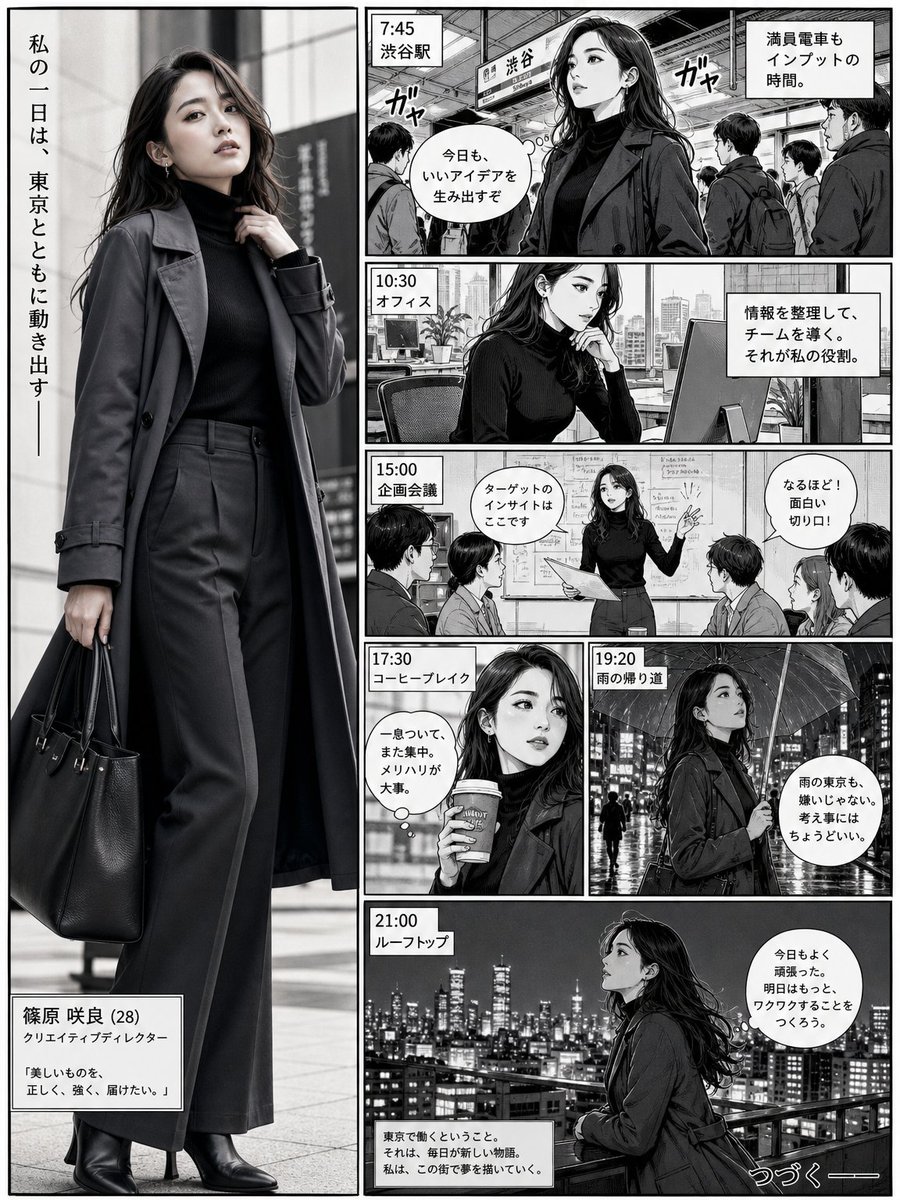
Realistic Professional Woman in Manga Page Layout
This prompt creates a sophisticated Japanese manga page layout that seamlessly integrates a highly realistic, full-body portrait of a character with stylized black-and-white narrative panels.
This is a GPT Image 2 prompt case for Portrait & Character. Use the copy-ready prompt below to generate similar visuals, and review Awesome GPT Image 2 Prompts attribution plus commercial-use rights before reuse.
Free 1K preview
Generate one preview image instantly, no sign-up required.
Prompt
Copy-ready prompt
Ultra-realistic full-body portrait of a {argument name="character description" default="confident young professional woman"} integrated directly into a {argument name="comic style" default="Japanese manga"} page layout. She appears inside a tall vertical hero panel on the left, spanning almost the full page height, and feels visually connected to the surrounding story panels. She wears a {argument name="outfit" default="sleek charcoal trench coat layered over a fitted black turtleneck and tailored wide-leg trousers, with leather ankle boots and a structured work bag"}. Her pose is stylish and confident, one hand lightly adjusting her coat collar, the other holding the bag, body slightly turned with one leg forward.\n\nOn the right side, create smaller black-and-white manga panels showing a day in her life in Tokyo: train station, office desk, creative meeting, coffee break, rainy street, and rooftop skyline. Make the woman feel like the main character of the page, as if the realistic figure exists inside the manga story, not outside it. Use strong ink lines, screentones, speech bubbles, motion lines, and cinematic panel storytelling. Blend the realistic subject naturally into the comic narrative while keeping her more detailed and visually dominant.Prompt variables
Editable argument placeholders found in the prompt, with their default values.
Best for
- - Portrait & Character visual exploration
- - Image generation and reference-image edits
- - Reusable briefs that keep source attribution visible
Change these parts
- - Subject, product, character, or scene
- - Aspect ratio, camera, lighting, and background
- - Brand, text, color, and output constraints
Recommended model and settings
- - Model: gpt-image-2
- - Input mode: Text to Image
- - Aspect ratio: source
- - Commercial status: review original source
How to use this prompt
- 1. Copy the prompt and preserve its structure for the first test.
- 2. Replace the subject, context, and publishing channel.
- 3. Change one camera, lighting, or style variable per iteration.
- 4. Inspect the output, source, text, and rights before reuse.
Limitations, source, and reuse cautions
- - Generated output is an editable draft, not factual, legal, or rights evidence.
- - Review the linked source, people, brands, logos, text, and third-party media before commercial use.
More cases in this category
Prioritized by category, input mode compatibility, quality, and lower risk.


Reuse and source notes
Use this prompt safely after previewing the case.
- 1.Copy the prompt or open it directly in Dovoo with the generation button.
- 2.Adjust variables, aspect ratio, and reference images for your own use case.
- 3.Before publishing or paid usage, verify source rights, attribution requirements, and brand or likeness risks.
Can I use this prompt commercially?
Commercial-use status is allowed. Review the original source, license, brand constraints, and legal requirements before paid usage.
Where does this case come from?
This case is imported from Awesome GPT Image 2 Prompts; keep attribution visible and check the source URL before reuse.