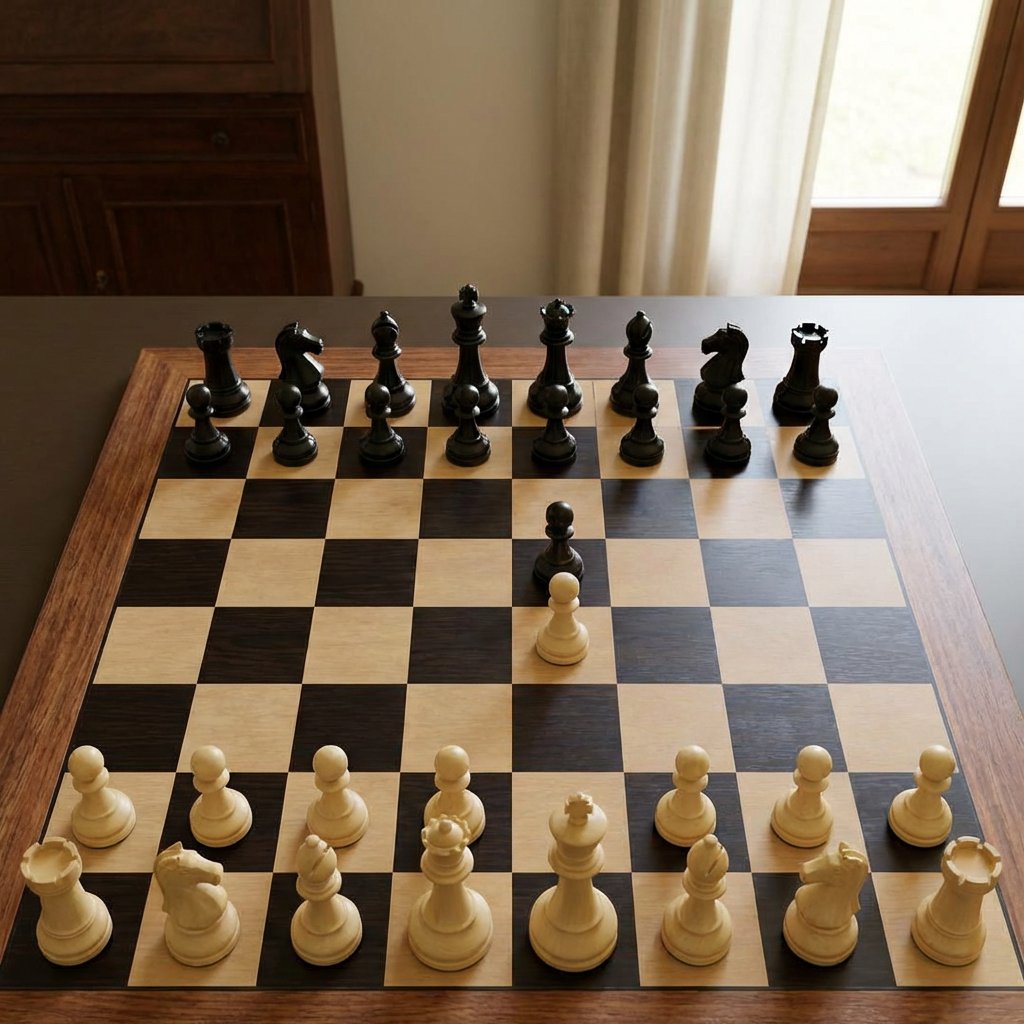
Realistic Chess Opening Photo
This prompt generates a realistic indoor photo of a wooden chessboard with a simple opening position, useful for chess visualization, move-accuracy comparisons, or model benchmarking.
This is a GPT Image 2 prompt case for Product & Commercial. Use the copy-ready prompt below to generate similar visuals, and review Awesome GPT Image 2 Prompts attribution plus commercial-use rights before reuse.
Free 1K preview
Generate one preview image instantly, no sign-up required.
Prompt
Copy-ready prompt
A realistic indoor photograph of a wooden chessboard on a dark wooden table, viewed from a slightly elevated front angle, with Staunton-style pieces in a mid-opening position. The board has light maple and dark walnut squares with a wooden border, and the pieces are glossy black and matte ivory. Show all 32 pieces with no captures: 16 black pieces and 16 white pieces. Black occupies the far side in standard back-rank order from left to right: rook, knight, bishop, queen, king, bishop, knight, rook, with 8 black pawns in front. White occupies the near side in standard back-rank order from left to right: rook, knight, bishop, queen, king, bishop, knight, rook, with 8 white pawns in front. The only moved pieces are 2 central pawns: a black pawn advanced two squares to e5 and a white pawn advanced two squares to e4, facing each other on adjacent central squares. Keep the rest of the pieces in their starting positions. Use natural window light from the right, soft shadows, a warm home interior background with cream curtains and a wooden cabinet, shallow depth of field, realistic proportions, clean digital-photography look, centered composition, and accurate chessboard geometry.
Best for
- - Product & Commercial visual exploration
- - Image generation and reference-image edits
- - Reusable briefs that keep source attribution visible
Change these parts
- - Subject, product, character, or scene
- - Aspect ratio, camera, lighting, and background
- - Brand, text, color, and output constraints
Recommended model and settings
- - Model: gpt-image-2
- - Input mode: Text to Image
- - Aspect ratio: source
- - Commercial status: review original source
How to use this prompt
- 1. Copy the prompt and preserve its structure for the first test.
- 2. Replace the subject, context, and publishing channel.
- 3. Change one camera, lighting, or style variable per iteration.
- 4. Inspect the output, source, text, and rights before reuse.
Limitations, source, and reuse cautions
- - Generated output is an editable draft, not factual, legal, or rights evidence.
- - Review the linked source, people, brands, logos, text, and third-party media before commercial use.
More cases in this category
Prioritized by category, input mode compatibility, quality, and lower risk.

Reuse and source notes
Use this prompt safely after previewing the case.
- 1.Copy the prompt or open it directly in Dovoo with the generation button.
- 2.Adjust variables, aspect ratio, and reference images for your own use case.
- 3.Before publishing or paid usage, verify source rights, attribution requirements, and brand or likeness risks.
Can I use this prompt commercially?
Commercial-use status is allowed. Review the original source, license, brand constraints, and legal requirements before paid usage.
Where does this case come from?
This case is imported from Awesome GPT Image 2 Prompts; keep attribution visible and check the source URL before reuse.