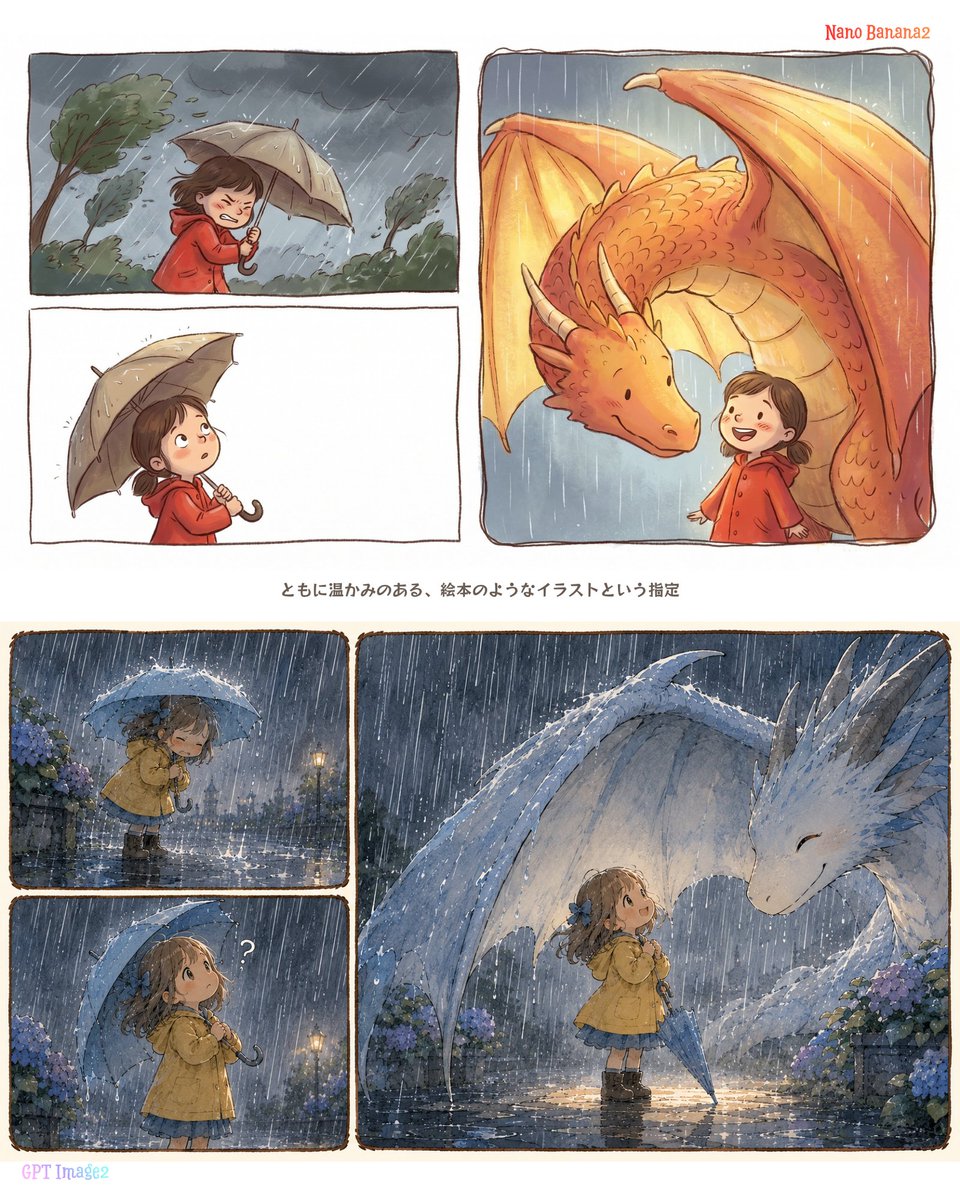
Rainy Dragon Comparison Sheet
Creates a square storybook-style comparison layout featuring rainy children-and-dragon scenes in warm red and hydrangea-blue palettes.
This is a GPT Image 2 prompt case for 插画艺术. Use the copy-ready prompt below to generate similar visuals, and review Awesome GPT Image 2 Prompts attribution plus commercial-use rights before reuse.
Prompt
Copy-ready prompt
目标:创建一个方形对比图表,展示基于同一个雨中龙的提示词生成的两种不同绘本风格图像,上半部分标记为暖红色雨衣版本,下半部分标记为绣球花蓝色雨天版本。

画布:1:1 正方形白色背景,类似简洁的社交媒体对比贴图。将画布水平分为两部分,中间由一行居中的日语标题分隔。使用手绘风格的面板边框,线条带有轻微的不规则墨迹感,边角圆润。

上半部分:在右上角用红色小字手写标注:“Nano Banana2”。排列 3 个面板:左上角 1 个宽矩形面板,展示一个身穿红色雨衣的孩子在狂风暴雨中艰难撑着米色雨伞,背景是乌云和弯曲的树木;下方 1 个宽矩形面板,展示同一个身穿红色雨衣的孩子侧影,背景几乎为空白;右侧 1 个大型高圆角矩形面板,展示一只友好的橙色龙在雨中向身穿红色连帽雨衣的孩子低头,龙的翅膀形成了一个温暖的庇护所形状。孩子的面部可以进行柔焦或简化处理。主色调为暖橙色、红色和赭色。

中间标题:在两部分之间添加一行居中的日语小字:“ともに温かみのある、絵本のようなイラストという指定”。

下半部分:在左下角用淡紫色小字手写标注:“GPT Image2”。排列 3 个面板:左下角上方 1 个小面板,展示一个小女孩身穿黄色雨衣,在蓝伞下站在大雨中,周围是湿润的地面、路灯光芒和紫蓝色绣球花;正下方 1 个小面板,展示同一个女孩抬头看,头顶附近有一个白色小问号;右侧 1 个大型宽面板,展示女孩在雨中对着一只温和的白蓝色龙微笑,龙向她低头并展开半透明的翅膀,两侧盛开着绣球花,地面有倒影,呈现出梦幻的蓝色暮色氛围。

主体细节:主要角色为 {argument name="main character" default="一个幼童或小女孩"};上方服装为 {argument name="top outfit color" default="红色连帽雨衣"};下方服装为 {argument name="bottom outfit color" default="黄色雨衣配蓝色裙子"};龙的主题为 {argument name="dragon colors" default="上方为橙色龙,下方为白蓝色龙"};天气主题为 {argument name="weather mood" default="梅雨季节的大雨,伴有绣球花"}。

视觉风格:温暖的儿童绘本插画,水彩和彩色铅笔质感,柔和的墨线轮廓,可见的笔触颗粒感,表情温和,电影感的雨丝,温馨的情感叙事。上半部分感觉多风、温暖且呈橙红色;下半部分感觉潮湿、明亮、呈蓝紫色,并带有绣球花主题。

约束条件:总共使用 6 个插画面板,2 个模型标签,以及 1 行居中的日语标题。不要添加额外的 UI、Logo、水印或额外文字。保持构图清晰,呈现为并排的模型对比图表。
Prompt variables
Editable argument placeholders found in the prompt, with their default values.
More cases in this category
Prioritized by category, input mode compatibility, quality, and lower risk.


Reuse and source notes
Use this prompt safely after previewing the case.
- 1.Copy the prompt or open it directly in Dovoo with the generation button.
- 2.Adjust variables, aspect ratio, and reference images for your own use case.
- 3.Before publishing or paid usage, verify source rights, attribution requirements, and brand or likeness risks.
Can I use this prompt commercially?
Commercial-use status is allowed. Review the original source, license, brand constraints, and legal requirements before paid usage.
Where does this case come from?
This case is imported from Awesome GPT Image 2 Prompts; keep attribution visible and check the source URL before reuse.