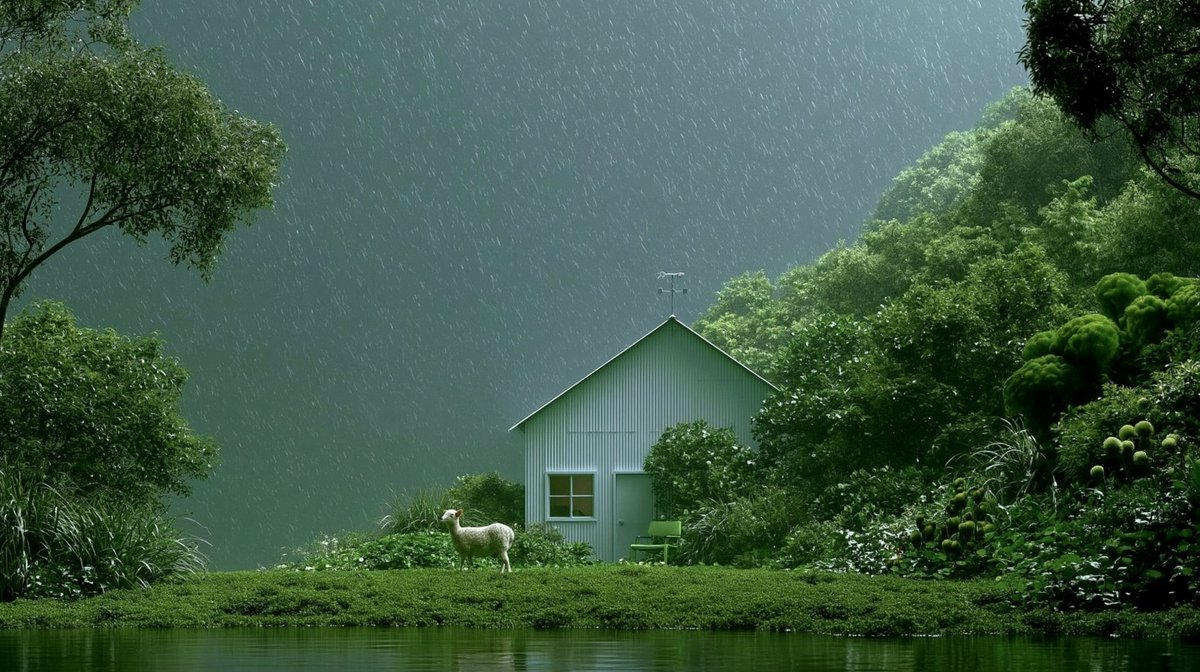
Rainy Cottage Garden With Sheep
Generates a cinematic photorealistic rainy garden scene with a small cottage, pond, dense greenery, and a lone sheep for atmospheric landscape artwork.
This is a GPT Image 2 prompt case for Landscape & Nature. Use the copy-ready prompt below to generate similar visuals, and review Awesome GPT Image 2 Prompts attribution plus commercial-use rights before reuse.
Free 1K preview
Generate one preview image instantly, no sign-up required.
Prompt
Copy-ready prompt
Create a cinematic photorealistic landscape in a lush rainy garden: a small pale sage-green corrugated metal shed/cottage with a steep gabled roof sits slightly right of center, partly hidden by dense wet shrubs and trees, with one small square window, one plain door, and a tiny weather vane on the roof peak. In front of the cottage is exactly one white sheep standing on the grass, facing left, and exactly one green outdoor chair beside the doorway. The foreground is a calm dark green pond occupying the bottom band of the image, reflecting the saturated vegetation. Surround the scene with abundant deep green foliage: large trees framing the top left and top right corners, thick bushes around the cottage, ornamental grasses on the left, and rounded mossy topiary-like plants on the right. Heavy rain falls diagonally across the entire frame as fine bright streaks, with a misty blue-green mountain or forested backdrop fading into the distance. Use a wide {argument name="aspect ratio" default="16:9"} composition, soft diffused overcast lighting, rich emerald tones, high detail, natural textures, serene magical realism atmosphere, no people, no text, no watermark. The main subject should feel like a quiet hidden refuge in a stormy botanical garden, with {argument name="weather" default="heavy rain"}, {argument name="building color" default="pale sage green"}, {argument name="animal" default="one white sheep"}, and {argument name="mood" default="peaceful and mysterious"}.Prompt variables
Editable argument placeholders found in the prompt, with their default values.
Best for
- - Landscape & Nature visual exploration
- - Image generation and reference-image edits
- - Reusable briefs that keep source attribution visible
Change these parts
- - Subject, product, character, or scene
- - Aspect ratio, camera, lighting, and background
- - Brand, text, color, and output constraints
Recommended model and settings
- - Model: gpt-image-2
- - Input mode: Text to Image
- - Aspect ratio: source
- - Commercial status: review original source
How to use this prompt
- 1. Copy the prompt and preserve its structure for the first test.
- 2. Replace the subject, context, and publishing channel.
- 3. Change one camera, lighting, or style variable per iteration.
- 4. Inspect the output, source, text, and rights before reuse.
Limitations, source, and reuse cautions
- - Generated output is an editable draft, not factual, legal, or rights evidence.
- - Review the linked source, people, brands, logos, text, and third-party media before commercial use.
More cases in this category
Prioritized by category, input mode compatibility, quality, and lower risk.
Reuse and source notes
Use this prompt safely after previewing the case.
- 1.Copy the prompt or open it directly in Dovoo with the generation button.
- 2.Adjust variables, aspect ratio, and reference images for your own use case.
- 3.Before publishing or paid usage, verify source rights, attribution requirements, and brand or likeness risks.
Can I use this prompt commercially?
Commercial-use status is allowed. Review the original source, license, brand constraints, and legal requirements before paid usage.
Where does this case come from?
This case is imported from Awesome GPT Image 2 Prompts; keep attribution visible and check the source URL before reuse.