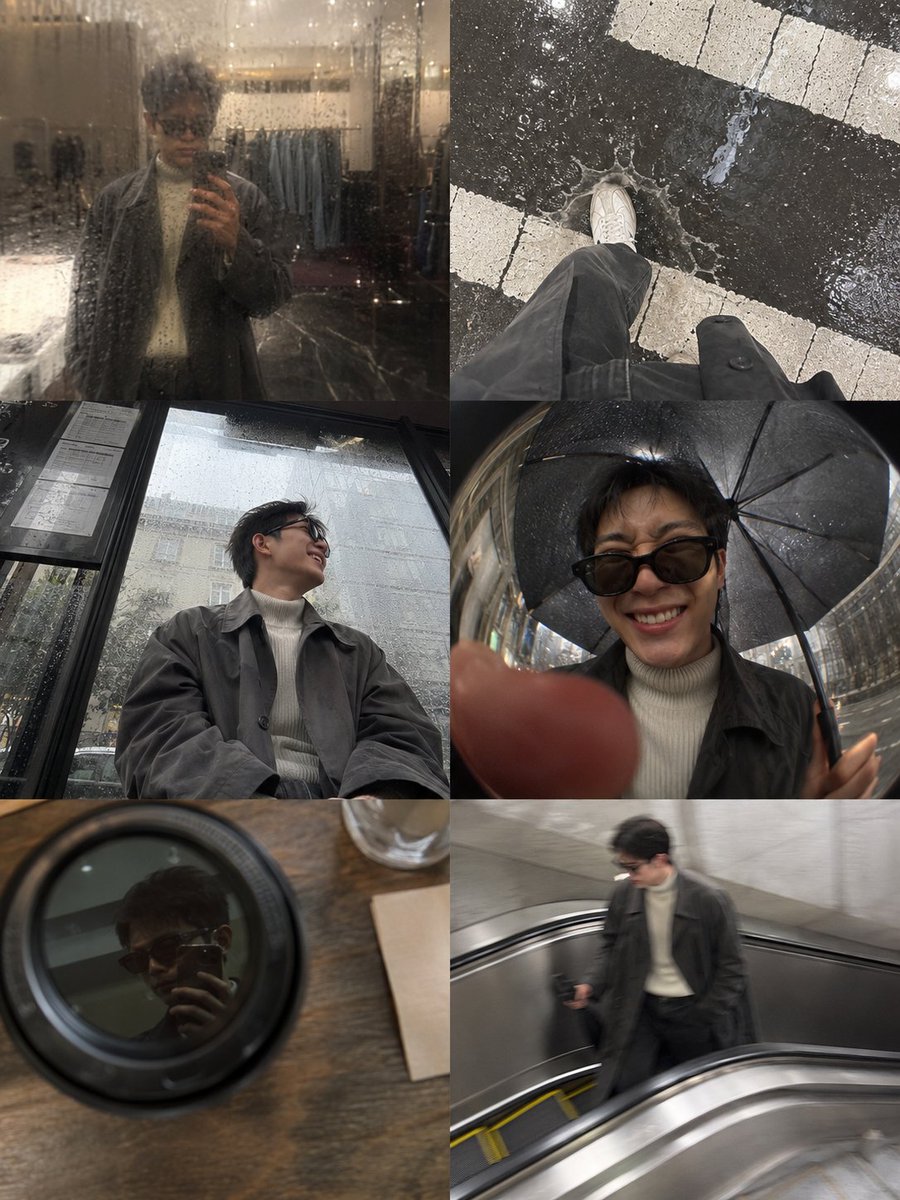
Rainy Afternoon Photo Collage
A complex prompt for a candid six-panel photo collage that looks like an iPhone camera roll from a rainy day downtown.
This is a GPT Image 2 prompt case for Portrait & Character. Use the copy-ready prompt below to generate similar visuals, and review Awesome GPT Image 2 Prompts attribution plus commercial-use rights before reuse.
Free 1K preview
Generate one preview image instantly, no sign-up required.
Prompt
Copy-ready prompt
A snapshot-style photo collage aiming to recreate the feel of {argument name="subject" default="[HUMAN]"}'s phone album while rushing around downtown {argument name="weather" default="rainy afternoon"}. {argument name="subject" default="[HUMAN]"} is wearing a damp {argument name="outfit" default="charcoal-grey oversized trench coat layered over a cream ribbed turtleneck, faded black straight-leg jeans and worn white leather sneakers"}. The composition uses a six-panel grid, like a collage effect from an iPhone album, with slight water stains on the lens of each photo and soft reflections of flashlights on the wet pavement. Panel content: a blurry mirror selfie in front of a shop window shrouded in rain; a top-down shot of shoes splashing through puddles on a crosswalk; a low-angle shot from a bus stop bench capturing a moment of unrestrained laughter; a fisheye selfie just inches from the lens under an umbrella; a reflection in the lid of a coffee cup on a cafe table; and a motion-blurred photo of steps on an escalator. Expressions range from squinting laughter in the rain to a suspicious glance at a shop window, to a quiet, natural half-smile on the bus. The overall color scheme is charcoal, beige, washed black, and the silver of wet pavement. High-end snapshot lifestyle photography style, with visible grain and uneven exposure, a matte texture, and a 4:5 aspect ratio.Prompt variables
Editable argument placeholders found in the prompt, with their default values.
Best for
- - Portrait & Character visual exploration
- - Image generation and reference-image edits
- - Reusable briefs that keep source attribution visible
Change these parts
- - Subject, product, character, or scene
- - Aspect ratio, camera, lighting, and background
- - Brand, text, color, and output constraints
Recommended model and settings
- - Model: gpt-image-2
- - Input mode: Text to Image
- - Aspect ratio: source
- - Commercial status: review original source
How to use this prompt
- 1. Copy the prompt and preserve its structure for the first test.
- 2. Replace the subject, context, and publishing channel.
- 3. Change one camera, lighting, or style variable per iteration.
- 4. Inspect the output, source, text, and rights before reuse.
Limitations, source, and reuse cautions
- - Generated output is an editable draft, not factual, legal, or rights evidence.
- - Review the linked source, people, brands, logos, text, and third-party media before commercial use.
More cases in this category
Prioritized by category, input mode compatibility, quality, and lower risk.


Reuse and source notes
Use this prompt safely after previewing the case.
- 1.Copy the prompt or open it directly in Dovoo with the generation button.
- 2.Adjust variables, aspect ratio, and reference images for your own use case.
- 3.Before publishing or paid usage, verify source rights, attribution requirements, and brand or likeness risks.
Can I use this prompt commercially?
Commercial-use status is allowed. Review the original source, license, brand constraints, and legal requirements before paid usage.
Where does this case come from?
This case is imported from Awesome GPT Image 2 Prompts; keep attribution visible and check the source URL before reuse.