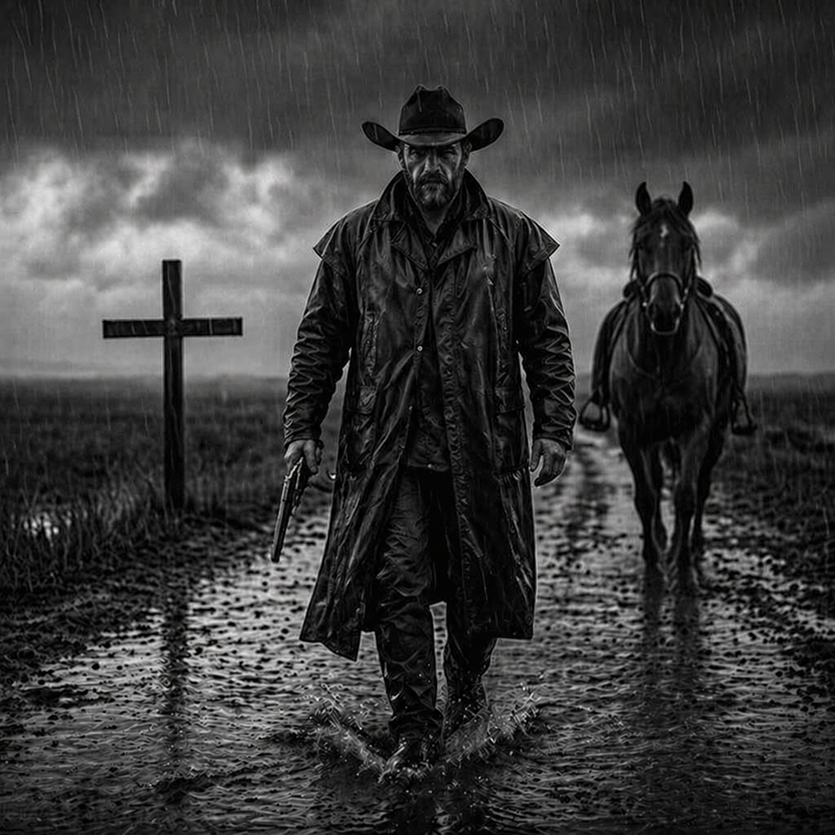
Rain-Soaked Dark Western Gunslinger
This prompt generates a cinematic monochrome western portrait scene, ideal for moody poster art, album covers, or dramatic neo-noir cowboy imagery.
This is a GPT Image 2 prompt case for Portrait & Character. Use the copy-ready prompt below to generate similar visuals, and review Awesome GPT Image 2 Prompts attribution plus commercial-use rights before reuse.
Free 1K preview
Generate one preview image instantly, no sign-up required.
Prompt
Copy-ready prompt
A cinematic black-and-white neo-western scene in heavy rain: a lone cowboy gunslinger walks directly toward the camera down a muddy road, centered in the frame, full body visible. He wears a dark wide-brim cowboy hat, a long soaked leather duster coat, dark shirt, dark pants, gloves, and boots, with rainwater glistening across every surface. Show every face clearly with natural, detailed facial features, intimidating presence. In one hand he carries a revolver pointed downward. Behind him on the right side of the road stands or slowly follows a dark horse, also wet from the rain, slightly out of focus but clearly visible. On the left side of the road is a single wooden grave cross planted in the ground. The landscape is flat, barren, and desolate, with open fields stretching into the distance beneath low storm clouds. The road is filled with puddles and reflective wet mud, with visible splashes around the cowboy’s boots. Use dramatic storm lighting, high contrast, deep blacks, silvery highlights, and a gloomy, brooding atmosphere. Composition should feel like a dark western movie poster, symmetrical and confrontational, with the central figure dominating the image, rain streaks falling vertically across the whole frame, sharp texture on the coat and mud, shallow depth of field in the background, and an overall gritty, somber, menacing tone.
Best for
- - Portrait & Character visual exploration
- - Image generation and reference-image edits
- - Reusable briefs that keep source attribution visible
Change these parts
- - Subject, product, character, or scene
- - Aspect ratio, camera, lighting, and background
- - Brand, text, color, and output constraints
Recommended model and settings
- - Model: gpt-image-2
- - Input mode: Text to Image
- - Aspect ratio: source
- - Commercial status: review original source
How to use this prompt
- 1. Copy the prompt and preserve its structure for the first test.
- 2. Replace the subject, context, and publishing channel.
- 3. Change one camera, lighting, or style variable per iteration.
- 4. Inspect the output, source, text, and rights before reuse.
Limitations, source, and reuse cautions
- - Generated output is an editable draft, not factual, legal, or rights evidence.
- - Review the linked source, people, brands, logos, text, and third-party media before commercial use.
More cases in this category
Prioritized by category, input mode compatibility, quality, and lower risk.





Reuse and source notes
Use this prompt safely after previewing the case.
- 1.Copy the prompt or open it directly in Dovoo with the generation button.
- 2.Adjust variables, aspect ratio, and reference images for your own use case.
- 3.Before publishing or paid usage, verify source rights, attribution requirements, and brand or likeness risks.
Can I use this prompt commercially?
Commercial-use status is allowed. Review the original source, license, brand constraints, and legal requirements before paid usage.
Where does this case come from?
This case is imported from Awesome GPT Image 2 Prompts; keep attribution visible and check the source URL before reuse.